



Best for:
- Users who manage playlists across multiple platforms
- Users who need ongoing automatic playlist sync
- Users switching from niche platforms with limited tool support
Not ideal for:
- One-time migrations where version accuracy matters
- Users who want on-demand sync control
- Users who prefer a one-time purchase over a subscription
Soundiiz is one of the most widely used playlist transfer tools available, supporting 45 music services and offering features that go beyond basic migration, including playlist sync, batch transfers, and AI playlist generation.
But the free tier holds you back, so is the Soundiiz premium worth paying for in 2026? We tested it across transfers, sync, and accuracy to give you a straight answer.
Part 1. What Is Soundiiz: What Do You Actually Get?
Soundiiz is a browser-based playlist transfer and management service that lets you move your music library between streaming platforms without rebuilding playlists by hand. It supports 45 music services — more than most competing tools — including all the major platforms most users care about: Spotify, Apple Music, YouTube Music, Amazon Music, TIDAL, Deezer, SoundCloud, Qobuz, Pandora, Beatport, KKBOX, Bandcamp, Plex, and more.
Soundiiz offers four key features beyond basic playlist transfer:
- Playlist Transfer — Move playlists, albums, artists, and liked tracks between streaming platforms. Free users can transfer one playlist at a time, capped at 200 tracks per playlist. Albums, artists, and liked tracks require Premium.
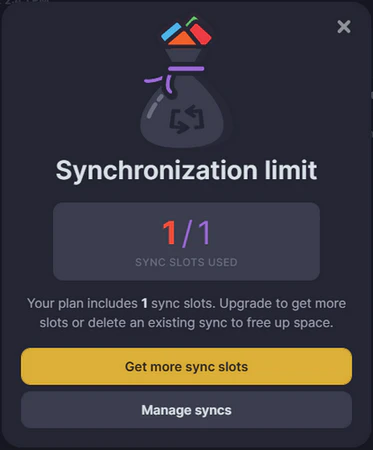
- Synchronize — Keep a playlist automatically updated across two platforms on a daily, weekly, or monthly schedule. Free users get one active sync slot; additional slots require Premium.
- Playlist AI — Generate new playlists by entering a text prompt or selecting moods, genres, and eras, then push the result directly to a streaming service. A Premium feature, currently in beta.
- Smartlinks — Create a single shareable link for a playlist that works across all supported platforms. Useful for playlist curators and artists promoting releases.
Soundiiz Pricing: Free vs. Premium vs. Creator
Soundiiz offers three plans. Most users will be choosing between Free and Premium, and Creator is aimed at playlist curators and labels.
| Feature | Free | Premium | Creator |
|---|---|---|---|
| Price | $0 | $5/month $39/year | $9.50/month $75/year |
| Playlist Transfer | One at a time, Up to 200 tracks | Unlimited, batch | Unlimited, batch |
| Transfer Albums / Artists / Tracks | ❌ | ✅ | ✅ |
| Playlist Sync slots | 1 | 20 | 50 |
| AI Playlist Generation | Up to 20 per 24 hours | ✅ Unlimited | ✅ Unlimited |
| Playlist tools (shuffle, sort, merge, split, etc.) | ❌ | ✅ | ✅ |
| Smartlinks | ✅ Standard | ✅ Standard | ✅ Advanced Analytics + Custom URL |
| Priority Support | ❌ | ❌ | ✅ |
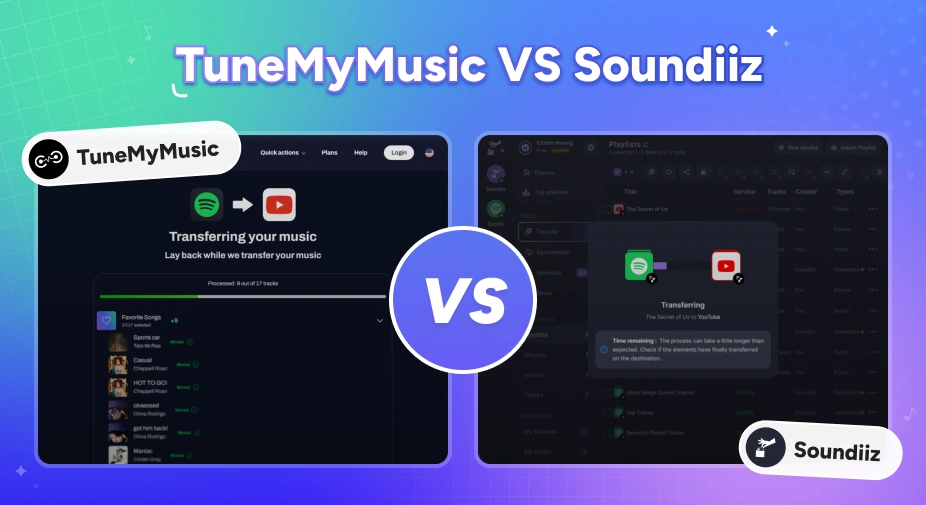
TuneMyMusic vs Soundiiz: Which Playlist Transfer Tool Is Better in 2026?
Moving music platforms? Compare TuneMyMusic vs Soundiiz — speed, accuracy, pricing, and which playlist transfer tool wins in 2026.
Part 2. Soundiiz Hands-On Test: Real Performance Results
We tested Soundiiz on Spotify-to-TIDAL transfers using playlists of different sizes. Let's take a look at the actual data.
- Source: Spotify
- Destination: TIDAL
- Playlist types: Mainstream pop, alternative rock, EDM, non-English tracks
Test Environment
Transfer Speed and Stability
1,000 tracks transferred in just over 3 minutes with a consistent failure rate across all three test sizes.
Soundiiz successfully transferred playlists of the three tested sizes, with zero crashes or transfer interruptions. Its overall transfer speed remains competitive.
| Tracks | Transfer Time | Transferred | Failed | Failure Rate |
|---|---|---|---|---|
| 100 | 0:25 | 96 | 4 | 4.0% |
| 500 | 1:28 | 488 | 12 | 2.4% |
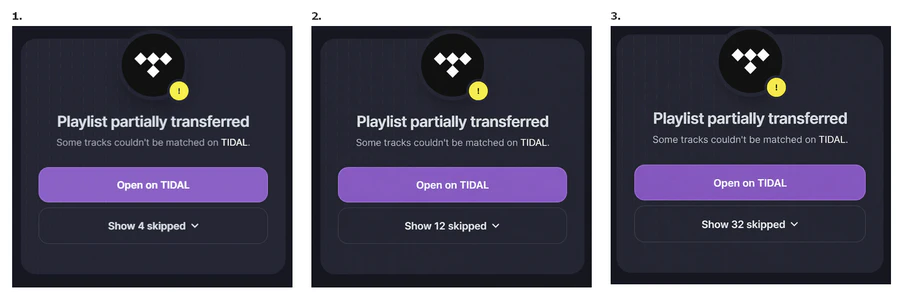
| 1000 | 3:02 | 968 | 32 | 3.2% |
Soundiiz generates a skipped track report at the end of each transfer, listing every song it couldn't match by name. Across all three tests, most skipped tracks were non-English titles and niche releases.
You'll see more skipped tracks with regional or foreign music, and mainstream music gets matched more easily. If you run into frequent mismatches, see our guide on how to fix matching errors in music transfer.
Transfer Accuracy: Version Matching
Overall match rate looked high, but many tracks had version mismatches that happen quietly without any notice.
| Tracks | Transferred | Version Mismatches | Mismatch Rate |
|---|---|---|---|
| 100 | 96 | 7 | 7.3% |
| 500 | 488 | 35 | 7.2% |
| 1000 | 925 | 75 | 7.5% |
The tracks play correctly in every case, yet the album details are altered. In our test, songs saved from standalone single releases on Spotify were frequently matched to album versions on TIDAL. For example, "My Big Break" (saved from its self-titled single) transferred to Echolocation on TIDAL. "COUGH DROP" landed on the Deluxe edition instead of the standard release.
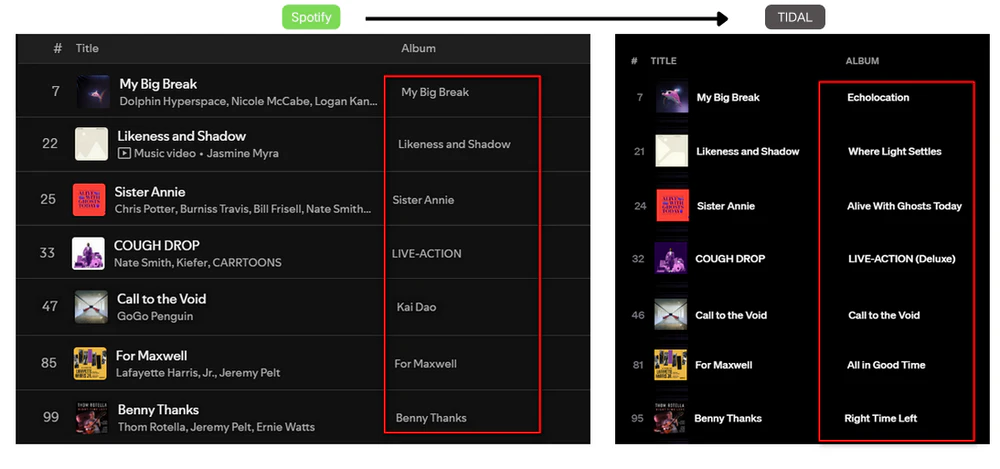
If you care about specific versions, release dates, or streaming credits, this matters. Soundiiz does not flag version mismatches in its transfer report. Only fully unmatched tracks get flagged. Version swaps happen quietly, and you'd only catch them by going through the playlist song by song.
Not Happy With The Accuracy? Try PlaylistGo! Try It Free
Move playlists between Spotify, Apple Music, YouTube Music and more with a 99.2% match rate.
Playlist Sync: Is It Actually Automatic?
Soundiiz sync runs automatically on schedule, but there is no option to trigger it on demand.
Setting up a sync takes four steps: select the source playlist, choose the destination, pick a sync method (add tracks or replace tracks), and set a schedule — daily, weekly, or monthly. Once saved, Soundiiz runs the sync automatically at the next scheduled time with no further input needed.
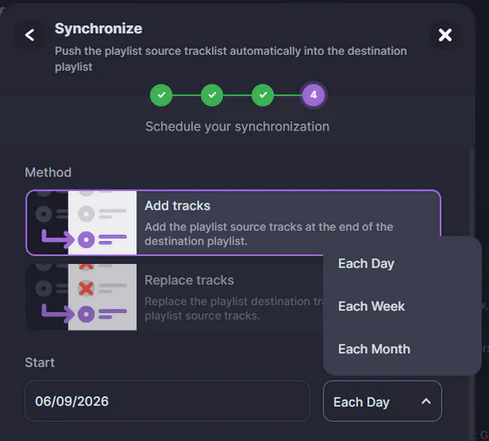
We added 5 tracks to the source playlist and waited for the next day's scheduled sync. All 5 appeared in the destination playlist the following day without any manual action. The limitation worth noting: there is no "Run now" button. If you need an immediate sync outside your schedule, you can't trigger one.
Free users are also limited to one active sync slot, so you can only keep one playlist pair in sync at a time. Adding a second requires either upgrading or deleting the first.
Pros
- Supports 45 music services — broadest coverage of any transfer tool
- Playlist sync runs automatically on a set schedule
- Browser-based. No software installation required
- Free plan functional for basic single-playlist transfers
- Skipped tracks clearly reported after every transfer
- AI playlist generation included
Cons
- Free plan limited to 200 tracks per playlist, one playlist at a time
- No on-demand sync — locked to daily, weekly, or monthly schedule
- Version mismatches happen at ~7% rate and go unreported
- Albums, artists, and liked tracks require Premium
- Subscription-only. No one-time purchase option
- Transfer logs deleted automatically after 7 days
Part 3. Soundiiz User Reviews: What Real Users Are Saying
Soundiiz holds a strong overall reputation across review platforms, though users often run into the same common issues.
Trustpilot: 4.4/5 (922 reviews)
Sources: Soundiiz Trustpilot Reviews
Positive reviews highlight speed and ease of use for large library migrations: one user described transferring a 6,000-song library as "flawless, smooth, effortless". Several users specifically mention Soundiiz as the tool that made leaving Spotify possible, and Qobuz even lists Soundiiz as its default transfer option.
Critical reviews surface three recurring issues. The most common is confusion around what the free plan covers. Several users transfer all their songs, only to hit the 200-track or single-playlist limit without warning. The second is the sync function sometimes messes up playlist order and adds extra songs. The third is transfer logs get deleted automatically after seven days, which frustrates users who move music in multiple batches and need to check old records later.
Part 4. The Best Soundiiz Alternative: PlaylistGo
If Soundiiz doesn't fit your needs, the most commonly compared alternatives are TuneMyMusic, FreeYourMusic, and PlaylistGo. Among these, PlaylistGo is the most directly comparable for users who prioritize accuracy and prefer a one-time purchase over a subscription.
Where Soundiiz relies on metadata for track matching alone, PlaylistGo uses a multi-point cross-reference engine to avoid wrong track versions — like single tracks being mistakenly swapped with album versions, achieving an overall match rate of 99.2%. If you have a carefully organized playlist and care about track accuracy, this is a meaningful difference in practice.
PlaylistGo is also a desktop app that processes everything locally, so no ongoing account access is required after the transfer is complete.
Need Higher Accuracy Than Soundiiz? Try PlaylistGo Try It Free
99.2% match rate, local processing, and a one-time purchase option — no subscription required.
| Item | Details |
|---|---|
| Compatible with | Windows, macOS |
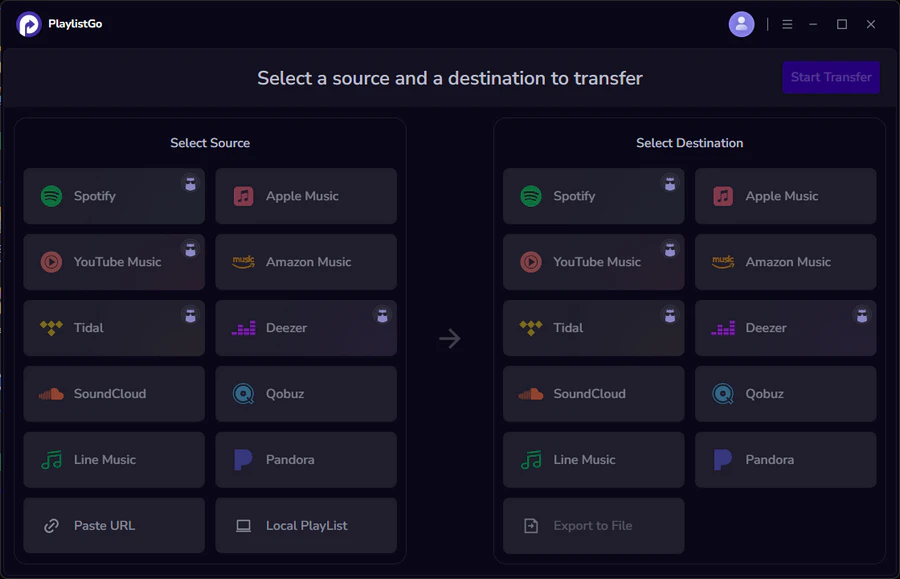
| Supported Platforms | Spotify, Apple Music, Amazon Music, YouTube Music, TIDAL, Deezer, and more |
| Transfer Objects | Liked songs, albums, playlists, full music library, local playlists, playlist URLs |
| Import & Export | Local files in M3U, M3U8, XSPF, XML, CSV, XLS, XLSX, JSON, TXT |
| Transfer Accuracy | Up to 99.2% matching accuracy |
| Transfer Speed | Fast and stable |
| Security | Safe and reliable. All transfers run locally |
Soundiiz vs PlaylistGo
| Feature | PlaylistGo | Soundiiz |
|---|---|---|
| Platform | Desktop (Win & Mac) | Web-based |
| Match Accuracy | Up to 99.2% | ~93% |
| Local Processing | ✅ | ❌ |
| Pre-transfer Preview | ✅ | ❌ |
| Local File Import/Export | M3U, M3U8, PLS, XSPF, XML, CSV, XLS, XLSX, JSON, TXT | 4 formats |
| Data Privacy | ✅ 100% local | ❌ Cloud-based |
| Free Tier | ✅ | ✅ (200 tracks/playlist) |
| Pricing | $14.95/mo, $25.95/yr, $49.95 one-time | $4.99/mo or $35.88/yr |
| One-Time Purchase | ✅ | ❌ |
How to Transfer Playlists Using PlaylistGo [3 Steps]
Select Your Source Platform
Launch PlaylistGo and choose your source platform (e.g. Spotify). Log in and PlaylistGo will load your library.
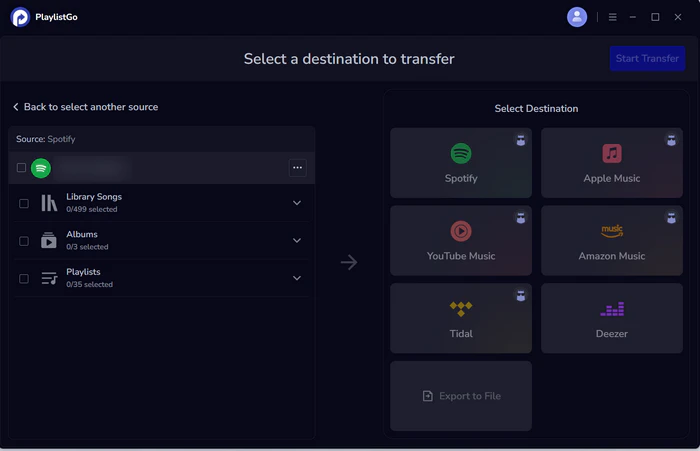
Select Your Destination Platform
Choose the destination platform (e.g. Apple Music, TIDAL) and sign in with that account.
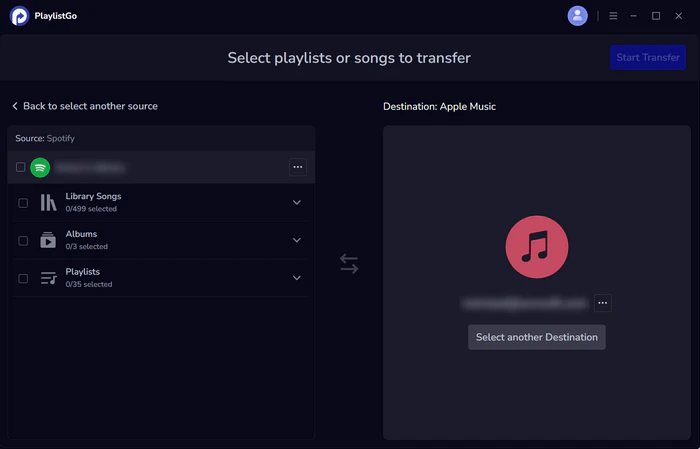
Start Transfer
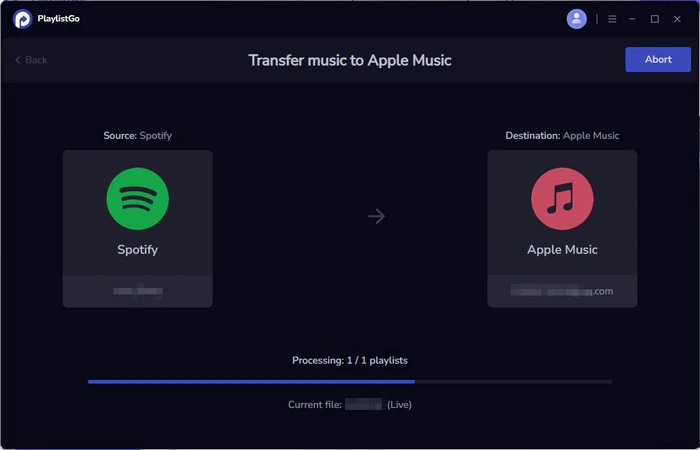
Select the playlists, liked songs, or full library you want to move. Click Start Transfer. PlaylistGo will automatically match tracks and migrate them. Once finished, open the destination platform to verify.
Frequently Asked Questions
Who Should Use Soundiiz?
Choose Soundiiz if:
- You actively manage playlists across multiple streaming services
- You need automatic playlist sync on a set schedule
- You're migrating from or to a niche platform with limited tool support
- You want a browser-based tool with no software to install
Consider alternatives if:
- You only need a one-time migration
- Version and release accuracy is important to you
- You want on-demand sync control rather than a fixed schedule
- You prefer a one-time purchase over a recurring subscription

PlaylistGo – Best Desktop Transfer Tool
The fastest and most reliable way to move entire Spotify library to Apple Music, YouTube Music, TIDAL, etc. 100% offline • No Cloud Required • 99.2% success rate



 Language ▴