Loading
playlistgo logo
Trusted by over 100,000 music lovers

Transfer Your Apple Music Playlists to Amazon Music

PlaylistGo — the smartest desktop app for Windows & macOS for reliable music library migration from Apple Music to Amazon Music.

  • Move playlists from Apple Music to Amazon Music with 99.2%+ accuracy
  • Preserve exact song order, original artwork & full metadata
  • 100% Secure & Private with Read-Only OAuth
  • Runs locally on your device — much more powerful than web tools
99.2%+
Success Rate
100K+
Playlists Transferred
200+
Countries Served
Apple Music
Source
0
songs transferred
Amazon Music
Destination
Transfer Complete!
99.2% matched

Works seamlessly with

Spotify Spotify
Apple Music Apple Music
YouTube Music YouTube Music
Amazon Music Amazon Music
Tidal TIDAL
Deezer Deezer

How to Transfer Apple Music Playlists to Amazon Music

Local Apple Music to Amazon Music transfer on Windows & Mac — no cloud.

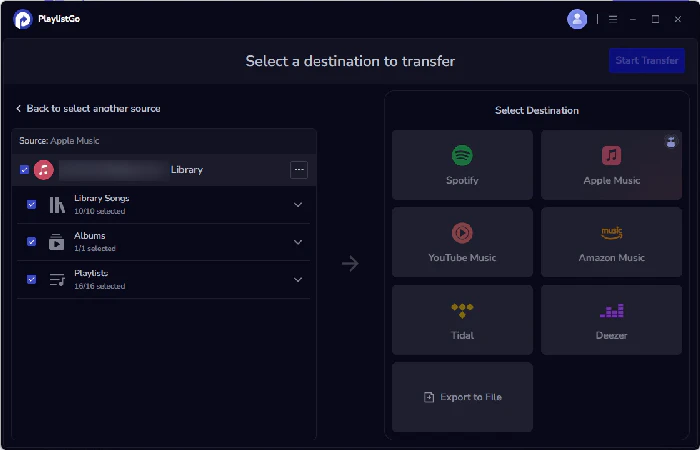
select apple music as source
1

Select Source

Choose Apple Music and your playlists

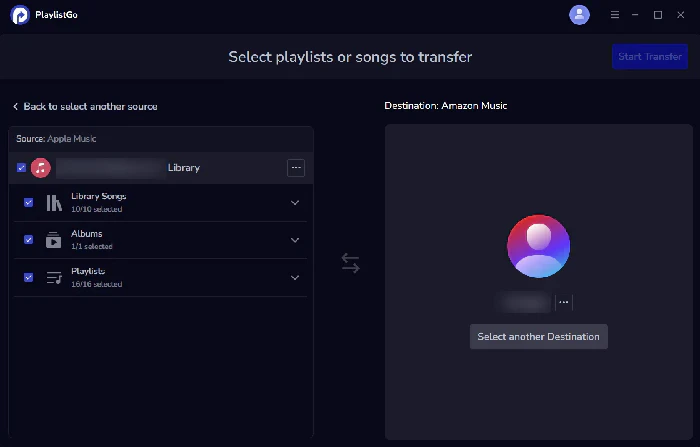
choose amazon music as destination
2

Choose Destination

Select Amazon Music

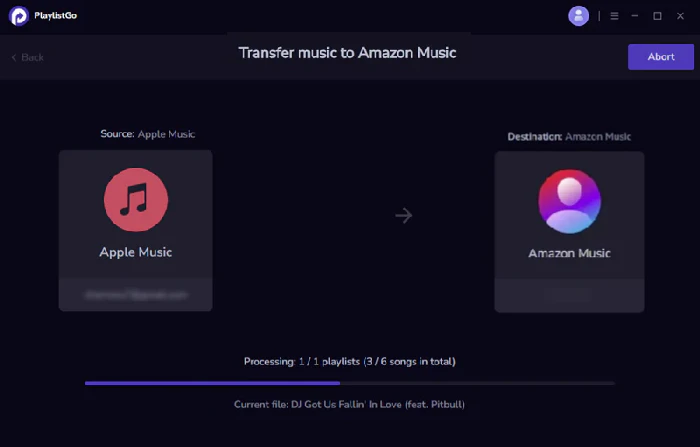
transfer apple music to amazon music
3

Start Transfer

Transfer your Apple Music library to Amazon Music

Why Music Lovers Choose PlaylistGo

More than just a transfer tool — PlaylistGo helps you move your music, own your library, and switch freely.

🔀

Transfer Between All Major Music Platforms

Move playlists between Spotify, Apple Music, YouTube Music, Amazon Music, TIDAL, and Deezer — all in one place.

📦

Own Your Music Library Forever

Export your playlists as local backup files in 10 formats, including M3U, CSV, and JSON. Back it up, keep it, take it anywhere — no matter what any platform decides.

99.2% Match Accuracy

Songs are matched using ISRC, title, artist, and album data — so you always get the exact version, correct order, artwork, and full metadata. Just like your original playlists.

♾️

No Limits on Library Size

Browser-based tools weren't built for large collections. PlaylistGo runs locally on your desktoptransfer 100,000+ songs smoothly, with no limits or slowdowns.

🔒

Your Account Stays Safe

Secure official OAuth with read-only access. We never see or store your password, and never modify your original playlists.

♻️

Switch Platforms Anytime Without Starting Over

Switch to any music service anytime without rebuilding playlists. With local backups, your playlists are always ready to move, and never tied to a single platform.

What Our Users Say

Real feedback from music lovers who made the switch with PlaylistGo

★★★★★

"I have Echo devices throughout my home and Alexa felt underused with Apple Music. PlaylistGo moved all my Apple Music playlists over in one go. Now I just ask Alexa to play whatever I want."

SL
Sophie Laurent
Music Teacher • Brussels
★★★★★

"Already paying for Prime, so Amazon Music Unlimited was a natural upgrade. PlaylistGo transferred everything in one session — playlists, song order, all of it. Done."

DO
Daniel Okafor
Guitarist & Session Musician • Lagos
★★★★★

"I had iTunes purchases mixed into my Apple Music library and wasn't sure how the transfer would handle them. PlaylistGo flagged exactly what it couldn't match. Knew precisely what I was working with."

MH
Mei Hashimoto
Music Journalist • Tokyo

Frequently Asked Questions

When you connect your Apple Music account, PlaylistGo reads your playlists and saved songs — including iTunes purchases, as long as iCloud Music Library sync is enabled. If those tracks are available on Amazon Music, they'll be matched and added automatically. Tracks that don't exist in Amazon Music's catalog can't be transferred. These will be clearly flagged in the results so you know exactly what was and wasn't moved.

Absolutely. PlaylistGo lets you export and back up your entire Apple Music library in up to 10 local file formats before or after your switch — including M3U, M3U8, PLS, XSPF, XML, CSV, XLS, XLSX, JSON, and TXT. M3U works with most media players, CSV opens straight in Excel, and JSON is handy for developers — whichever you pick, your Apple Music playlists live on your device, not on any subscription.

Not necessarily. PlaylistGo transfers your playlists to your Amazon Music account regardless of which tier you're on. However, Amazon Music Prime has a more limited catalog than Unlimited, so some of your Apple Music tracks may not be available to play until you upgrade. If you want full access to everything PlaylistGo transfers, Amazon Music Unlimited is the plan to go with — and if you're already a Prime member, the upgrade cost is lower than a standalone subscription.

PlaylistGo achieves a 99.2% song matching success rate on Apple Music to Amazon Music transfers, cross-referencing track title, artist, album, and ISRC code to find the right match every time. Any unmatched tracks are clearly flagged in the results so you can review them manually.

If you experience any issues while transferring your Apple Music playlists to Amazon Music, our support team is ready to help. You can reach us directly at [email protected]. We're committed to responding promptly and resolving your issue as quickly as possible so you can get back to enjoying your music.

Ready to Switch From Apple Music to Amazon Music?

Start your free transfer today — no credit card required.