Loading
playlistgo logo
Trusted by over 100,000 music lovers

Transfer Your Spotify Playlists to YouTube Music

PlaylistGo — the fastest desktop app for Windows & macOS to move your Spotify library to YouTube Music.

  • Transfer Spotify playlists, liked songs and albums to YouTube Music
  • 99.2% Spotify to YouTube Music match rate with correct version and order
  • Transfer large Spotify libraries locally without slowdowns or track limits
  • Connects to Spotify and YouTube Music via official OAuth with no passwords stored
99.2%+
Success Rate
100K+
Playlists Transferred
200+
Countries Served
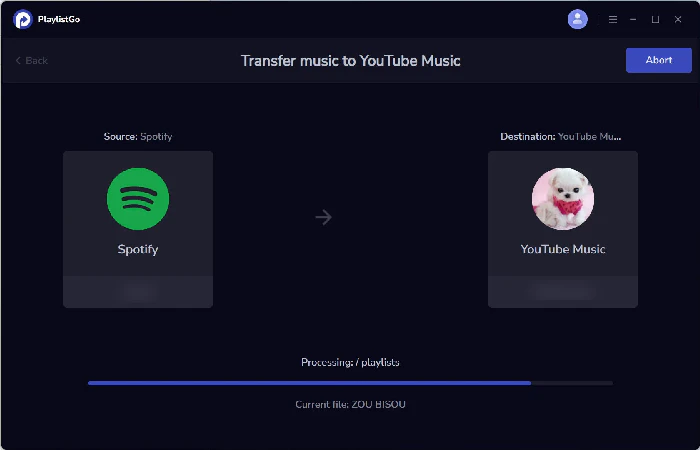
Spotify
Source
0
songs transferred
YouTube Music
Destination
Transfer Complete!
99.2% matched

Works seamlessly with

Spotify Spotify
Apple Music Apple Music
YouTube Music YouTube Music
Amazon Music Amazon Music
Tidal TIDAL
Deezer Deezer
SoundCloud SoundCloud
Pandora Pandora
Qobuz Qobuz
Line Line
••• More

How to Transfer Spotify Playlists to YouTube Music

Transfer Spotify playlists, liked songs, and albums to YouTube Music on Windows & Mac — runs locally, no cloud upload.

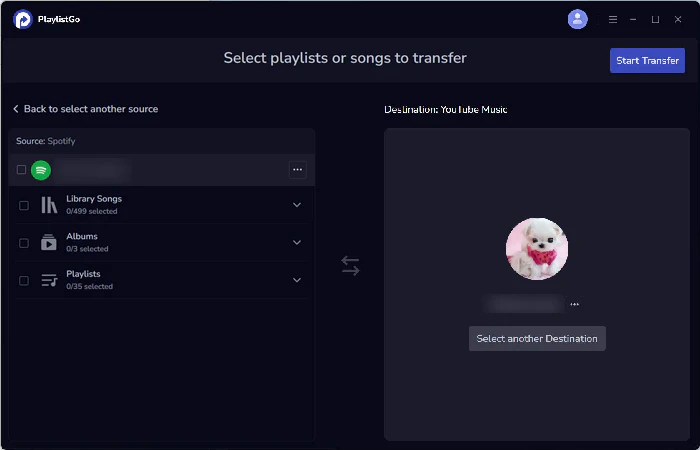
select spotify as source
1

Select Source

Choose Spotify and your playlists

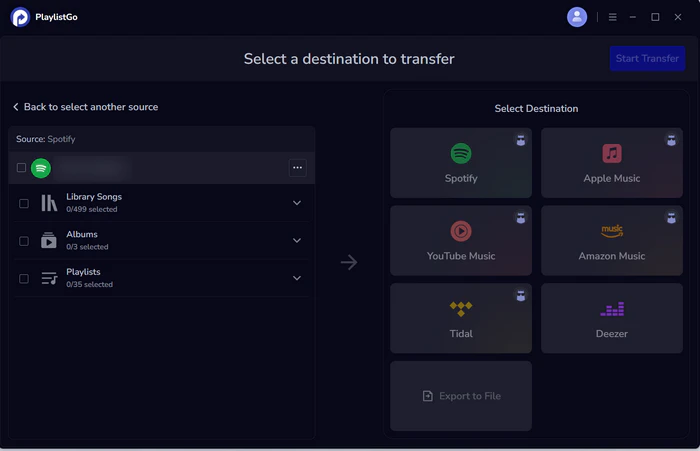
choose youtube music as destination
2

Choose Destination

Select YouTube Music

transfer spotify to youtube music
3

Start Transfer

Transfer your Spotify library to YouTube Music

What Can You Transfer from Spotify to YouTube Music

PlaylistGo moves more than just playlists — your entire Spotify library comes with you.

🎵
Spotify Playlists

All your created Spotify playlists transfer with original song order, names, and artwork intact.

❤️
Spotify Liked Songs

Your entire Spotify Liked Songs library transfers directly into YouTube Music as a playlist.

💿
Spotify Albums

Saved albums from your Spotify library are matched and added to your YouTube Music collection.

🎤
Spotify Artists

Followed artists on Spotify are transferred so you never miss a new release on YouTube Music.

📚
Spotify Full Library

Transfer everything at once — playlists, liked songs, albums, and artists — in a single session.

Why Music Lovers Choose PlaylistGo

The fastest, safest way to transfer Spotify playlists to YouTube Music.

99.2% Spotify to YouTube Music Match Rate

Matched by ISRC, title, artist and album. Correct version, correct order, fewer missing tracks.

🔀
Transfer Between All Music Streaming Platforms

10+ platforms including Spotify, Apple Music, YouTube Music, Amazon Music, TIDAL.

♾️
Transfer Large Spotify Libraries Without Crashing

Runs locally on your desktop. Handles 100,000+ songs without slowdowns — no data stored.

📦
Import, Export & Back Up Playlists Locally

Import M3U, CSV or JSON into Spotify and YouTube Music. Export your full library in 10 formats.

What Our Users Say

Real feedback from music lovers who made the switch with PlaylistGo

★★★★★

"I have a huge Spotify library with over 10,000 tracks, and every other tool capped transfers. PlaylistGo moved my entire library to YouTube Music in one go!"

SM
Sarah Mitchell
Music Producer • Los Angeles
★★★★★

"Tired of transfer tools messing up remixes? PlaylistGo's match rate is insane! It got every song right, even hard-to-find ones. Mismatch report fixes errors super easy!"

JK
James Kim
Software Engineer • Seoul
★★★★★

"I was wary of web-based tools sharing my Spotify login. PlaylistGo runs locally, so my data never leaves my device. Fast, secure, no stored credentials."

DC
David Chen
DJ & Music Collector • London

Frequently Asked Questions

Yes. PlaylistGo transfers your Spotify Liked Songs directly into YouTube Music as a playlist. You can transfer your Spotify playlists, saved albums, and followed artists in the same session.

PlaylistGo uses track title, artist, album, duration, and ISRC code to match songs in YouTube Music. This achieves a 99.2% match rate across most transfers.

Yes. PlaylistGo preserves the exact song order from your original Spotify playlists when transferring to YouTube Music. Playlist names and available metadata are carried over as well.

No, a free YouTube Music account is all you need to receive transferred Spotify playlists. A YouTube Music Premium subscription is only required for ad-free listening, background play, and offline downloads.

Totally safe. PlaylistGo connects to Spotify and YouTube Music via official OAuth. Your passwords are never accessed or stored. All transfer data is processed locally on your device. Your credentials, and personal library remain fully private. If you run into any issues, reach our support team at [email protected].

Ready to Switch From Spotify to YouTube Music?

Transfer your Spotify playlists, liked songs, and albums to YouTube Music in minutes — 99.2% match rate, no songs lost.