


Spotify has 640 million users. Apple Music has around 100 million. But subscriber count isn't the right metric. The better question is which one is built for how you listen.
This guide compares Spotify and Apple Music on the things that actually matter: sound quality, music discovery, social features, pricing, and device support. If you're deciding which to stick with, or thinking about switching, here's what you need to know.
Quick Comparison — Spotify vs Apple Music
| Feature | Spotify | Apple Music |
|---|---|---|
| Music Library | 100M+ | 100M+ |
| Audio Quality | Lossless (24-bit/44.1kHz) | Lossless + Hi-Res (up to 192kHz) + Spatial Audio |
| Music Discovery | ⭐⭐⭐⭐⭐ | ⭐⭐⭐ |
| Podcasts | ⭐⭐⭐⭐⭐ | ⭐⭐ |
| Social Features | ⭐⭐⭐⭐⭐ | ⭐⭐ |
| Apple Ecosystem | ⭐⭐⭐ | ⭐⭐⭐⭐⭐ |
| Price (Individual) | $12.99/month | $11.99/month |
| Free Plan | Yes (with ads) | No |
Switch Playlists Between Spotify and Apple Music? Try It Free
Try PlaylistGo! Transfer playlists and liked songs between Spotify and Apple Music in minutes.
Round 1. Spotify vs Apple Music: Sound Quality
Winner: Apple Music. Both platforms now offer lossless, but Apple Music goes further with Hi-Res Lossless up to 192kHz and Dolby Atmos Spatial Audio.
This used to be Apple Music's most decisive advantage. That's changed. Spotify rolled out Lossless audio to Premium subscribers in September 2025. Spotify subscribers can listen at up in up to 24-bit/44.1kHz FLAC, which matches regular CD sound quality.
Even so, Apple stays ahead on maximum resolution: it offers Hi-Res Lossless up to 24-bit/192kHz, plus Spatial Audio with Dolby Atmos. Spotify's lossless audio currently tops out at 44.1kHz. For most casual listeners, both platforms sound excellent, while listeners with higher-end wired setups may have more reason to explore Apple's higher-resolution options.
| Compare | Spotify | Apple Music |
|---|---|---|
| Max Audio Quality | Up to 24-bit / 44.1 kHz lossless | Up to 24-bit / 192 kHz Hi-Res Lossless |
| Standard Streaming | 320kbps (Ogg Vorbis) | 256kbps AAC |
| Audio Format | Ogg Vorbis / AAC / FLAC | AAC / ALAC / Hi-Res ALAC |
| Hi-Res Audio | ❌ | ✅ Up to 192 kHz |
| Spatial Audio | Standard stereo | ✅ Dolby Atmos |
| Bluetooth earbuds | Similar for most listeners | Similar for most listeners |
| Hi-Fi system / wired | Good quality | Higher fidelity |
Can You Actually Hear the Difference?
For most listeners, the honest answer is: probably not. On Bluetooth earbuds, like AirPods, Sony WH-1000XM5, Bose QC45, both platforms sound nearly identical at lossless quality.
You'll hear clearer differences when using wired headphones plus an external DAC. With premium headsets such as the Sennheiser HD 600, Apple Music's high-quality lossless audio sounds more dynamic than Spotify's standard sound. The gap is small but obvious on classical, jazz and acoustic songs that rely on fine audio details.
I had been a loyal Spotify user for years, and for most of that time, I was happy with it. But recently, I started paying more attention to audio quality, especially when listening on wired headphones and a dedicated DAC. Spotify's lossless audio sounded good, but I wanted to see whether I could hear a difference with higher-resolution audio.
After comparing the two services side by side, I spent more time listening to Apple Music. On well-recorded classical, jazz, and acoustic tracks, I noticed more detail in quieter passages and a little more separation between instruments. The difference wasn't dramatic on everyday Bluetooth listening, but it was more noticeable with my wired setup.
That experience made Apple Music more interesting to me than it had been before. As of 2026, I've also subscribed to Apple Music and am using it alongside my existing music setup. Rather than rebuilding my playlists manually, I used PlaylistGo to transfer my Spotify playlists to Apple Music.
| Setup | Spotify | Apple Music |
|---|---|---|
| Bluetooth earbuds (AirPods, Sony, Bose) | Sounds great | Sounds great |
| Wired headphones + DAC | Good quality | Higher fidelity at 192kHz |
| AirPods Pro / AirPods Max | Standard stereo | Dolby Atmos Spatial Audio |
| Car / Bluetooth speaker | No difference | No difference |
Round 2. Spotify vs Apple Music: Music Discovery & Playlist Experience
Winner: Spotify. Discover Weekly, AI Playlist, and Blend give Spotify a clear lead in music discovery. Apple Music's recommendations are improving but still noticeably behind.
Spotify's recommendation engine is one of the best in the industry, full stop. Discover Weekly, Daily Mix, Release Radar, AI Playlist, and Blend are all handy tools for finding music that matches your taste.
Apple Music's personalized mixes and radio stations are decent, but they're noticeably behind. Collaborative playlists and the social Blend feature also give Spotify an edge for people who listen with others. If discovering new music is a core part of how you use a streaming service, Spotify is the better platform.
| Compare | Spotify | Apple Music |
|---|---|---|
| Discovery Tools | Discover Weekly, Daily Mix, Release Radar, AI Playlist, Blend | Personalized Mixes, Stations |
| Recommendation Algorithm | More mature and accurate | Decent, less consistent |
| Collaborative Playlists | ✅ Blend, shared playlists | Limited |
| Social Listening | ✅ Friend Activity, Blend | ❌ |


Round 3. Spotify vs Apple Music: Price & Plans
Winner: Apple Music for paid pricing. It's cheaper for Individual and Family plans, while student pricing is the same. Spotify's main pricing advantage is its free ad-supported tier.
Spotify's Individual plan costs $12.99/month in the US, while Apple Music is $11.99/month. Both services also offer discounted student plans at $6.99/month, although Spotify includes an ad-supported free tier that Apple Music does not.
Apple Music is $1 cheaper than Spotify for Individual plans and $2 cheaper for Family plans, while the Student plans cost the same at $6.99/month. Spotify, however, is the only one of the two with a free ad-supported tier. For paid subscribers, the price difference is relatively small, so features and the extras included with each plan may matter more than the monthly fee alone.
| Plan | Spotify | Apple Music |
|---|---|---|
| Free Plan | ✅ Available (with ads) | ❌ |
| Individual | $12.99/month | $11.99/month |
| Student | $6.99/month | $6.99/month |
| Family (up to 6) | $21.99/month | $19.99/month |
| Extra Add-Ons | 15 hrs/month audiobooks; Hulu access for Student plan | Apple One bundle available |
Best Value for Families
Apple Music's Family plan costs $19.99/month for up to six people, compared with $21.99/month for Spotify. That's a $2 monthly difference, or $24 per year. Both plans let family members keep separate accounts, libraries, playlists, and recommendations, so the main pricing difference is relatively modest.
Best Value for Students
Both services offer student plans at $6.99/month for eligible students. Spotify's US student plan includes access to Hulu's ad-supported plan, while Apple Music's student plan includes Apple TV at no extra cost. The better fit depends on which included benefit you would actually use.
Switching from Apple Music to Spotify? Try It Free
Transfer your Apple Music playlists and liked songs to Spotify in minutes, no rebuilding from scratch.
Round 4. Spotify vs Apple Music: Podcasts & Social Features
Winner: Spotify. Podcasts, audiobooks, and social features are all built into one app. Apple Music is music-only, everything else requires a separate app.
Spotify has evolved into a full audio platform: podcasts, audiobooks, and music all in one place. Apple Music focuses purely on music; for podcasts you'd need to switch to the separate Apple Podcasts app.
On the social side, Spotify lets you see what friends are listening to, create shared playlists, and use Blend to merge tastes with someone else. Apple Music has minimal social features by comparison.
| Compare | Spotify | Apple Music |
|---|---|---|
| Podcasts | ✅ Built-in | ❌ Separate app required |
| Audiobooks | ✅ 15 hrs/month included | ❌ |
| Friend Activity | ✅ | ❌ |
| Shared Playlists | ✅ Blend + collaborative | Limited |
Round 5. Spotify vs Apple Music: Device Compatibility
Winner: Spotify takes cross-platform wins: it works on nearly every device. Apple Music shines on Apple products for a nicer daily experience on iPhone and Mac.
Spotify runs on almost everything. Apple Music has improved cross-platform support in recent years but remains strongest in the Apple ecosystem. Here's how they compare across common devices:
| Device | Spotify | Apple Music |
|---|---|---|
| Windows | ✅ Native app | ✅ Native app |
| macOS | ✅ Native app | ✅ Native app |
| iPhone / iPad | ✅ Native app | ✅ Built-in |
| Android | ✅ Native app | ✅ Native app |
| Linux | ✅ Web player | ⚠️ Web player only (beta) |
| Apple Watch | ✅ | ✅ |
| HomePod | ⚠️ Limited (no default) | ✅ Full native support |
| Amazon Alexa | ✅ | ✅ |
| Google Assistant | ✅ | ⚠️ Limited |
| Chromecast | ✅ | ⚠️ Not supported natively |
| Smart TVs | ✅ Most major brands | ✅ Samsung, LG, Vizio |
| PlayStation / Xbox | ✅ | ✅ (Apple TV app) |
Spotify or Apple Music: Which One Should You Choose?
| Category | Spotify | Apple Music |
|---|---|---|
| Sound Quality | ✓ Winner | |
| Music Discovery | ✓ Winner | |
| Price & Plans | ✓ Winner | |
| Podcasts & Social | ✓ Winner | |
| Device Compatibility | ✓ Winner | |
| Final Score | Spotify 3 | Apple Music 2 |
Choose Spotify if:
- Discovering new music is important to you
- You listen to podcasts and want everything in one app
- You use Android, Windows, or non-Apple devices
- You want a free option before paying
Choose Apple Music if:
- You use iPhone, Mac, or other Apple devices
- Audio quality matters and you use AirPods Pro or wired headphones
- You already subscribe to Apple One
- You want the cheaper paid plan, especially for families
How to Transfer Playlists Between Spotify and Apple Music
Switching platforms doesn't mean losing your library. PlaylistGo is a desktop tool to move playlists, Liked songs and saved albums between 10 music platforms such as Spotify, Apple Music, YouTube Music and SoundCloud. It matches songs using ISRC data, hitting a 99.2% accuracy rate even on large libraries. The transfer runs locally on your computer — no cloud upload, no data collection.
PlaylistGo: Transfer Playlists Between Spotify & Apple Music Try It Free
Move playlists, liked songs, and your full library between Spotify and Apple Music in just a few clicks.
How to Transfer Spotify Playlists to Apple Music
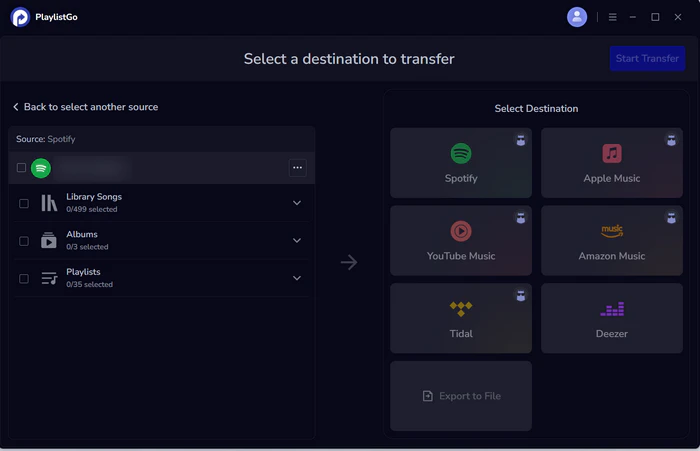
Select Spotify as the source
Choose Spotify as the source platform and connect your Spotify account. Once connected, PlaylistGo loads your Spotify library. You can move Spotify Liked songs, albums, playlists or your entire music libraries.
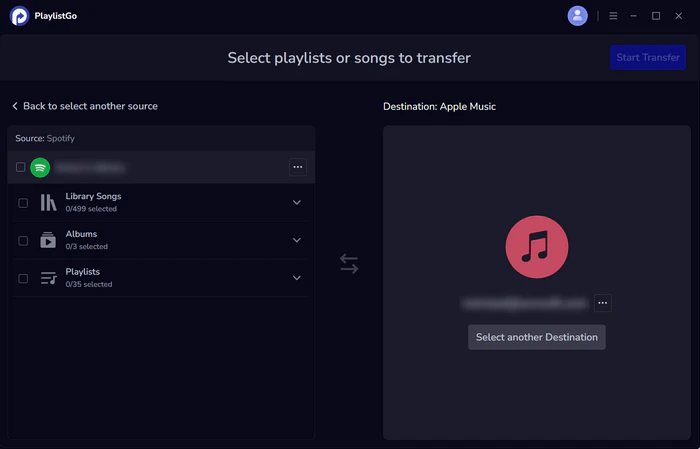
Choose Apple Music as the destination
Select Apple Music as the destination platform and sign in to your Apple Music account.
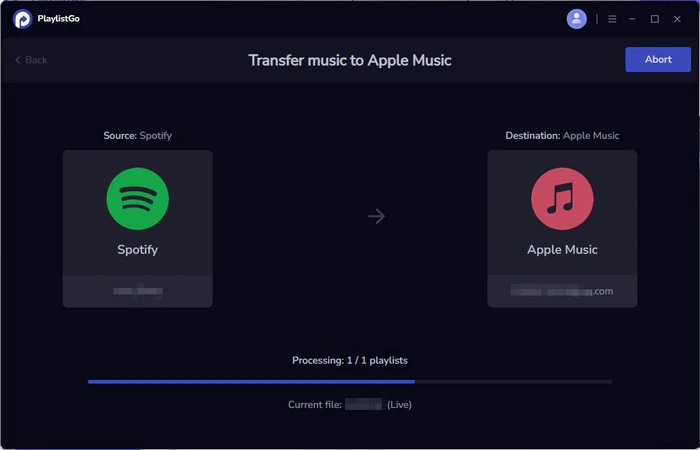
Start the transfer
Click Start Transfer to begin the process. PlaylistGo automatically matches songs between Spotify and Apple Music and transfers them to your Apple Music library.
Want to go the other direction? See our guide on how to transfer Apple Music to Spotify. If you're worried about losing songs during the process, read how to transfer playlists without losing songs.
FAQs about Spotify vs Apple Music
YouTube Video: Spotify vs Apple Music in 2026
Final Verdict
For most users in 2026, Spotify is the better all-around choice — its recommendation engine, podcast integration, and cross-platform support are hard to beat. Apple Music pulls ahead if audio quality and the Apple ecosystem matter more to you than discovery.
Neither platform locks in your library. PlaylistGo transfers your playlists, liked songs, and albums in minutes. See the full Spotify to Apple Music transfer guide or the Apple Music to Spotify guide for step-by-step instructions.

PlaylistGo – Best Desktop Transfer Tool
The fastest and most reliable way to move entire Spotify library to Apple Music, YouTube Music, TIDAL, etc. 100% offline • No Cloud Required • 99.2% success rate



 Language ▴