


Apple Music and YouTube Music now cost the same for an individual plan, so the real difference isn't price. Apple Music's edge is sound quality, officially curated library, and integration across Apple devices. YouTube Music's edge is content breadth, and a free ad-supported tier with no time limit.
This guide breaks down Apple Music and YouTube Music across the six things that actually matter — price, sound quality, content variety, music discovery, everyday features, and device support — then shows you how to move your library if you decide to switch.
Apple Music vs YouTube Music: Quick Comparison
| Feature | Apple Music | YouTube Music |
|---|---|---|
| Price | $11.99/mo Individual | $11.99/mo Individual |
| Free Access | ❌ 1-month trial only | ✅ ad-supported |
| Audio Quality | Hi-Res Lossless, 24-bit/192kHz | 256kbps AAC/Opus |
| Music Catalog | 100M+ official tracks | 100M+ official tracks + video content |
| Music Videos | ⚠️ Limited | ✅ Extensive |
| Live Performances & Remixes | ⚠️ Limited | ✅ Extensive |
| Music Discovery | Human-curated editorial + AI ("Playlist Playground") |
Algorithm & AI ("Ask Music") |
| Dolby Atmos | ✅ | ❌ |
| Offline Listening | ✅ | ✅ Premium only |
| Best Ecosystem Fit | Apple devices & CarPlay | Android & Google ecosystem |
Switching Between Apple Music and YouTube Music? Try It Free
Try PlaylistGo! Transfer playlists and liked songs between Apple Music and YouTube Music in minutes.
Round 1. Apple Music vs YouTube Music: Price & Value
Winner: YouTube Music for overall value. Individual plans both cost $11.99/month, yet its free tier and YouTube Premium bundle put YouTube Music ahead.
Apple Music and YouTube Music now match at $11.99 per month for their individual plans. While the Individual plans now cost exactly the same, value for money varies between the services. Apple Music offers no free tier at all, only a one-month trial before you're required to pay. YouTube Music, on the other hand, offers a free, ad-supported tier with no time limit, so you can keep listening without ever paying.
| Plan | Apple Music | YouTube Music |
|---|---|---|
| Free Plan | ❌ Not offered | ✅ Ad-supported, no time limit |
| Individual | $11.99/month | $11.99/month |
| Student | $6.99/month | $5.99/month |
| Family (up to 6) | $19.99/month | $18.99/month |
| Bundled Option | Apple One (multi-service bundle) | YouTube Premium — $15.99/month, includes ad-free YouTube video |
Which Service Gives You More for Your Money?
This is where YouTube Music pulls ahead. YouTube Premium bundles YouTube Music Premium with ad-free YouTube video, background play, and offline video downloads for $15.99/month. If you already watch YouTube regularly, the extra $4 per month over the music‑only plan gets you two services in one.
Conversely, Apple Music offers Apple One, which bundles Apple Music with other Apple services like TV+, Arcade and iCloud storage. It is valuable if you already use lots of Apple products, yet this package does not add extra video‑related perks to your music subscription like YouTube Premium does.
If you don't watch much YouTube, this advantage disappears. But if you regularly switch between YouTube and a music app, YouTube Music's bundled offer makes it the better‑value pick.
Round 2. Apple Music vs YouTube Music: Sound Quality
Winner: Apple Music. It offers Lossless and Hi-Res Lossless audio up to 24-bit/192kHz plus Dolby Atmos Spatial Audio. YouTube Music tops out at 256kbps AAC with no lossless option.
Apple Music offers Lossless and Hi-Res Lossless audio up to 24-bit/192kHz, plus Spatial Audio with Dolby Atmos, all included at no extra cost. YouTube Music streams at a maximum of 256kbps AAC/Opus and does not offer lossless or spatial audio options at all.
| Compare | Apple Music | YouTube Music |
|---|---|---|
| Max Audio Quality | 24-bit / 192 kHz Hi-Res Lossless | 256kbps AAC/Opus |
| Standard Streaming | 256kbps AAC | 128kbps AAC/Opus (free) 256kbps AAC/Opus (Premium) |
| Lossless Audio Quality | ✅ | ❌ |
| Spatial Audio | ✅ Dolby Atmos | ❌ |
| Bluetooth earbuds | Similar for most listeners | Similar for most listeners |
| Wired headphones / DAC | Noticeably higher fidelity | Good quality, lossy‑limited |
For casual listening on standard earbuds or in a car, you won't notice much difference, and YouTube Music's lower bitrate uses less data as a side benefit. If you use headphones or home speakers, Apple Music is the better long‑term pick, since the quality gap becomes noticeable with high‑end audio devices.
Round 3. Apple Music vs YouTube Music: Music Library & Content Variety
Winner: YouTube Music for variety. Apple Music wins for a clean, official-only catalog.
Both platforms list catalogs well over 100 million songs, so total track numbers are not a helpful comparison. The real difference is content type. Apple Music's library is limited to officially released like studio albums and singles, with no user uploads or unofficial versions. YouTube Music pulls content from the whole YouTube platform, mixing official songs with music videos, live performances, fan covers, remixes and user-uploaded recordings.
| Compare | Apple Music | YouTube Music |
|---|---|---|
| Catalog Size | 100M+ official tracks | 100M+ official tracks + video content |
| Music Videos | Limited | ✅ Extensive |
| Live Performances | Limited | ✅ Extensive |
| Covers & Remixes | ❌ | ✅ |
| User-Uploaded Content | ❌ | ✅ |
| Content Consistency | Clean, officially curated only | Mixed official + unofficial |
If you mostly listen to studio albums and singles, this difference won't matter much. If you regularly look for a specific live version, a rare remix, or a cover that never got an official release, YouTube Music's breadth is a real advantage that Apple Music can't match.
Switching from Apple Music to YouTube Music? Try It Free
Transfer your Apple Music playlists and liked songs to YouTube Music in minutes, no rebuilding from scratch.
Round 4. Apple Music vs YouTube Music: Music Discovery & Recommendations
Split verdict. Both support AI playlists from text prompts, yet Apple Music keeps human curation as its main discovery tool, and YouTube Music focuses on algorithm‑based suggestions.
Apple Music's playlists are human-curated, offering mood- and activity-focused lists like Coffee Shop or Rainy Day, alongside curated "Essential Albums" guides for artists. In 2026, Apple added Playlist Playground, an Apple Intelligence-powered tool that generates a custom playlist from a text prompt. YouTube Music relies on algorithmic recommendations based on your listening habits and YouTube history, plus its own AI feature called "Ask Music" that builds a custom station from a prompt in seconds.
| Compare | Apple Music | YouTube Music |
|---|---|---|
| Discovery Approach | Human-curated editorial playlists | Algorithm + AI ("Ask Music") |
| Mood/Activity Playlists | Editor-built | Algorithm-generated |
| Artist Guides | ✅ "Essential Albums" | Descriptions from Wikipedia |
| Text-Prompt Playlist Generation | ✅ "Playlist Playground" | ✅ "Ask Music" |
Which One Is Better for Discovering New Music?
It depends on how you want to be recommended new music. Go with Apple Music if you like human-picked recommendations built around moods or daily moments, plus fast AI playlist creation when you cannot find the exact feel you want. Go for YouTube Music if you want an algorithm to search its huge library (videos and covers included) for you non‑stop. Apple Music's clean library suits human-made playlists; YouTube Music's huge collection is ideal for open-ended exploration.
Round 5. Apple Music vs YouTube Music: Features & Listening Experience
Split verdict. Apple Music wins on Apple‑device playback hand‑offs, karaoke and advanced playlist tools; YouTube Music wins on queue sync and extra AI playlist tools.
Beyond price and sound quality, your everyday experience comes down to small, useful extras — how playlists work, whether lyrics sync properly, and how smart the app's recommendations feel in the moment.
| Feature | Apple Music | YouTube Music |
|---|---|---|
| Real-Time Lyrics | ✅ | ✅ |
| Search Songs by Lyrics | ✅ | ❌ |
| Karaoke Mode | ✅ Apple Music Sing (Apple-device only) | ❌ |
| Playlists | ✅ Editorial + AI-generated (Playlist Playground) | ✅ Algorithmic + AI-generated ("Ask Music") |
| * Cross-Device Playback | ✅ AirPlay, Handoff, Siri | ⚠️ Cast to TV/speakers; no live remote control |
| * Queue Sync | ⚠️ Basic queue, no cross-device sync | ✅ Queue syncs across Android, iOS & web |
| Offline Listening | ✅ | ✅ Premium only |
| Music Videos | ⚠️ Limited | ✅ Extensive |
| Smart / AI Features | Playlist Playground (AI playlists) + Concerts Near You |
Ask Music (AI playlists) + AI Music Host commentary |
| Library Management | ✅ Smart Playlists, bulk multi-song adding | Basic library tools |
Apple Music vs YouTube Music: Which Service Is Better for Everyday Use?
YouTube Music wins on cross-device convenience; Apple Music wins on personalization and library control.
Playback & Device Control
Both services let you switch playback between devices, but in different ways. Apple Music uses AirPlay, Handoff and Siri to move playback across Apple devices. YouTube‑Music can cast to TVs or speakers, yet you cannot remotely control playback from your phone.
The bigger everyday difference is queue sync. YouTube Music syncs your song queue automatically across Android, iOS and web. Apple Music has no queue sync; AirPlay and Handoff only stream your current track, but the queue itself stays on whichever device you built it.
Personalization & AI
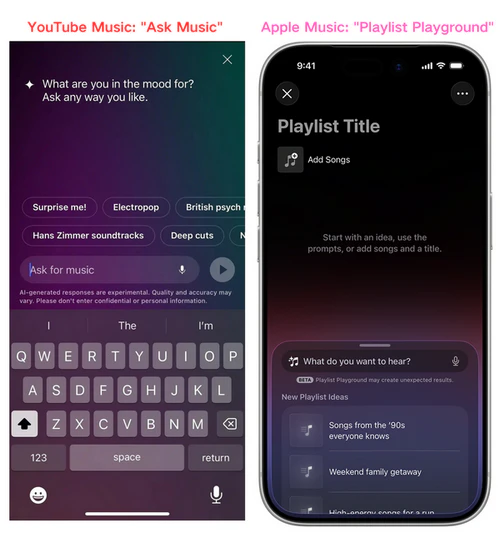
Both services now generate AI playlists from a text prompt: Apple Music's Playlist Playground and YouTube Music's "Ask Music" work in essentially the same way. YouTube Music is also testing an AI feature called Music Host, which adds spoken commentary between tracks, though it's still restricted to a small group of users as of 2026.
Library Management
Apple Music's Smart Playlists refresh automatically based on rules you define — set a condition like "all tracks played more than 10 times" and the playlist updates itself without any manual work. This is especially useful if your library has grown into the thousands and you don't want to curate it by hand. YouTube Music has no comparable rule-based playlist tool.
Round 6. Apple Music vs YouTube Music: Device Support & Ecosystem
Depends on your ecosystem. Apple Music integrates deepest on Apple hardware; YouTube Music fits naturally into Android and Google services. Both run fine on the other's home platform.
Apple Music integrates deeply with iPhone, iPad, Mac, Apple Watch, HomePod, and CarPlay — and it also runs on Android, Windows, and the web, so it's not locked to Apple hardware. YouTube Music runs on Android, iOS, and the web, with strong integration into Android Auto and Google Assistant, but it has no dedicated desktop app for Windows or macOS.
| Device / Platform | Apple Music | YouTube Music |
|---|---|---|
| iPhone / iPad | ✅ | ✅ |
| Android | ✅ | ✅ |
| Mac / Windows Desktop | ✅ Native app | ⚠️ Web player only |
| Apple Watch | ✅ | ❌ |
| CarPlay / Android Auto | ✅ | ✅ |
| HomePod / Chromecast | ✅ | ✅ |
If you already own lots of Apple devices, Apple Music will work smoothly across all of them. If you're on Android or rely heavily on Google services day to day, YouTube Music fits more naturally into your existing setup.
Apple Music vs YouTube Music: Which One Should You Choose?
| Category | Apple Music | YouTube Music |
|---|---|---|
| Price & Value | ✓ Winner | |
| Sound Quality | ✓ Winner | |
| Content Variety | ✓ Winner | |
| Music Discovery | Split | |
| Features & Listening Experience | Split | |
| Device Support & Ecosystem | ✓ Apple devices | ✓ Android/Google |
Choose Apple Music if:
- You use an iPhone, iPad, or Mac as your primary device
- You want lossless or Hi-Res audio and Dolby Atmos included at no extra cost
- You prefer human-curated playlists, but still want the option of AI-generated ones when you need something fast
- You want to be able to find a song by typing a remembered lyric into search
- You mostly listen to full albums and official releases
Choose YouTube Music if:
- You already pay for (or plan to get) YouTube Premium
- You want access to music videos, live performances, covers, and remixes
- You are on Android and want tighter integration with Google services
- You switch between phone, tablet, and desktop a lot and want your queue to follow you automatically
- You want the option of a free tier with no trial period limit
How to Transfer Playlists Between Apple Music and YouTube Music
Switching platforms doesn't mean rebuilding your library from scratch. PlaylistGo is a desktop playlist transfer tool that moves playlists, liked songs, and saved albums between 10 streaming services, including Spotify, Apple Music, YouTube Music, TIDAL and more. It matches each track by its ISRC code rather than just title and artist, so PlaylistGo works reliably even with disorganized music libraries — live versions, deluxe editions, and regional releases included. Everything runs locally on your own computer, so your login credentials and listening history never pass through an external server.
PlaylistGo: Transfer Playlists Between Apple Music & YouTube Music Try It Free
Move playlists, liked songs, and your full library between Apple Music and YouTube Music in just a few clicks.
How to Transfer Apple Music Playlists to YouTube Music
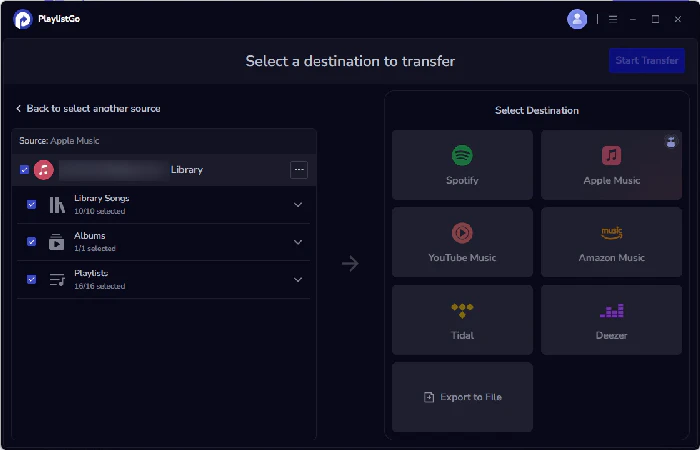
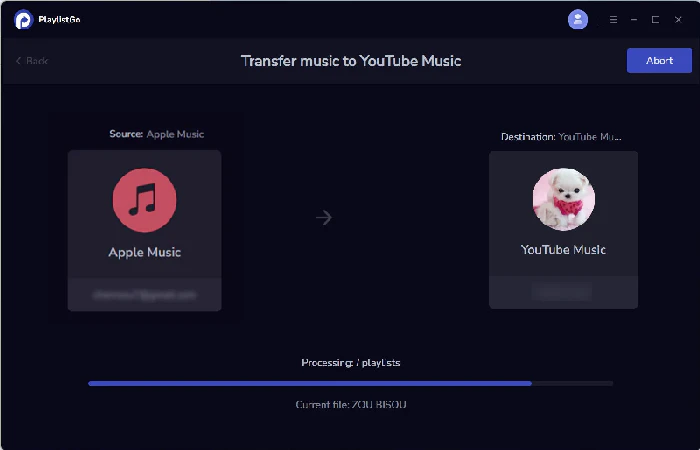
Select Apple Music as the source
Choose Apple Music as the source platform and connect your Apple Music account. Once connected, PlaylistGo loads your Apple Music library. You can move liked songs, albums, playlists, or your entire music library.
Choose YouTube Music as the destination
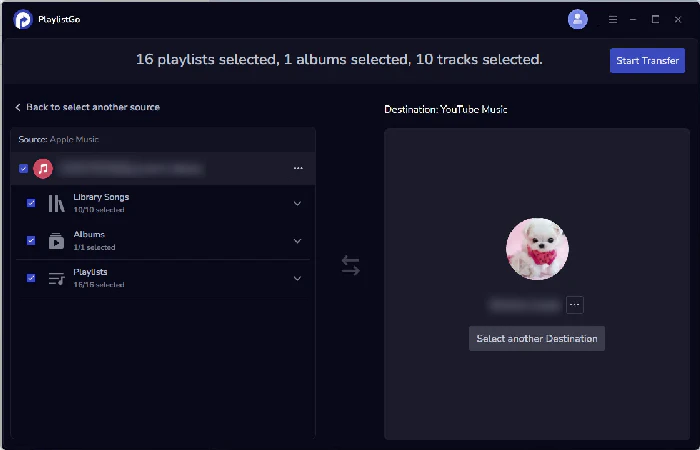
Select YouTube Music as the destination platform and sign in to your YouTube Music account.
Start the transfer
Click Start Transfer to begin the process. PlaylistGo automatically matches songs between Apple Music and YouTube Music and transfers them to your YouTube Music library.
Spotify vs Apple Music: Which Music Streaming Service Is Better in 2026?
Spotify vs Apple Music? A full comparison of sound quality, price, music discovery, and podcasts. Find out which one is right for you.
FAQs about Apple Music vs YouTube Music
Conclusion
If sound quality, curated playlists, and a clean music-only experience matter most to you, Apple Music remains the more polished choice, especially on Apple hardware. If you want more than just studio tracks like music videos, live sets, remixes, and want a free tier or extra benefits from YouTube Premium, YouTube Music offers something Apple Music simply doesn't build for.
Whether you're switching from Apple Music to YouTube Music or vice versa, PlaylistGo covers both directions: Apple Music to YouTube Music and YouTube Music to Apple Music — no need to rebuild your music library from scratch.

PlaylistGo – Best Desktop Transfer Tool
The fastest and most reliable way to move entire Spotify library to Apple Music, YouTube Music, TIDAL, etc. 100% offline • No Cloud Required • 99.2% success rate



 Language ▴