


Spotify is the better all-around music streaming service in 2026, while Amazon Music is the better choice for Amazon Prime members, Echo owners, and listeners who want Hi-Res audio.
This guide compares Amazon Music and Spotify across five rounds — price and plans, sound quality, AI and discovery, audiobooks and podcasts, and devices — so you can see where each service wins before you choose.
Quick Comparison Table — Amazon Music vs Spotify
| Feature | Spotify | Amazon Music |
|---|---|---|
| Audio Quality | Lossless, up to 24-bit/44.1 kHz | HD, Ultra HD up to 24-bit/192 kHz, Dolby Atmos |
| Price (Individual) | $12.99/month | $12.99/month ($11.99 with Prime) |
| Free Plan | ✅ Ads | ✅ Ads |
| AI Features | Prompted Playlist, AI DJ | Maestro |
| Audiobooks | 15 hours per month | One full Audible audiobook per month |
| Podcasts | Video and audio podcasts in one app | Ad-free top podcasts |
| Devices | 2,000+ devices | Amazon devices focused |
Switching Between Amazon Music and Spotify? Try It Free
Move playlists, liked songs and saved albums between Amazon Music and Spotify in a few clicks.
Round 1. Amazon Music vs Spotify: Price & Plans
Winner: Amazon Music comes out ahead for Prime members, who get a discounted rate on Amazon Music Unlimited. It also offers a cheaper student plan compared to Spotify.
Amazon Music Unlimited runs $11.99 monthly for Prime members, while Spotify Premium costs $12.99 each month. If you don't have Prime, the individual plans cost the same for both services. Prime discount and lower student pricing make Amazon Music the better choice for those who qualify.
Prime membership provides a different music experience from Amazon Music Unlimited. Prime alone does not unlock on-demand streaming for every track, but it brings ad-free top podcasts and shuffle playback for any artist, album or playlist. Amazon Music Unlimited is a separate paid subscription offering on-demand playback, HD and Ultra HD audio, spatial audio, plus one audiobook every month.
| Plan | Spotify | Amazon Music |
|---|---|---|
| Free | ✅ (ads, limited on-demand listening) | ✅ (ads, on-demand playback for select playlists only) |
| Included with Prime | — | Shuffle play |
| Individual | $12.99/month | $12.99/month ($11.99 for Prime members) |
| Student | $6.99/month (includes Hulu access) | $5.99/month |
| Duo | $18.99/month | — |
| Family (up to 6) | $21.99/month | $21.99/month (Prime account required) |
Round 2. Amazon Music vs Spotify: Sound Quality
Winner: Amazon Music. Amazon Music Unlimited offers the higher maximum quality, up to 24-bit/192 kHz plus Dolby Atmos. Spotify Premium includes lossless audio up to 24-bit/44.1 kHz at no extra cost.
Amazon Music Unlimited includes HD at CD quality (16-bit/44.1 kHz) and Ultra HD up to 24-bit/192 kHz, along with Dolby Atmos spatial audio. Spotify Premium provides lossless audio up to 24-bit/44.1 kHz and does not include spatial audio or Hi-Res audio above 44.1 kHz.
| Compare | Spotify Premium | Amazon Music Unlimited |
|---|---|---|
| Max audio quality | 24-bit / 44.1 kHz lossless | 24-bit / 192 kHz (Ultra HD) |
| CD-quality tier | ✅ | ✅ |
| Spatial audio | ❌ | ✅ Dolby Atmos & 360 Reality Audio |
| Extra cost for top quality | None | None |
| Free listening quality | Up to 160 kbps (app); 128 kbps AAC (web player) | SD, up to 320 kbps |
I found Spotify's lossless audio clean and balanced for everyday listening. But Amazon Music's Ultra HD tracks and Dolby Atmos spatial audio deliver noticeably richer detail and immersive depth, especially when paired with good headphones or speakers. That said, casual listeners using basic earbuds in noisy environments likely won't hear much difference. This round's win really matters most for audiophiles with compatible hardware.
Switching from Spotify to Amazon Music? Try PlaylistGo Free
PlaylistGo carries your playlists, liked songs and albums over — nothing left behind.
Round 3. Amazon Music vs Spotify: AI Playlists & Music Discovery
Winner: Spotify. Both offer AI playlists, but Spotify's personalized discovery like Discover Weekly stands out. Amazon Music has custom stations and AI playlist generation, but no direct equivalent to Discover Weekly.
AI Playlist Generation: Maestro vs Spotify Prompted Playlist
Both services let you describe the music you want instead of building every playlist track by track, but they take different approaches.
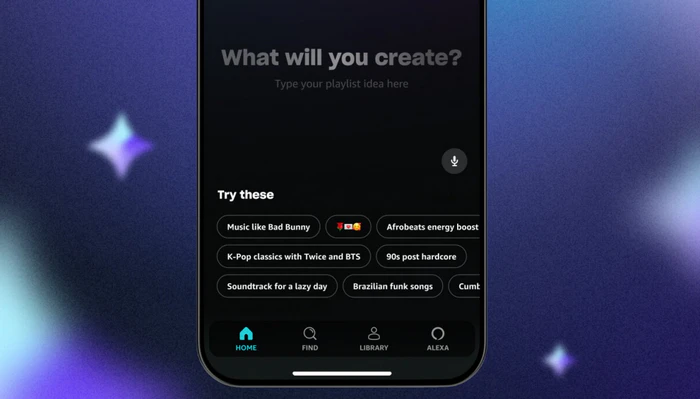
Amazon Music's Maestro is an AI playlist generator that turns text prompts, moods, activities or emojis into playlists. You can describe the music you want, and Maestro creates a playlist based on your idea.
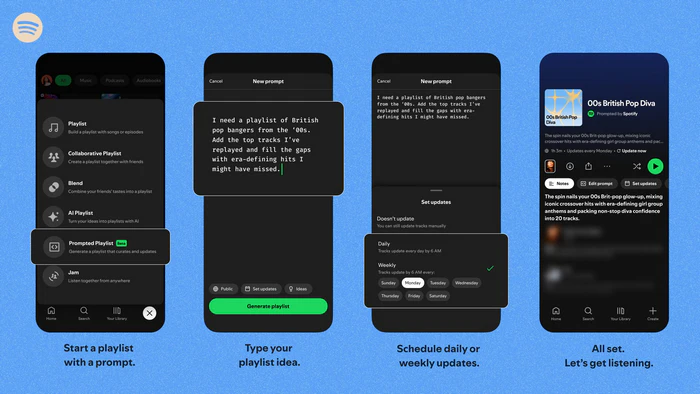
Spotify's Prompted Playlist turns a text description into a personalized playlist using your listening history and current music trends. You can edit the prompt, refresh the playlist daily or weekly, and see a one-line reason for each track. Spotify's AI DJ also accepts voice or text requests.
Music Discovery: Personalized Recommendations Beyond AI
AI-generated playlists are only one part of music discovery. Both services also recommend music through personalized mixes, stations and other listening experiences.
Spotify's music discovery tools are household names. Discover Weekly refreshes every Monday with personalized recommendations, while Release Radar highlights new releases from artists you follow every Friday. Daily Mix blends your favorites with similar songs, and daylist shifts to match your mood throughout the day. Blend even lets you create shared playlists with friends by combining your listening tastes.

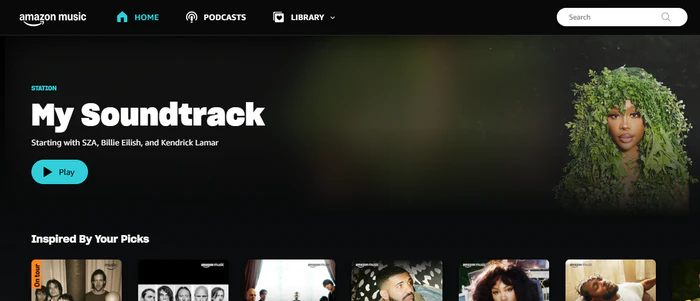
Amazon Music also offers personalized discovery through stations based on artists or tracks, My Soundtrack mixes and [RE] Discover recommendations. These help you explore similar music and rediscover old favorites. Even so, Amazon Music has no direct counterpart to Spotify's signature Discover Weekly.
| Compare | Spotify | Amazon Music |
|---|---|---|
| AI playlist creation | Prompted Playlist | Maestro |
| Discovery playlists | Discover Weekly, Release Radar, Daily Mix, daylist | My Soundtrack, [RE] Discover and personalized stations |
| Regular discovery updates | Discover Weekly every Monday; Release Radar every Friday | No directly equivalent Discover Weekly schedule |
| Social discovery | Blend and Jam | Playlist sharing |
Round 4. Amazon Music vs Spotify: Audiobooks & Podcasts
Winner: Split. Amazon Music is better for listeners who want one full Audible audiobook per month, while Spotify is better for podcasts and for people who read several shorter audiobooks.
Audiobooks: Spotify's 15 Hours vs Amazon Music's One Book a Month
Amazon Music Unlimited includes one Audible audiobook per month with no hourly limit, but you can only listen to one title at a time. Spotify Premium gives 15 hours of audiobook listening per month from a catalog of more than 700,000 titles; on Duo and Family plans, only the plan manager receives the hours.
| Compare | Spotify Premium | Amazon Music Unlimited |
|---|---|---|
| Monthly allowance | 15 hours | 1 full Audible book |
| How it is counted | By listening time | By title, no time limit |
| Multiple books at once | ✅ Within 15 hours | ❌ One at a time |
| Family plan access | Plan manager only | Primary account holder |
Podcast Catalog, Features and Exclusives
Spotify hosts a much wider selection of podcasts, including exclusive originals and video podcasts. It packs practical tools like synced episode transcripts and dedicated podcast discovery.
Amazon Music's total podcast library is smaller, but Prime members get ad-free access to most top podcast series. It works smoothly with Alexa voice commands for hands-free listening on Echo speakers and features Wondery exclusive shows.
Spotify gets the edge for people who mainly listen to podcasts, especially those who like video podcasts and personalized recommendations. Amazon Music remains attractive if you want ad-free podcasts plus a monthly Audible audiobook bundled with your music subscription.
Round 5. Amazon Music vs Spotify: Devices & Ecosystem
Winner: Spotify. It works on 2,000+ devices across 200+ brands. Amazon Music suits Echo and Fire TV users, but Spotify has broader cross-device support.
Spotify supports a wide range of devices, including Apple CarPlay, Android Auto, smartwatches, smart speakers, TVs and game consoles. Spotify Connect also lets you switch playback between compatible devices without interrupting your listening session.
Amazon Music supports mobile devices, web browsers, Sonos, Roku, Fire TV and Echo speakers. Alexa integration provides a particularly convenient experience within Amazon's ecosystem.
| Feature | Spotify | Amazon Music |
|---|---|---|
| Device coverage | 2,000+ devices across 200+ brands | Broad device support, optimized for Amazon devices |
| Echo & Fire TV integration | Basic compatibility | Deep native Alexa integration |
| Cross-device playback | Spotify Connect | Vary by device and casting method |
| Best for | Multi-brand device setups | Echo / Fire TV owners |
Amazon Music vs Spotify: Which One Should You Choose?
| Category | Winner |
|---|---|
| Price & Plans | Amazon Music (for Prime members) |
| Sound Quality | Amazon Music |
| AI Playlists & Discovery | Spotify |
| Audiobooks & Podcasts | Audiobooks: Amazon Music; Podcasts: Spotify |
| Devices & Ecosystem | Spotify |
Choose Amazon Music if:
- You're an Amazon Prime member and want discounted Amazon Music Unlimited pricing.
- High-resolution lossless audio and Dolby Atmos matter to you.
- You use Echo speakers or Fire TV and want tight Alexa integration.
- You prefer one full Audible audiobook each month over a 15-hour listening allowance.
Choose Spotify if:
- You want personalized music discovery through Discover Weekly, Release Radar, Daily Mix and daylist.
- You want AI-generated playlists and more ways to discover music based on your tastes.
- You watch video podcasts or want more podcast discovery features.
- You listen across different brands of devices and want Spotify Connect to switch playback easily.
How to Switch Between Amazon Music and Spotify
To switch between Amazon Music and Spotify without losing your playlists, use a playlist transfer tool such as PlaylistGo to copy playlists, liked songs and saved albums from one service to the other. PlaylistGo is a desktop app for Windows and Mac that runs transfers locally on your computer, so your account credentials never leave your device. Beyond Spotify and Amazon Music, it also supports TIDAL, Apple Music, YouTube Music and more.
PlaylistGo: Transfer Playlists Between Amazon Music & Spotify Try It Free
Move playlists, liked songs and your full library between Amazon Music and Spotify in just a few clicks.
How to Transfer Spotify Playlists to Amazon Music
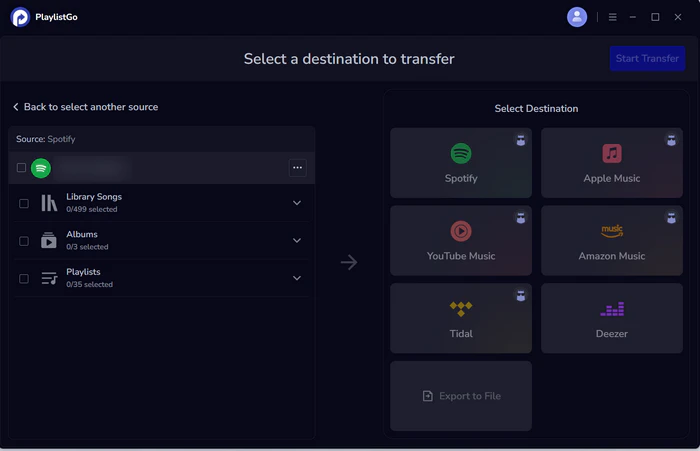
Select Spotify as the source
Choose Spotify as the source platform and sign in to your Spotify account. PlaylistGo then loads your Spotify library, including liked songs, albums and playlists.
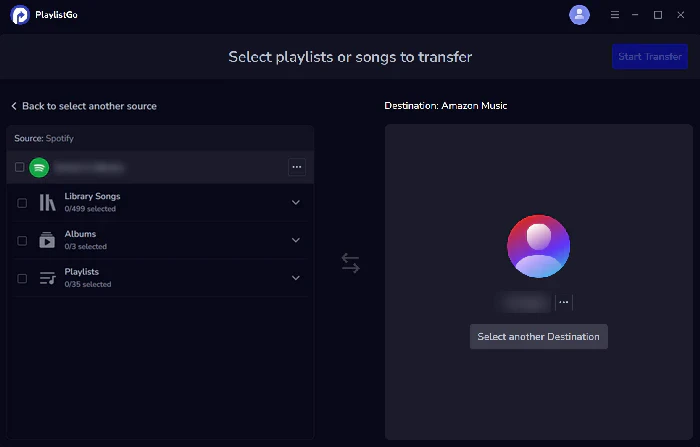
Choose Amazon Music as the destination
Select Amazon Music as the destination platform and connect your account.
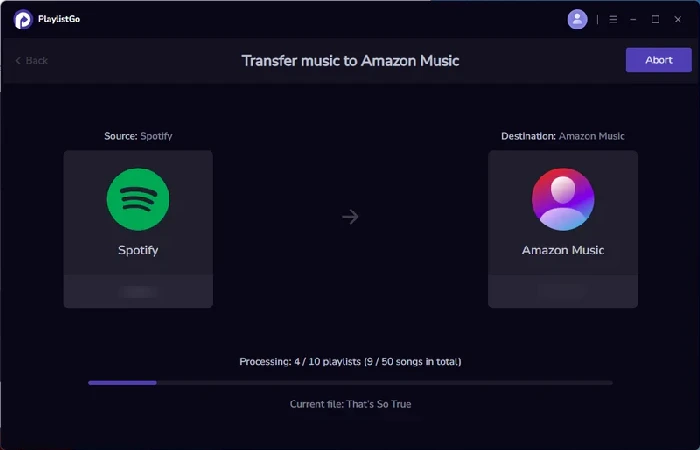
Start the transfer
Click Start Transfer. PlaylistGo matches the songs and transfers them to your Amazon Music library.
FAQs about Amazon Music vs Spotify
Conclusion
Spotify is the better choice for listeners who prioritize personalized music discovery, podcasts, and broad device compatibility. Amazon Music Unlimited is a stronger option for Prime members who want a discounted subscription, high-resolution audio, and an Audible audiobook each month.
The best choice depends on how you listen. Compare the available plans, supported devices, and features you actually use before subscribing. If you're switching between the two services, you can also transfer your playlists and saved music library with PlaylistGo.

PlaylistGo – Best Desktop Transfer Tool
The fastest and most reliable way to move entire Spotify library to Apple Music, YouTube Music, TIDAL, etc. 100% offline • No Cloud Required • 99.2% success rate



 Language ▴