



Qobuz and Spotify both stream more than 100 million tracks, but they have built opposite businesses: Spotify is the mass-market all-in-one app with algorithmic playlists, millions of podcasts, and a free tier; Qobuz is the specialist offering lossless and Hi-Res FLAC, expert editorial writing, and a digital store. The five rounds below break down where each one wins before you subscribe.
Quick Comparison Table — Qobuz vs Spotify
| Feature | Qobuz | Spotify |
|---|---|---|
| Max Audio Quality | 24-bit/192 kHz Hi-Res FLAC, plus DXD and DSD | Lossless up to 24-bit/44.1 kHz FLAC |
| Everyday Lossy Streaming | CD-quality FLAC (16-bit/44.1 kHz) | Free: up to 160 kbps AAC; Premium: up to 320 kbps AAC |
| Discovery | Human editorial curation, curated playlists, Explore section | Discover Weekly, Release Radar, AI DJ, personalized playlists |
| Podcasts | ❌ | Millions of shows |
| Audiobooks | ❌ | 700,000+ titles, 15 hours/month included |
| Free Access | ❌ 1-month free trial only | ✅ Ad-supported |
| Individual Plan | $12.99/mo monthly ($10.83/mo billed annually) |
$12.99/month |
| Buy and Own Music | ✅ CD/Hi-Res store | ❌ Access only |
| Device Support | Mobile, desktop, web, CarPlay, Qobuz Connect Hi-Fi device | 2,000+ devices, smart speakers, consoles, cars |
Switch Playlists Between Spotify and Qobuz? Try It Free
Whichever way you go, PlaylistGo moves your playlists and liked songs with you.
Round 1. Qobuz vs Spotify: Sound Quality and Hi-Res Audio Comparison
Qobuz wins on resolution: it streams 24-bit/192 kHz Hi-Res FLAC across the whole catalog, while Spotify's Lossless tier stops at 24-bit/44.1 kHz.
Qobuz streams music in lossless quality, from CD-quality FLAC (16-bit/44.1 kHz) up to Hi-Res FLAC at 24-bit/192 kHz, depending on the track and available release. Some albums are also available for purchase in DXD and DSD formats, but these formats are not supported for streaming. Because every track ships at least at CD quality, Qobuz's baseline already matches Spotify's Lossless ceiling, and that gap becomes obvious on good hardware rather than on a phone speaker.
Spotify rolled Lossless audio into Premium at up to 24-bit/44.1 kHz FLAC at no extra cost, a genuine upgrade over its lossy AAC streams. Spotify does not currently offer Hi-Res above 44.1 kHz, DSD, or master-quality tiers, which keeps it a step behind Qobuz on the specification ladder.
| Compare | Qobuz | Spotify |
|---|---|---|
| Max Streaming Quality | 24-bit/192 kHz Hi-Res FLAC | 24-bit/44.1 kHz FLAC (Lossless) |
| Lossy Stream Range | CD-quality FLAC on every plan | 24–320 kbps AAC; 320 kbps on Premium, free capped at 160 kbps |
| Extra Cost for Lossless | None | None, included in Premium |
| Hi-Res Above 44.1 kHz | ✅ FLAC, DXD, DSD | ❌ |
I spent a month switching between Qobuz and Spotify using wired in‑ears and a desktop DAC, and that's where I really heard the difference. If you use Bluetooth earbuds or phone speakers, the audio gets compressed anyway, so the 24‑bit/192 kHz advantage basically vanishes. Acoustic, jazz, and classical tracks separated more clearly on Qobuz, while compressed pop and EDM sounded almost identical. I would not upgrade just for the specs alone if you mostly listen on wireless earbuds during your commute.
Round 2. Qobuz vs Spotify: Music Discovery and Listening Experience
Spotify wins personalization and social listening; its algorithmic playlists, Blend, and Friend Activity are unmatched. Qobuz wins curated picks and album-focused browsing for anyone who likes full albums over random tracks.
Algorithmic Personalization on Spotify
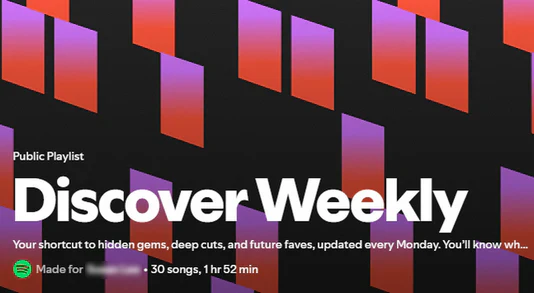
Spotify's discovery feature is the most mature in streaming. Discover Weekly and Release Radar refresh weekly from years of listening data, while the AI DJ narrates and builds mixes for you, and Blend and Jam let two or more listeners merge tastes into a shared playlist. This rewards passive listening: new music arrives without effort, tuned close to what you already play, though it can also keep you inside a familiar taste bubble after a few months.
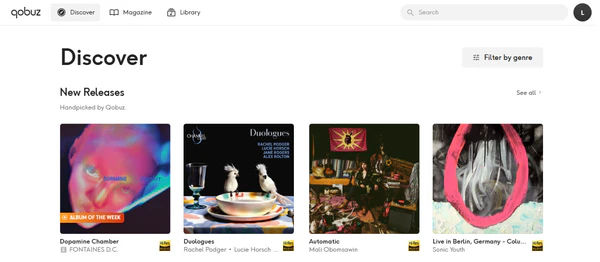
Qobuz's Explore section surfaces similar albums, artists, radio stations, and label or genre connections from the track you are playing, but its recommendation engine is younger and simpler, and it rarely surprises in the way that Spotify's weekly playlists do.
Editorial Curation on Qobuz
Qobuz's discovery strength is human curation rather than prediction. Music editors write reviews, artist interviews, album deep dives, and digital liner notes inside the app. It prioritizes full albums as the listening unit rather than a stream of shuffled tracks; Friday releases are highlighted to broaden your tastes rather than repeat what you already like. Real-time synchronized lyrics, added in 2026, appear alongside detailed credits, artist bios, and audio specs for each record.
Spotify's social layer remains unmatched: Friend Activity, Blend, collaborative playlists, and sharing tracks to friends all assume music is a shared activity, while Qobuz is built around private, intentional listening.
| Compare | Qobuz | Spotify |
|---|---|---|
| Personalized Algorithm | Explore section, simpler | Discover Weekly, Release Radar, AI DJ |
| Human Editorial | Reviews, interviews, liner notes, Qobuz Magazine | Limited |
| Listening Unit | Album-first, curated | Track-first personalized playlists |
| Social Features | Minimal | Blend, Jam, Friend Activity, collaborative playlists |
I missed Spotify's weekly playlists more than expected when testing Qobuz. It can serve up new tracks too, but not with that effortless flow. Still, Qobuz's notes and deep-dive reviews made me finish whole albums I would otherwise have skipped. The two scratch different habits: one feeds you, the other asks you to listen.
Round 3. Qobuz vs Spotify: Pricing, Artist Payouts, and Content Policy
Spotify wins entry cost: its free ad-supported tier and cheaper Student plan lower the barrier. Qobuz wins artist payouts, per-stream transparency, and an explicit anti-AI-content policy.
Subscription Plans and Pricing
Spotify's free ad-supported tier makes it easy to start listening without a subscription. Its $6.99/month Student plan also includes Hulu for eligible students, making it the cheapest entry point for students and budget-focused listeners.
Qobuz offers no free tier. Its monthly Individual plan matches Spotify's at $12.99, while the cheaper $10.83 Solo plan requires annual upfront payment. Qobuz Sublime has the exact same streaming access as Studio. The only add-on is up to 60% off Hi-Res purchases, a benefit worth it only if you plan to buy albums and not just stream.
The real difference between Qobuz and Spotify, therefore, lies not in the headline monthly price but in Spotify's free entry point against Qobuz's annual-only discount.
| Plan | Qobuz | Spotify |
|---|---|---|
| Free Tier | ❌ 1-month trial | ✅ Ad-supported |
| Individual (Solo) | $12.99/mo monthly; $10.83/mo billed annually | $12.99/mo |
| Duo | $17.99/mo monthly; $14.99/mo billed annually | $18.99/mo |
| Family (up to 6) | $21.90/mo monthly; $17.99/mo billed annually | $21.99/mo |
| Student | $4.99/mo | $6.99/mo (includes Hulu) |
| Store Discounts | Sublime from $14.99/mo (annual); up to 60% off Hi-Res purchases | ❌ |
Artist Payouts and Per-Stream Royalties
Back in March 2025, Qobuz made history as the first music streaming service to publish an independently audited average per-stream royalty rate. For its 2024 fiscal year, Qobuz paid labels and publishers an average of $0.01873 per stream — that works out to $18.73 for every thousand streams.
By outside estimates, Spotify lands somewhere around $0.003 to $0.005 per stream on average. Spotify uses a pooled revenue split model instead of a fixed per-stream rate. Royalty payouts are collected into a shared pool first, then divided out based on each track's share of total platform streams. Estimated average per-stream compensation is lower, and these rates fluctuate with total play volume.
If you care about artist compensation, treat Qobuz's audited figure as a useful data point for comparison. That said, it's not the be-all and end-all for deciding which platform is truly fair.
AI Policies and Artist Support
Qobuz takes a human-first approach to music discovery. Its AI Charter sticks to human curation, bans AI-made music in its catalog, and blocks external AI scraping. In September 2026, Qobuz also introduced clear labels for AI-generated tracks. Spotify also has its own AI transparency measures, like track AI credits and AI Persona badges. However, these features serve different purposes and do not provide equivalent track-level labeling coverage.
Beyond AI policies, artist compensation and corporate decisions have fueled the 2025 “Death to Spotify” boycott and broader criticism from parts of the music community. Discussions on Reddit include listeners sharing their reasons for leaving Spotify, while some Qobuz users cite ethical concerns when explaining their switch. These discussions illustrate why artist support and platform values matter to some listeners.
I've used both long enough to know which one I actually keep open. Spotify is still easier to start with — free tier, cheap Student plan. Qobuz costs the same monthly and has no free option, but the higher payouts and strict no-AI policy feel better to me. I switch between them, but when I care about where the money goes and don't want AI tracks mixed in, I leave Qobuz running more often.
Ready to Move Your Playlists to Qobuz? Try It Free
Start the free trial, then bring your Spotify playlists, liked songs, and saved albums to Qobuz without rebuilding them by hand.
Round 4. Qobuz vs Spotify: Catalog, Podcasts, and Music Ownership
Spotify wins podcasts, audiobooks, and wide coverage of niche music; Qobuz wins owned Hi-Res downloads and deeper classical and jazz catalogs.
Music Catalog and Niche Coverage
Qobuz and Spotify both list over 100 million tracks, and mainstream pop, rock, hip-hop, and major-label releases show a small coverage gap. Differences appear at the edges: Spotify tends to carry more regional music, local indie releases, and niche electronic and urban catalogs. Qobuz, by contrast, goes deeper on classical, jazz, acoustic, and premium master‑grade recordings. Before subscribing, search your specific favorite obscure tracks and particular recording versions, since a small number of niche titles and local releases may be absent.
Podcasts and Audiobooks
This is the clearest loss when leaving Spotify. The service hosts millions of podcast shows and a catalog of more than 700,000 audiobooks, with 15 hours of monthly listening time included. Qobuz carries neither; it is music, editorial, and downloads only. If podcasts during commutes or audiobooks before sleep are part of your routine, Spotify remains the practical choice unless you use a separate app.
Streaming Access vs Owned Downloads
One key difference between Qobuz and Spotify is how they let you access music. With Spotify, your Premium subscription gives you access to its streaming catalog for as long as your subscription remains active. Qobuz offers a similar streaming subscription, but it also lets you purchase individual albums and tracks as downloadable music files. The Sublime plan adds up to 60% off Hi-Res file purchases; these purchased downloads remain yours to store and play independently of your Qobuz streaming subscription.
| Compare | Qobuz | Spotify |
|---|---|---|
| Music Catalog | 100M+, depth in classical/jazz/Hi-Res | 100M+, broadest niche and regional coverage |
| Podcasts | ❌ | ✅ Millions of shows |
| Audiobooks | ❌ | ✅ 700,000+ titles, 15 hrs/month |
| Own Your Files | ✅ Buy CD/Hi-Res downloads; Sublime discount up to 60% | ❌ Access only |
The 100-million-track headline makes the catalog gap look zero, but I kept finding regional indie cuts on Spotify that Qobuz simply did not carry, while Qobuz filled out classical and jazz recordings Spotify only had in compressed form. The owned-download option also changes the mindset: once I buy a Hi-Res file, it stays on my drive even if I cancel.
Round 5. Qobuz vs Spotify: Device Compatibility and Ecosystem Support
Spotify wins everyday device coverage; it runs on the broadest consumer ecosystem. Qobuz wins Hi-Fi integration for dedicated home systems.
Everyday Device and Car Integration
Spotify works with more than 2,000 devices from over 200 brands, covering smart speakers, TVs, game consoles, wearables, and connected cars including Apple CarPlay and Android Auto. Spotify Connect lets you control playback and switch listening between compatible devices without interruption. You can see this wide ecosystem from Spotify's device directory.
Qobuz supports iOS, Android, desktop, web, CarPlay, Android Auto, and compatible Hi-Fi systems through Qobuz Connect, AirPlay, and Chromecast. It also introduced a redesigned CarPlay app with Siri voice control in early 2026. While Qobuz focuses more on Hi-Fi listening, Spotify offers broader compatibility with everyday connected devices, making it the more convenient choice if you want music across a wide range of gadgets.
Hi-Fi Integration and Open File Formats
Qobuz is particularly well suited to dedicated Hi-Fi systems. Qobuz Connect works with more than 100 partners, including brands such as Naim and Bluesound, so you can stream directly to compatible network players and audio systems. Roon and similar library software integrate Qobuz natively, which matters for a dedicated home system. For purchased downloads, Qobuz offers formats including FLAC, AIFF, WAV, DSD, and DXD files.
Spotify Connect also supports many compatible Hi-Fi devices, but Spotify Premium's lossless streaming currently tops out at 24-bit/44.1 kHz FLAC, while Qobuz offers streaming in Hi-Res quality up to 24-bit/192 kHz on compatible devices. For listeners with a Hi-Res-capable audio setup, Qobuz provides the higher-resolution streaming option.
| Compare | Qobuz | Spotify |
|---|---|---|
| Everyday Device | Mobile, desktop, web, CarPlay | 2,000+ devices, consoles, smart speakers, cars |
| Hi-Fi Integration | Qobuz Connect, 100+ partners, Roon-ready | Spotify Connect on selected hardware |
| File Formats | Open FLAC, AIFF, WAV, DXD, DSD | Proprietary delivery, Lossless FLAC capped at 44.1 kHz |
I run my whole-home setup via Spotify Connect without a second thought, and that convenience is hard to give up. Sending a 192 kHz file to a network player over Qobuz Connect performed more cleanly than I expected, so Qobuz felt more native for a dedicated Hi‑Fi room.
Qobuz vs Spotify: Which One Should You Choose?
| Category | Qobuz | Spotify |
|---|---|---|
| Hi-Res audio resolution | ✓ Winner | |
| Algorithmic recommendation engine | ✓ Winner | |
| Human editorial curation | ✓ Winner | |
| Social listening and shared playlists | ✓ Winner | |
| Free entry tier | ✓ Winner | |
| Student pricing | ✓ Winner | |
| Artist payout and per-stream transparency | ✓ Winner | |
| AI content labeling policy | ✓ Winner | |
| Podcasts and audiobooks | ✓ Winner | |
| Niche and regional catalog | ✓ Winner | |
| Depth of classical and Hi‑Res catalog | ✓ Winner | |
| Buy and own permanent downloads | ✓ Winner | |
| Everyday device coverage | ✓ Winner | |
| Dedicated Hi-Fi integration | ✓ Winner |
Choose Qobuz if:
- You listen on wired headphones, a DAC, or a home Hi-Fi system where Hi-Res files can actually be heard
- You want master-quality 24-bit/192 kHz recordings and a deep classical, jazz, or acoustic catalog
- You prefer album-first listening, editorial reviews, and liner notes over algorithmic shuffle
- You want to buy and permanently own CD or Hi-Res albums
- Higher artist payouts and an explicit anti-AI-content policy matter to you
Choose Spotify if:
- You rely on Discover Weekly, Release Radar, and the AI DJ to find new music without effort
- Podcasts or audiobooks are a regular part of your listening
- You need a free ad-supported tier, the cheapest student plan, or playback on consoles and smart speakers
- You share playlists through Blend, Jam, or Friend Activity
- You mostly listen on wireless earbuds or phone speakers where Hi-Res cannot be heard
How to Switch Between Spotify and Qobuz?
Before making the switch, we suggest backing up your Spotify playlists, liked songs, and saved albums to CSV, M3U, or TXT files if you plan to cancel your subscription. Try Qobuz's one-month trial to check for obscure tracks and specific recordings, and keep Spotify active while testing so you can compare both services.
PlaylistGo is a transfer tool that moves playlists, liked songs, and saved albums in bulk, and preserves the correct version and playlist order with a 99.2% match rate. It never stores your passwords and processes matches locally without uploading your library to the cloud.
PlaylistGo: Transfer Playlists Between Spotify & Qobuz Try It Free
Move playlists, liked songs, and your full library between Spotify and Qobuz in just a few clicks.
How to Transfer Spotify Playlists to Qobuz
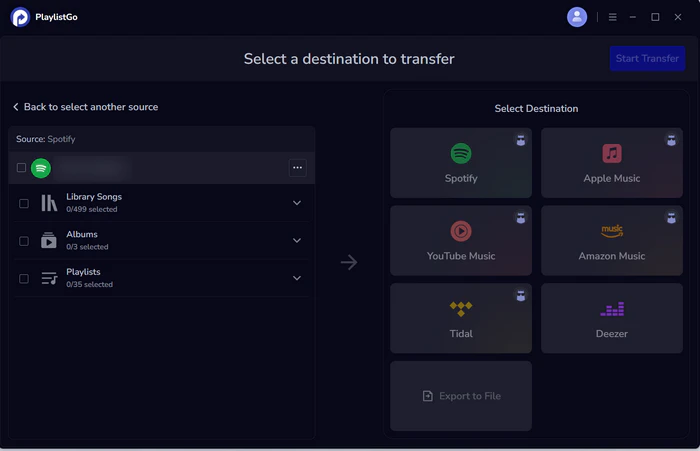
Select Spotify as the source
Choose Spotify as the source platform and connect your Spotify account. Once connected, PlaylistGo loads your Spotify library. You can move Spotify Liked songs, albums, playlists or your entire music library.
Choose Qobuz as the destination
Select Qobuz as the destination platform and sign in to your Qobuz account.
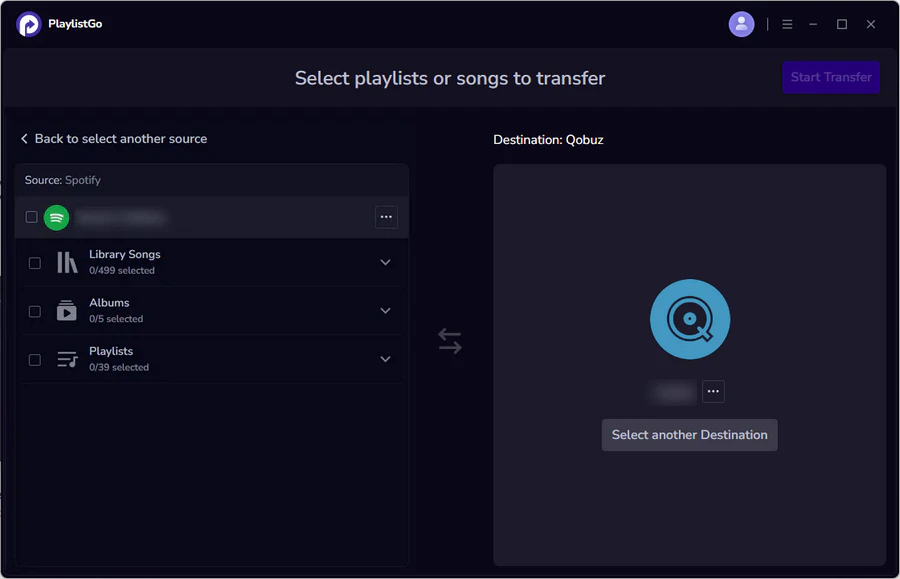
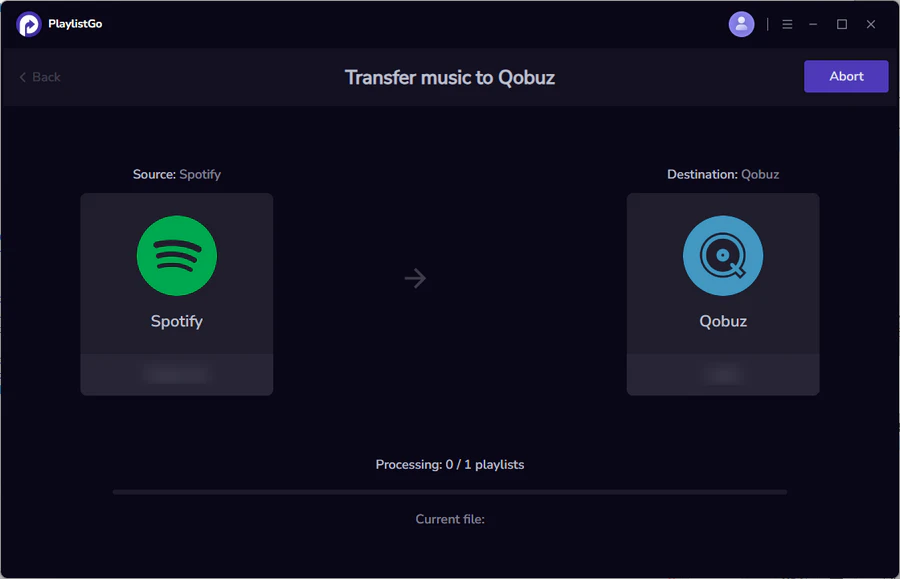
Start the transfer
Click Start Transfer to begin the process. PlaylistGo automatically matches songs between Spotify and Qobuz and transfers them to your Qobuz library.
FAQs about Qobuz vs Spotify
Qobuz vs Spotify: Final Verdict
There is no universal winner between Qobuz and Spotify because the two services serve different listening habits. Qobuz is the pick for Hi-Res fidelity, editorial depth, and music you own; Spotify is the pick for discovery, podcasts, device coverage, and a low-cost entry. Whichever direction you lean, your accumulated playlists do not have to be rebuilt from scratch. PlaylistGo moves them for you while you test the new service.

PlaylistGo – Best Desktop Transfer Tool
The fastest and most reliable way to move your Spotify library to Qobuz, Apple Music, YouTube Music, TIDAL, etc. 100% offline • No Cloud Required • 99.2% success rate



 Language ▴