



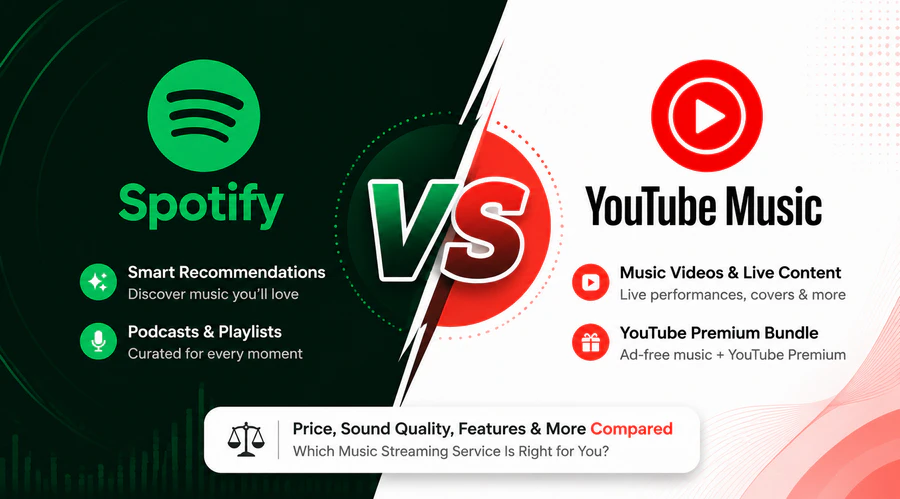
Spotify and YouTube Music are two of the most popular music streaming services, but they are designed for different types of listeners. Spotify stands out with its powerful music discovery algorithms, podcasts, and wide device support. YouTube Music ties into YouTube’s full library for official releases, music videos, live performances, remixes, and fan uploads.
In this Spotify vs YouTube Music comparison, we break down the key differences in music library, sound quality, pricing, features, and user experience to help you decide which platform fits your listening habits — and how to move your playlists if you decide to switch.
Spotify vs YouTube Music: Quick Comparison
Prices and specs current as of 2026. Verify current rates at spotify.com/premium and youtube.com/musicpremium before subscribing.
| Feature | Spotify | YouTube Music |
|---|---|---|
| Individual Monthly Price (US) | $12.99 | $11.99 |
| Maximum Audio Quality | Up to 24-bit/44.1kHz FLAC* | Up to 256kbps AAC/Opus |
| Audio & Video Content | Music streaming + podcasts + audiobooks | Official videos, live shows, remixes & fan uploads |
| Podcasts | Large library with exclusive series | Limited podcast selection |
| Bundled Perks | Student Hulu offer (US only) | YouTube Premium includes ad-free YouTube + Music |
| Device Compatibility | Broad support across TVs, cars & speakers | Integration with Google / Nest / Chromecast |
Switching from Spotify to YouTube Music? Try It Free
Transfer your playlists between Spotify and YouTube Music in minutes.
Round 1. Spotify vs YouTube Music: Music Discovery & Recommendations
Both Spotify and YouTube Music offer powerful recommendation systems, but they find new music in different ways. Spotify focuses on understanding your listening habits, while YouTube Music benefits from YouTube's massive video content library.
Spotify's Algorithm-Driven Discovery
Spotify remains one of the strongest platforms for personalized recommendations. Features like Discover Weekly, Release Radar, Daily Mixes, and AI-powered recommendations analyze your listening history, saved tracks, playlists, searches, and interactions to continuously refine your music suggestions.
Since Spotify focuses primarily on official releases from artists and labels, its recommendations are especially strong for discovering new albums, emerging artists, and mainstream releases that match your personal taste.
YouTube Music's Edge: Discover Music Across YouTube
YouTube Music's biggest discovery edge comes from YouTube's full content library. It can surface live performances, covers, remixes, fan uploads, concert recordings, and alternative versions that are often unavailable on regular streaming platforms. The Samples feed provides a short-video style way to discover new music, while its personalized radio and recommendations can uncover different versions of songs beyond official studio releases.
If you prefer algorithm-based discovery of official releases, Spotify has the edge. If you enjoy exploring rare tracks, live performances, and alternative versions, YouTube Music offers something different.
Round 2. Spotify vs YouTube Music: Music Library & Content Catalog
Both platforms feature over 100 million official studio tracks. YouTube Music, though, has both audio and video content plus personal cloud storage, creating a major content advantage Spotify can't beat.
Spotify's Licensed Audio-Focused Library
Spotify focuses mainly on officially released music from labels and independent artists. While it has short looping Canvas visuals, native music videos are limited to Premium users in select regions and only available on a small number of tracks.
YouTube Music's Edge: Cloud Storage, Video & Expanded Library
YouTube Music includes millions of fan uploads, rare bootlegs and indie remixes unavailable on Spotify's license-only catalog. You can switch between studio audio, official music videos and full concert footage with a single tap, without disrupting your playback queue. Another advantage of YouTube Music is personal library support. You can upload up to 100,000 of their own songs to YouTube Music and access them alongside their streaming library.
Round 3. Spotify vs YouTube Music: Audio Quality
Streaming quality varies widely between Spotify and YouTube Music. Free listeners, Premium members and lossless playback each have different bitrate limits. The table below shows the maximum audio quality you can get on each platform.
| Streaming Quality Tier | Spotify | YouTube Music |
|---|---|---|
| Free Account | 160kbps OGG (Mobile) / 128kbps AAC (Web) | Up to 128kbps lossy AAC / Opus |
| Premium Standard Lossy | 320kbps OGG (App) / 256kbps AAC (Web) | 256kbps AAC (App) / Opus (Web) |
| Lossless / Hi-Res Audio Support | 24-bit / 44.1kHz FLAC (Included with Premium) | Not supported at all |
For casual listeners using basic Bluetooth earbuds or phone speakers, you likely won't hear much difference between these quality levels. The contrast becomes obvious for audiophiles with wired headphones and external DACs: Spotify's lossless FLAC delivers wider dynamic range and clearer instrument separation for classical, jazz, and acoustic tracks.
Round 4. Spotify vs YouTube Music: Pricing & Free Tier Restrictions
| Subscription Plan | Spotify | YouTube Music Premium | YouTube Premium |
|---|---|---|---|
| Individual Monthly Plan | $12.99 | $11.99 | $15.99 |
| Student Discount Plan | $6.99 | $5.99 | $8.99 |
| Family Plan | $21.99 (6 members) | $18.99 (5 members) | $26.99 (5 members) |
| What You Get |
Music streaming + podcasts Hulu bundle available for eligible students |
Music streaming only |
YouTube Premium benefits + YouTube Music Premium (Ad-free YouTube, background playback, downloads) |
If you already watch YouTube regularly, YouTube Premium often provides better overall value because it combines music streaming with an ad-free video experience. For users focused mainly on music discovery and podcasts, Spotify remains a strong choice.
Beyond pricing, both platforms place different limits on users using their free tiers.
Limitations of Spotify Free
- Regular audio and visual ads during playback
- Only 6 track skips per hour on mobile
- Cannot download songs for offline listening
- Lower maximum streaming audio quality
- Less flexible queue control on mobile
In contrast, YouTube Music Free comes with unique mobile limitations you won't encounter on Spotify Free.
Limitations of YouTube Music Free
- Audio & video ads interrupt playback
- No background playback on mobile; music stops when locking screen or switching apps
- Cannot download songs for offline listening
- Limited maximum streaming audio quality
- No bundled access to ad-free regular YouTube videos (only included in Premium)
Migrate Playlists with PlaylistGo Try It Free
Easily transfer entire playlists between Spotify and YouTube Music in one click.
Round 5. Spotify vs YouTube Music: User Interface & Experience
Spotify's UI is built for audio and music management, while YouTube Music's layout centers around switching between audio tracks and visual music video content.
Spotify's Audio-First Layout Strengths
Spotify's native desktop client is industry-leading for playlist organization, bulk track editing, and drag-and-drop sorting. The clean design cuts out unnecessary visual clutter, making it ideal for background music during work or commutes.
YouTube Music's Video-Integrated UI Strengths
An audio-video toggle button on every player page is YouTube Music's signature feature. The vertical Samples tab supports quick short-video music discovery, and navigation layout matches YouTube app for familiar user flows. Its biggest UX flaw hits free users: playback stops if the phone screen locks, so you cannot play music passively in the background on mobile.
Round 6. Spotify vs YouTube Music: Platform & Device Compatibility
Spotify works smoothly across a wide range of devices, including smart TVs, game consoles, cars, speakers, and streaming devices. YouTube Music also supports major platforms, but it has the strongest integration with Google's devices, especially Android devices, Nest speakers, and Chromecast.
| Device Category | Spotify | YouTube Music |
|---|---|---|
| Game Consoles | Native app on PS5 / Xbox | No official console app |
| Smart Speakers | Works with Alexa, Sonos, Google speakers | Optimized for Google Nest & Chromecast |
| Casting Devices | Chromecast + Spotify Connect | Deep Chromecast integration |
| Car Systems | CarPlay & Android Auto supported | CarPlay & Android Auto supported |
| Smart TVs | Wide support across major TV platforms | Available on most mainstream smart TVs |
Spotify is the better choice if you use a mix of devices from different brands, including gaming consoles, Amazon devices, Sonos speakers, and smart TVs. YouTube Music works especially well if you are already invested in Google's ecosystem with Android phones, Google Nest speakers, and Chromecast devices.
Round 7. Spotify vs YouTube Music: Podcast & Audiobooks
Podcasts and audiobooks are important parts of Spotify's broader audio service. YouTube Music also supports podcasts, but it prioritizes music videos and songs, rather than dedicated spoken-word features.
Spotify offers a more complete podcast experience with dedicated podcast discovery features, exclusive shows, and specialized playback tools such as silence skip, chapter markers, and adjustable playback speed. In supported markets, Premium subscribers can also access audiobook listening benefits.
YouTube Music supports podcasts, but its podcast experience is less developed than Spotify's. Podcast episodes are integrated into music interface rather than built around an independent podcast section. It also lacks many of Spotify's advanced podcast features and currently provides no audiobook access at all.
Spotify vs YouTube Music: Which One Should You Choose?
| Category | Spotify | Tie / Depends | YouTube Music |
|---|---|---|---|
| Music Discovery | ✓ | ||
| Audio & Video Content Library | ✓ | ||
| Audio Streaming Quality | ✓ | ||
| Pricing & Bundle Value | ✓ | ||
| User Interface & Usability | ✓ | ||
| Cross-Device Compatibility | ✓ | ||
| Podcast & Audiobooks | ✓ | ||
| Final Tally | Spotify 3 | Tie 2 | YouTube Music 2 |
This scoreboard reflects general strengths, not a universal ranking. Which service works better for you can easily change based on your listening habits and the devices you own.
Choose Spotify if:
- Audio quality matters and you want lossless FLAC streaming
- You regularly listen to podcasts and spoken-word content
- You own a mixed set of devices, including game consoles and non-Google smart speakers
- You mostly listen to audio and rarely watch music videos or live footage
Choose YouTube Music if:
- You want switching between audio, official music videos and live performances
- You hunt for remixes, fan uploads, rare bootlegs unavailable on standard audio platforms
- You subscribe or plan to get YouTube Premium for ad-free YouTube video access
- You are in the Google/Android ecosystem and want personal cloud music upload support
Can You Transfer Playlists Between Spotify and YouTube Music?
After comparing all the key differences between Spotify and YouTube Music, you may wonder one practical question: can you move your saved music library over when switching platforms? Manually recreating hundreds of playlists one by one would be extremely time-consuming, but professional third-party tools can finish this entire transfer automatically.
Using a playlist transfer tool can fully automate the migration work. PlaylistGo connects your Spotify and YouTube Music accounts, then accurately matches every track by song title, artist name, album information and ISRC unique code to rebuild your entire library. It supports transferring custom playlists, liked tracks and saved albums in full.
PlaylistGo: Transfer Playlists Between Spotify & YouTube Music Try It Free
Move playlists, liked songs, and your full library between Spotify and YouTube Music in just a few clicks.
How to Transfer Spotify Playlists to YouTube Music
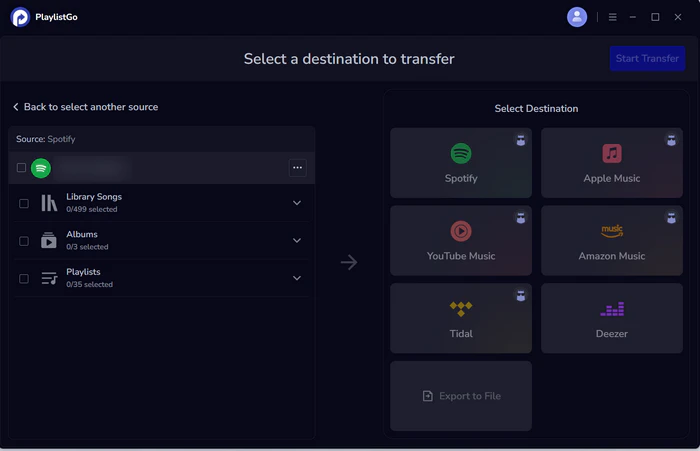
Select Spotify as the source
Choose Spotify as the source platform and connect your Spotify account. Once connected, PlaylistGo loads your Spotify library — you can move liked songs, albums, playlists, or your entire music library.
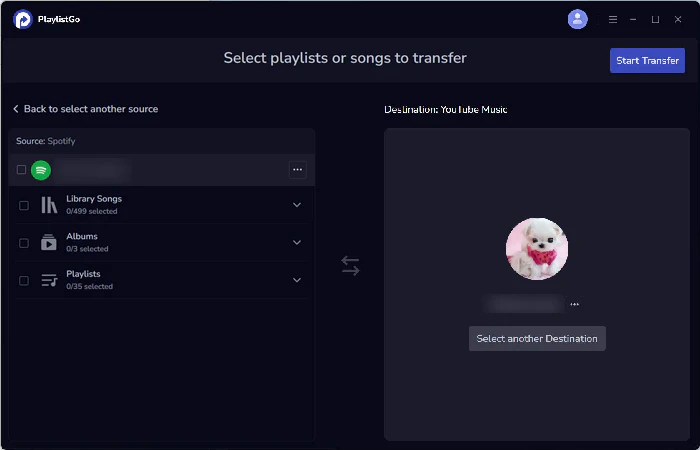
Choose YouTube Music as the destination
Select YouTube Music as the destination platform and sign in to your YouTube Music account.
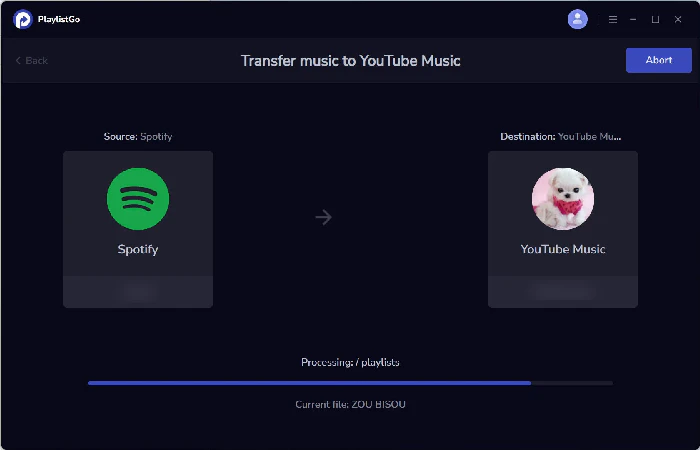
Start the transfer
Click Start Transfer to begin the process. PlaylistGo automatically matches songs between Spotify and YouTube Music and transfers them to your YouTube Music library.
How to Transfer YouTube Music to Spotify?
This guide shows you the fastest way to transfer your favorite YouTube Music playlists to Spotify with PlaylistGo.

FAQs about Spotify vs YouTube Music
Final Verdict
Spotify and YouTube Music are both strong choices — Spotify tends to win on audio quality, podcasts, discovery, and device compatibility, while YouTube Music wins on music videos, live content, and value for existing YouTube Premium users.
Neither platform locks in your library. PlaylistGo transfers your playlists, liked songs, and albums in minutes. See the full Spotify to YouTube Music transfer guide or the YouTube Music to Spotify guide for step-by-step instructions.

PlaylistGo – Best Desktop Transfer Tool
The fastest and most reliable way to move entire Spotify library to Apple Music, YouTube Music, TIDAL, etc. 100% offline • No Cloud Required • 99.2% success rate



 Language ▴