


Looking for the cheapest music streaming service? The answer depends on what you need — whether you want the lowest monthly price, a student discount, a family plan, or the best audio quality for your money.
With subscription prices changing across Spotify, Apple Music, YouTube Music, Amazon Music, TIDAL, Qobuz, and other platforms, choosing the right service can be difficult. This guide compares popular music streaming services by pricing, plans, and features to help you find the best value.
Cheapest Music Streaming Services at a Glance
| Situation | Cheapest Option | Cost | Main Trade-off |
|---|---|---|---|
| Completely free | Spotify / YouTube Music / Deezer / Amazon Music / SoundCloud / Pandora | $0 | Ads + limited skips, offline, or on-demand control |
| Individual Premium | Pandora Premium | $10.99/mo | More radio-style; smaller catalog than major platforms |
| Students | Qobuz Student | $4.99/mo | Smaller mainstream catalog |
| Families | Pandora / Qobuz Family | $17.99/mo | Pandora is radio-oriented; Qobuz requires one household |
| Prime members | Amazon Music Unlimited | $11.99/mo | Only cheaper if you already pay for Prime |
| YouTube Premium subscribers | YouTube Music | $0 extra | Only free if you already pay for YouTube Premium |
| Lossless / hi-res audio | Apple Music / Tidal / Deezer | $11.99/mo | Needs wired headphones or DAC to hear the difference |
Ready to switch to a more affordable music streaming service? PlaylistGo helps you transfer playlists, liked songs, albums, and other music data when moving between supported platforms.
Which Music Streaming Service Is Cheapest for You?
There is no single winner across all nine services. The cheapest option changes depending on your situation, and what you lose by going for the cheapest plan matters just as much as its listed price. Below is a detailed breakdown of each section.
1. Best Free Music Streaming Option
Free tiers aren't really about price competition, since they're all $0. The real question is which limitation you can live with. Spotify and YouTube Music are the two most "complete" free experiences — both let you search for and play a specific song rather than just shuffling a station. Deezer, SoundCloud, and Pandora lean more toward radio-style or shuffle playback, and Amazon Music's free tier (bundled automatically with Prime) is also station-based rather than full search. If on-demand playback matters more to you than price, that's the split to pay attention to.
Apple Music, Tidal and Qobuz have no free tiers, only short trials that automatically bill your card when they end.
| Service | Cost | Ad-Free | Key Limitation |
|---|---|---|---|
| Spotify Free | $0 | ❌ | Lower audio quality, no offline downloads |
| YouTube Music Free | $0 | ❌ | No background play |
| Deezer Free | $0 | ❌ | Shuffle-only on mobile, no offline mode |
| Amazon Music Free (with Prime) | $0 | ❌ | Station-based, not full on-demand search |
| SoundCloud Free | $0 | ❌ | Some tracks time-limited, lower audio quality |
| Pandora Free | $0 | ❌ | Radio stations only, no on-demand search |
2. Cheapest Individual Music Streaming Plan
When comparing paid on‑demand plans, the $1–2 price gap matters less than the features you actually get for your money. Pandora undercuts everyone at $10.99, making it the cheapest full on-demand Premium plan on this list, but it leans more heavily on radio-style discovery and has a smaller catalog than the major streaming platforms — keep this in mind before you think it can directly replace Spotify.
Among the $11.99 tier, the big difference is audio quality: Apple Music, Tidal, and Deezer include lossless sound or higher for no extra cost, while YouTube Music and SoundCloud do not offer lossless audio at any price. If you're deciding between two specific services, see our full Spotify vs Apple Music comparison or Apple Music vs YouTube Music breakdown.
| Service | Price | Catalog Focus | Audio Quality | Key Feature |
|---|---|---|---|---|
| Pandora | $10.99 (Plus: $4.99) |
Mainstream + radio-style discovery | Up to 192 kbps | Personalized radio |
| Apple Music | $11.99 | Mainstream + classical | Hi-Res Lossless + Dolby Atmos | Spatial Audio + Apple ecosystem |
| Tidal | $11.99 | Mainstream + global music | Hi-Res Lossless + Dolby Atmos | Music videos + editorial content |
| Deezer | $11.99 | Mainstream + global + podcasts | CD-quality FLAC | Flow personalized mixes |
| YouTube Music | $11.99 | Official tracks + live, covers & remixes | Up to 256 kbps | Music videos & hard-to-find versions |
| SoundCloud Go+ | $11.99 (Go: $4.99) |
Indie, remixes, DJ sets & user uploads | Up to 256 kbps | Underground & hard-to-find music |
| Amazon Music Unlimited | $11.99 (Prime) / $12.99 | Mainstream + podcasts | Ultra HD Hi-Res + Dolby Atmos | Prime member discount |
| Spotify | $12.99 | Mainstream + podcasts & audiobooks | Lossless | Discover Weekly & personalization |
| Qobuz (Studio Solo) | $12.99 | Mainstream + hi-res catalog | Hi-Res Lossless | Hi-res streaming + downloads |
Decided on a Cheaper Service? Transfer Your Playlists! Try It Free
Don't start from zero. PlaylistGo moves playlists, liked songs and albums across Spotify, Apple Music, YouTube Music and more.
3. Cheapest Music Platforms for Students
The nine student prices are pretty close, from $4.99 to $6.99, so cost rarely makes the final call. If audio quality matters to you, Qobuz's $4.99 student rate is the cheapest way into true hi-res streaming anywhere on this list. If catalog breadth matters more, YouTube Music or Deezer at $5.99 get you a full mainstream library for one dollar more. All nine require student-status verification, and most require annual re-verification to keep the discount.
| Service | Student Price | Bundle / Extra | Eligibility | Re-verification |
|---|---|---|---|---|
| Qobuz | $4.99 | — | Eligible student, age 18–24 | Annual |
| SoundCloud Go+ | $5.49 | — | Enrolled student | Annual |
| Amazon Music Unlimited | $5.99 | Audible audiobooks & podcasts | Accredited college/university student | Annual |
| YouTube Music | $5.99 | — | Higher-ed student | Annual |
| Deezer | $5.99 | — | Eligible student | Annual |
| Pandora | $5.99 | — | Undergraduate or graduate student | Annual |
| Apple Music | $6.99 | Apple TV+ included | College/university student | Annual |
| Spotify | $6.99 | Hulu (With Ads) included | Accredited higher-ed student, 18+ | Annual |
| Tidal | $6.99 | — | Eligible student | Every 11 months |
4. Cheapest Family Music Services
All these family plans support up to six separate accounts, so the cost per person is generally similar to the single‑user rate. There is one exception: SoundCloud does not offer a family plan. Beyond price, Qobuz requires all family members to share one household address to qualify.
| Service | Family Price | Cost per Person* |
|---|---|---|
| Pandora | $17.99 | $3.00 |
| Qobuz (Studio Family) | $17.99 | $3.00 |
| YouTube Music | $18.99 | $3.17 |
| Apple Music | $19.99 | $3.33 |
| Tidal | $19.99 | $3.33 |
| Deezer | $19.99 | $3.33 |
| Amazon Music | $21.99 | $3.67 |
| Spotify | $21.99 | $3.67 |
| SoundCloud | ❌ No family plan | $11.99 per account |
5. Cheapest Options for Lossless / Hi-Res Audio
Apple Music, Tidal and Amazon Music all deliver true hi‑res audio (24‑bit/192kHz) plus Dolby Atmos for $11.99 a month. Deezer costs the same $11.99, yet its highest quality is only CD‑grade FLAC (16‑bit/44.1kHz). That beats compressed streaming, but it is not hi‑res, and there is no spatial audio. Spotify lossless also stops at CD quality, and charges more at $12.99.
Qobuz has the largest hi‑res library of them all. Its $4.99 student plan is the lowest‑cost way to unlock hi‑res streaming, though its regular single‑user subscription costs more than $11.99.
Keep in mind you need proper device to hear these improvements. Bluetooth headphones cannot reach even CD quality, no matter what the streaming service sends. You will need a wired connection or external DAC to enjoy lossless audio.
| Service | Price | Lossless/Hi-Res Included? |
|---|---|---|
| Apple Music | $11.99 | ✅ Up to 24-bit/192kHz + Dolby Atmos |
| Tidal | $11.99 | ✅ Up to 24-bit/192kHz + Dolby Atmos |
| Amazon Music (Prime) | $11.99 | ✅ Up to 24-bit/192kHz (Ultra HD) + Dolby Atmos |
| Deezer | $11.99 | ✅ CD-quality FLAC, 16-bit/44.1kHz (no hi-res tier) |
| Spotify | $12.99 | ✅ CD-quality FLAC, 24-bit/44.1kHz (no hi-res tier) |
| Qobuz (Studio Solo) | $12.99 | ✅ Up to 24-bit/192kHz across nearly the full catalog |
| YouTube Music | $11.99 | ❌ |
| SoundCloud | $11.99 | ❌ |
| Pandora | $10.99 | ❌ |
Tired of Overpaying for Music Streaming? Try It Free
Switch to a cheaper service and keep every playlist, liked song, and album — one click with PlaylistGo
6. Best Deal If You Already Have Amazon Prime
Prime already includes Amazon Music's ad-supported tier at no extra cost. If you're a Prime member who mostly listens casually, that free ad-supported plan may meet all your needs. If you want to upgrade to Amazon Music Unlimited, Prime members pay just $11.99/month, compared with the regular $12.99/month price for non-Prime users.
7. Best Deal If You Already Pay for YouTube Premium
If you already subscribe to YouTube Premium at $15.99/month, YouTube Music Premium is included, so you pay nothing extra for music streaming. This only works as a "cheapest" strategy if you were going to pay for ad-free YouTube video anyway. Spending $15.99 just to skip the $11.99 music fee is not a good deal by itself. But if you're already a YouTube Premium subscriber, it's effectively the cheapest music plan on this list.
Editor's Choice: How to Pick the Right Cheap Plan for Your Situation
- 🎧 Free with Full-Catalog → Spotify, YouTube Music or Deezer
- 💰 Lowest Possible Bill → Pandora
- 🎵 Cheapest Mainstream Catalog → Apple Music, YouTube Music, Tidal or Deezer
- 🎓 Best Student Deal → Qobuz or SoundCloud
- 👨👩👧👦 Best Family Value → Pandora or Qobuz
- 📦 Already Paying for Prime or YouTube Premium → Amazon Music or YouTube Music
What you give up at the cheapest price point matters just as much as the sticker price:
- Ads and playback limits on free tiers — usually limited song skips or no on-demand play on some devices
- Offline listening — often missing entirely from free plans, and from SoundCloud's cheapest Go tier
- Audio quality — free tiers typically top out at standard bitrate; only some paid tiers bundle lossless in
- Catalog depth — Pandora and SoundCloud are cheapest overall but trade breadth or major-label completeness for that price
- Account/device limits — some plans restrict simultaneous streams, or require the same household address for family plans
The cheapest service, in the end, is the one that checks all your must‑have boxes for the least money — not always the option with the lowest advertised price.
How to Switch to a Cheaper Music Streaming Service
Once you've picked a cheaper option, moving your library over is usually the biggest hesitation, since nobody wants to manually rebuild years of playlists.
PlaylistGo is a desktop transfer tool that matches your tracks against the new platform's catalog and rebuilds your playlists in a few clicks, running entirely on your own device with no cloud uploads. It supports transfers across 10+ platforms, including all nine services covered in this guide — Spotify, Apple Music, YouTube Music, Amazon Music, Tidal, Deezer, SoundCloud, Qobuz, and Pandora — and delivers a 99.2% song‑matching rate, helping you move your library without losing any tracks..
Switching to a Cheaper Streaming Service? Try It Free
PlaylistGo moves your playlists, liked songs, and saved albums to Apple Music, YouTube Music, Amazon Music, Tidal, Deezer, SoundCloud, Qobuz, Pandora, or Line Music.
Tutorial: How to Move Your Library to a Cheaper Service
Select your current service as the source platform
Launch PlaylistGo, choose your current streaming service (for example Spotify) as the source platform, and log in to your account. PlaylistGo will load your library.
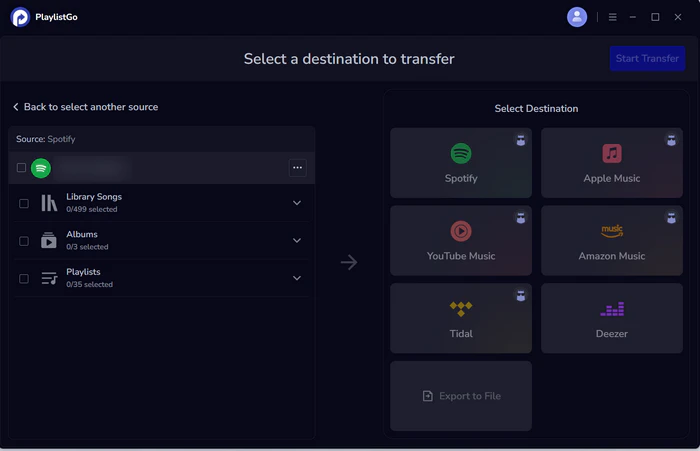
Select your new, cheaper platform as the destination
Choose your new destination platform — Apple Music, YouTube Music, Amazon Music, or Tidal — and sign in with your account.
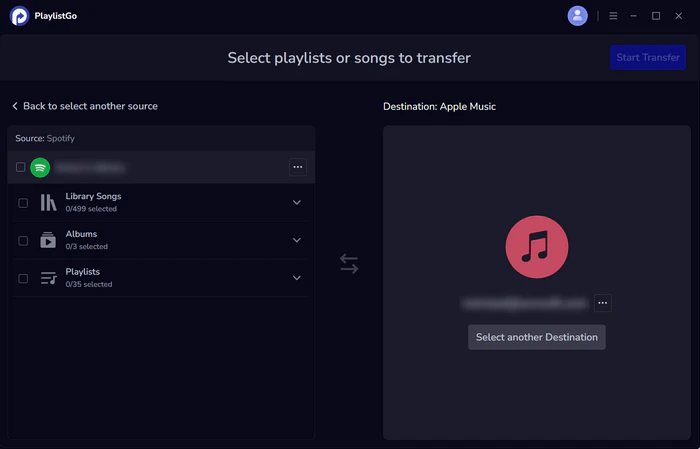
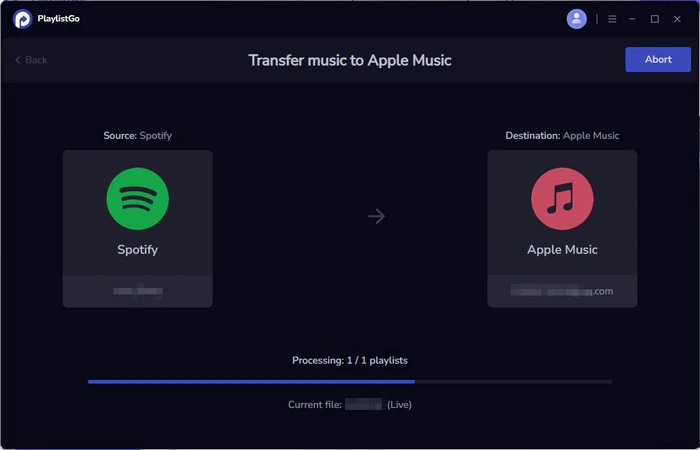
Start the transfer
Choose your liked songs, playlists, or entire music library, then click Start Transfer. PlaylistGo automatically matches tracks and moves them to your new platform. Once finished, open the app to check your transferred playlists.
Spotify Alternatives: 8 Free & Paid Music Streaming Services Compared
Thinking about leaving Spotify? Compare 8 Spotify alternatives on price and audio quality, then move your Spotify playlists over in minutes.
FAQs about the Cheapest Music Streaming Service
Conclusion: Which Cheap Music Streaming Service Should You Pick?
There's no single "cheapest" service in 2026 — the right pick depends on which trade-off you're willing to accept. If your only goal is the lowest possible bill, Pandora at $10.99/month wins. If you want a full mainstream library at the lowest cost, Apple Music, YouTube Music, and Tidal all land at $11.99/month. Students should look at Qobuz first for hi-res audio at $4.99/month, or YouTube Music/Deezer for a broader catalog at $5.99. And if you're already paying for Amazon Prime or YouTube Premium, check those bundles before signing up for anything new — you may already have what you need.
Whichever service ends up cheapest for your situation, you don't have to start your music library from scratch to get there. PlaylistGo can move your playlists, liked songs, and saved albums over in a few clicks, so switching for a better price costs you nothing but time.

PlaylistGo – Best Desktop Transfer Tool
The fastest and most reliable way to move entire Spotify library to Apple Music, YouTube Music, TIDAL, etc. 100% offline • No Cloud Required • 99.2% success rate



 Language ▴