




Spotify is the better music streaming service for most listeners because it offers on-demand playback on every plan, supports lossless audio, and is available in 184 countries. Pandora is the better pick for one specific job: hands-free personalized radio in the United States, at the lowest ad-free price among the major services.
The six rounds below compare Spotify and Pandora on listening model, music discovery, catalog focus, free plans and pricing, audio and non-music content, and availability. If you are already a Pandora listener and only want to know whether to leave, skip to the switch guide.
Comparison Table — Spotify vs Pandora
| Feature | Spotify | Pandora |
|---|---|---|
| Free Tier | ✅ Ad-supported | ✅ Ad-supported stations |
| On-Demand Playback | Every plan; limited on Free | Pandora Premium only |
| Offline Listening | Premium: songs, albums and playlists | Plus: selected stations; Premium: songs, albums and playlists |
| Max Audio Quality | Up to 24-bit/44.1 kHz FLAC lossless | 192 kbps MP3; no lossless tier |
| Music Discovery | Discover Weekly, Release Radar, AI DJ, Daylist, Blend | Thumbs up/down, Pandora Modes |
| Radio Stations | Song, artist and playlist radio, generated on request | Persistent stations on every plan |
| Individual Plan | $12.99/mo (Premium) | Plus $5.99/mo; Premium $11.99/mo |
| Availability | 184 markets | United States only |
Quick Pick: Spotify vs Pandora
- Better audio quality → Spotify. Lossless FLAC up to 24-bit/44.1 kHz is included with Premium.
- Better for radio → Pandora. Stations are persistent and improve with every thumb.
- Cheapest ad-free plan → Pandora Plus at $5.99/month, but it is radio only.
- Cheaper full on-demand plan → Pandora Premium at $11.99 vs Spotify Premium at $12.99.
- Better free tier for control → Spotify. More playback control on desktop and web.
- Mainstream catalog → Both. Big releases, chart artists and major-label albums are on both services.
- Listening outside the US → Spotify. Pandora is US only.
- Podcasts and audiobooks → Spotify.
Moving Between Spotify and Pandora? Try It Free
Whichever way you go, PlaylistGo moves your playlists and liked songs with you.
Round 1. Spotify vs Pandora: On-Demand Streaming vs Personalized Radio
Spotify is the better fit for active listening, where you pick the song, album or playlist. Pandora is the better fit for hands-free radio, where one station runs for hours and learns from your thumbs.
Spotify is built for active listening. You search for a song, artist or album, queue it up, build playlists, reorder them and share them. Premium removes the remaining limits: any play order, unlimited skips, unlimited repeats.
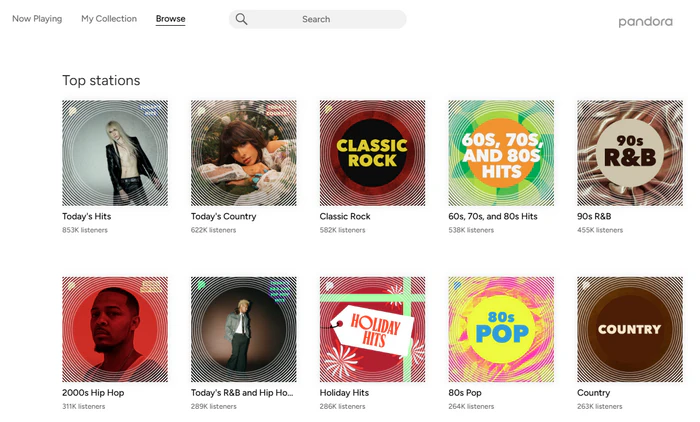
Pandora is built for passive listening. You start a station from a song, artist, genre or mood, and Pandora keeps the music coming. You can tune your station with thumbs up, thumbs down, skips and Pandora Modes. Inside a station stream you never pick the exact next track.
That said, this does not mean Pandora is radio-only. Pandora Premium unlocks on-demand playback, playlist creation and album playback, so the label "radio only" applies to Free and Plus plans, but not Premium.
| Compare | Spotify | Pandora |
|---|---|---|
| Pick a specific song | ✅ | Premium only |
| Build and reorder playlists | ✅ | Premium only |
| Persistent tunable station | ❌ | ✅ |
If you like building and curating playlists, Spotify fits better. If you want music running while you drive, cook or work, and you would rather not decide anything, a Pandora station removes that decision entirely.
I ran both apps on my commute for weeks. Spotify needed a decision every time I opened it, which is fine when I want a specific album. Pandora needed one tap and then ran hands-free for the whole drive. The surprise was Pandora Premium: once on-demand was unlocked, it behaved much closer to Spotify than the "radio only" reputation suggests.
Round 2. Spotify vs Pandora: Music Discovery and Recommendations
Spotify offers wider discovery tools based on your full listening history. Pandora wins in-station discovery, matching songs by musical attributes to surface fitting new tracks.
How Spotify Recommends Music
Spotify's recommendations come from what you play, skip, save and add to playlists. Discover Weekly refreshes every Monday, Release Radar follows new releases from artists you follow, AI DJ narrates and mixes live, Daylist shifts with your mood across the day, and Blend merges your taste with a friend's. This system is broader and more current, but it leans toward music similar to what you already listen to.

Pandora Station Modes: How They Change Your Mix
Pandora compares each track against hundreds of musical attributes such as melody, harmony, rhythm, instrumentation and vocal style, then plays songs that share those attributes. Because the match is based on how a song sounds, a new station can find a genuinely unfamiliar artist on day one.
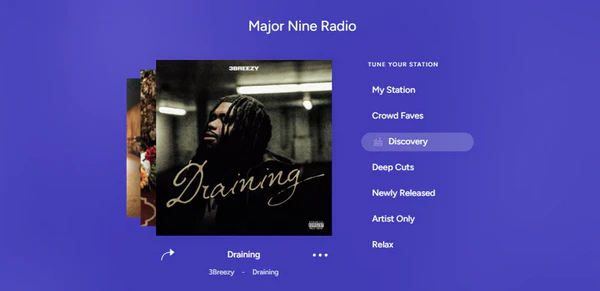
Pandora Modes are the reason a station does not feel like a loop. They let you re-tune the same station without creating a new one, and each mode draws from a different part of the catalog.
- My Station — The default mix, tuned by your thumbs and skips
- Crowd Faves — The songs other listeners thumb up most on this station
- Discovery — More artists who do not usually appear on this station
- Deep Cuts — Less familiar tracks from the artists already in the station
- Newly Released — The newest releases from the station's artists
- Artist Only — Tracks from the seed artist alone
Spotify Radio vs Pandora Stations: Can Spotify Replace Pandora?
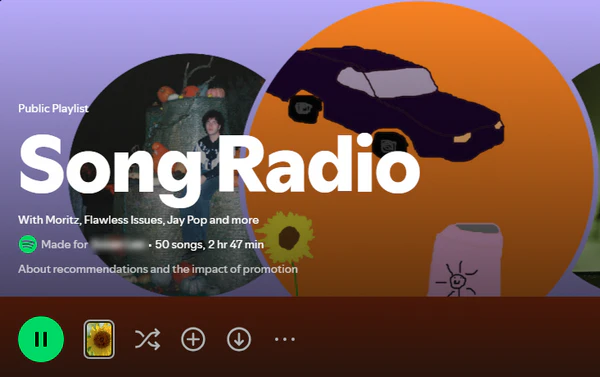
No, Spotify radio is not a replacement for a Pandora station. Radio exists inside Spotify too, as Song Radio, Artist Radio and playlist radio, but it is a side feature rather than the main way the app wants to be used. Song Radio and Artist Radio behave like a generated playlist that happens to match a seed. Pandora stations sit in your collection, remember years of thumbs, and can be re-tuned with a Mode without starting over.
Likes and dislikes in Spotify radio update your full listening profile. Pandora keeps your feedback tied only to one station, while Spotify applies it everywhere across your account.
| Compare | Spotify | Pandora |
|---|---|---|
| Recommendation basis | Listening behavior, playlists, skips, saves | Musical attributes of each track |
| Weekly personalized playlist | Discover Weekly, Release Radar | ❌ |
| AI or narrated mixing | AI DJ | ❌ |
| Shared or social discovery | Blend, Jam, Friend Activity | Station sharing only |
| Continuous radio from a seed | Song Radio, Artist Radio, playlist radio | Core experience on every plan |
A thread on r/spotify shares a common take from long-time Pandora fans switching to Spotify: its mixes don't work as well for background listening. The opposite complaint pops up too on Pandora's community forum: Spotify users find Pandora stations repetitive over long sessions. Both are correct. Pandora finds music that sounds alike; Spotify predicts what you might want to play next.
Round 3. Spotify vs Pandora: Catalog Focus
Spotify runs a licensing-first global catalog built for search and on-demand playback. Pandora's catalog is built around personalized stations and attribute-based matching. Both cover mainstream music. Their differences show up with more obscure tracks.
What the Pandora Catalog Is Built For
Pandora's Music Genome Project describes songs through roughly 450 musical attributes, many of them scored by trained music analysts rather than inferred from listener behavior. Pandora's library is also shaped by US-only licensing and a radio-first design, so it is smaller and less complete than Spotify's on-demand catalog, especially for self-released, regional and non-English releases.
What the Spotify Catalog Is Built For
Spotify works on licensing, not manual analysis. If a label or distributor delivers a release and the rights cover your market, it goes live right away. It is also why Spotify can carry things Pandora's curators would never reach: a self-released debut, a regional pressing, an indie album, a reissue nobody charts.
For chart pop, country, rock, hip-hop and the major Latin releases, Spotify and Pandora feel almost the same. Pandora was built around American radio styles, and Spotify's licensed library cover all of that too. If your library is what the charts play, catalog is not a reason to choose between them.
| Music type | Spotify | Pandora |
|---|---|---|
| New mainstream releases | Available on launch day | Covered; timing varies by label feed, and niche releases can lag |
| Independent & self-released music | Huge library; unsigned artists can upload via distributors | Smaller; fewer self-released and distributor-uploaded titles |
| K-pop, J-pop & Asian regional music | Strong catalog with dedicated hubs | Limited, US-focused licensing |
| Jazz, classical & world music | Pick specific recordings/versions | More detailed audio tagging |
| Electronic subgenres, remixes & DJ sets | Official releases and label remixes | Only radio-friendly selections |
If you want a station that keeps finding music in a particular style, Pandora's attribute matching tends to be more consistent than Spotify's behavior-based recommendations, especially in jazz, classical and world music. But if you're looking for a specific track, a special version, an imported record, or an artist that hasn't been added to Pandora yet, Spotify is the better choice.
Leaving Pandora for Spotify's catalog? Try It Free
If deeper catalog is the reason you are switching, PlaylistGo carries your Pandora playlists and liked songs into Spotify in one click, so you are not rebuilding them by hand.
Round 4. Spotify vs Pandora: Free & Paid Plans
Pandora is cheaper, Spotify's free tier gives more control. Pandora Plus is the lowest ad-free price at $5.99, and Premium at $11.99 undercuts Spotify by a dollar.
Spotify Free vs Pandora Free
Spotify Free controls the play order and limits how many tracks you can skip each hour. Pandora Free won't let you pick albums, though your station keeps playing, and you can usually unlock extra skips by watching ads. If what you want from free is "play this one song", Spotify wins. If what you want is "music all afternoon without touching anything", Pandora wins.
| Free tier | Spotify Free | Pandora Free |
|---|---|---|
| Ads | ✅ | ✅ |
| Skips | 6 per hour in the mobile app | Capped per hour and per day; extra skips unlockable by watching an ad |
| On-demand playback | Shuffle-only on mobile; more on-demand control on desktop and web | Stations only, plus single tracks unlocked by watching an ad |
| Playlists | Create and save playlists | ❌ |
| Offline listening | ❌ | ❌ |
| Audio quality | Up to ~160 kbps in the desktop and mobile apps; 128 kbps AAC on the web player | 64 kbps AAC+ on the web |
Spotify Paid vs Pandora Paid
Spotify charges one standard price for full playback across all devices, and it has Student, Duo and Family plans to fill out its lineup. Pandora Plus is not a cheaper Spotify Premium. It is a cheaper radio plan. If you want on-demand songs, playlists or full albums, you'll need to upgrade to Pandora Premium.
| Plan | Spotify (US) | Pandora (US) |
|---|---|---|
| Entry paid tier | $12.99/mo Premium Individual | $5.99/mo Plus. Ad-free radio, unlimited skips and replays, station downloads. |
| Full on-demand tier | $12.99/mo Premium Individual | $11.99/mo Premium |
| Student | $6.99/mo, includes Hulu on us | ❌ |
| Two-person | $18.99/mo Duo | ❌ |
| Family | $21.99/mo, up to 6 accounts | $19.99/mo, up to 6 accounts |
| Free trial | 1 month on Individual and Student, new Premium customers only | Free trial on Plus and Premium for new subscribers |
Round 5. Spotify vs Pandora: Audio Quality, Podcasts and Audiobooks
Spotify wins on audio quality and non-music content, with lossless FLAC included in Premium and a podcast and audiobook catalog in the same app.
Audio Quality
Spotify Premium streams lossless FLAC up to 24-bit/44.1 kHz at no extra cost, reaches 320 kbps in its lossy tier. Pandora tops out at 192 kbps MP3 on Plus and Premium, and has not announced a lossless tier.
| Audio Spec | Spotify | Pandora |
|---|---|---|
| Lossless | Up to 24-bit/44.1 kHz FLAC, included with Premium | ❌ |
| Max lossy bitrate | 320 kbps (Premium) | 192 kbps MP3 (Plus and Premium) |
| Free tier | ~160 kbps (desktop and mobile apps); 128 kbps AAC (web player) | 64 kbps AAC+ (web); 32 to 192 kbps selectable on Premium mobile |
| Codec | Ogg Vorbis / AAC / FLAC (varies by platform) | MP3 / AAC+ (varies by platform) |
Whether this matters depends. On phone speakers or a car stereo, 192 kbps versus lossless is hard to tell apart. On wired headphones or a decent home system, the difference is obvious with well-mastered recordings.
Podcasts and Audiobooks
Spotify has built a large non-music catalog on top of its music library. It carries a deep podcast catalog, including Spotify Originals and exclusives, and episodes appear in search, playlists and recommendations alongside songs. Eligible Premium plans also include a big audiobook catalog, with 15 hours of audiobook listening each month; you can buy more time once the monthly allowance runs out.

Pandora offers podcasts and comedy, and its podcasts work on mobile, web and selected connected devices, with thumbs up and thumbs down carrying over from its music radio. It has no comparable audiobook library, so if audiobooks are part of your routine, this round is not close.
Round 6. Spotify vs Pandora: Availability and Devices
Spotify has wider device and global support: it runs in 184 markets. Pandora is US only, so for anyone living elsewhere the comparison ends here.
Pandora is available only in the United States. If you visit from other countries, you'll see a message saying it's unavailable. Even US users get limited access when traveling overseas. Spotify operates in 184 markets, so it is the only practical option for anyone outside the US, frequent travellers, or households split across countries.
Spotify runs on phones, tablets, desktop, web, smart speakers, TVs, game consoles, wearables, CarPlay, and Android Auto, with Spotify Connect for moving playback between devices. Pandora covers mobile, desktop, web, connected cars, and smart speakers, which is enough for typical home and car listening but narrower for consoles and wearables.
| Compare | Spotify | Pandora |
|---|---|---|
| Market availability | 184 markets | United States only |
| Consoles and wearables | PlayStation, Xbox, watches | ❌ |
| Car integration | CarPlay, Android Auto, built-in systems | CarPlay, Android Auto, built-in systems |
| Handoff between devices | Spotify Connect | Basic cross-device resume |
Pandora is US only. Where do your playlists go? Try It Free
For anyone outside the US, PlaylistGo moves your Pandora playlists and liked songs into Spotify before you cancel.
Spotify vs Pandora: Which One Should You Choose?
| Category | Spotify | Pandora |
|---|---|---|
| On-demand playback without shuffle limits | ✓ Winner | |
| Hands-free auto radio | ✓ Winner | |
| Persistent, tunable stations | ✓ Winner | |
| Breadth of discovery tools | ✓ Winner | |
| Cheapest ad-free plan | ✓ Winner | |
| Cheapest full on-demand plan | ✓ Winner | |
| Two-person plan | ✓ Winner | |
| Family plan price for six accounts | ✓ Winner | |
| Lossless audio | ✓ Winner | |
| Podcasts and audiobooks | ✓ Winner | |
| Supported devices | ✓ Winner | |
| Works outside the US | ✓ Winner |
Choose Spotify if:
- You want to play specific songs, albums and playlists, with only the Free mobile shuffle limit in the way
- You build, reorder and share playlists as your main way of listening
- You rely on Discover Weekly, Release Radar or AI DJ to find new music
- You want lossless audio on wired headphones, a DAC or a home system
- Podcasts or audiobooks are part of your daily listening
- You listen on consoles, wearables, or several kinds of device
- You live outside the United States, or travel often
Choose Pandora if:
- You want music to start playing without choosing anything
- You mostly listen in the car, at home, or as background while working
- You want the cheapest ad-free option at $5.99/month with Plus
- You prefer thumbs up and down over building playlists
- You are in the United States and listen to stations more than albums
How to Switch Between Spotify and Pandora
PlaylistGo is a desktop transfer tool that moves playlists, liked songs and saved albums in bulk between Spotify and Pandora in either direction. It preserves playlist order and the correct track version, with a 99.2% match rate, never stores your passwords, and matches locally without uploading your library to the cloud.
Before you cancel anything, back up your Spotify playlists, liked songs and saved albums to CSV, M3U or TXT. A backup costs a minute and removes the risk of losing a library you spent years building.
PlaylistGo: Transfer Playlists Between Spotify & Pandora Try It Free
Move playlists, liked songs, and your full library between Spotify and Pandora in just a few clicks.
How to Transfer Playlists Between Spotify and Pandora
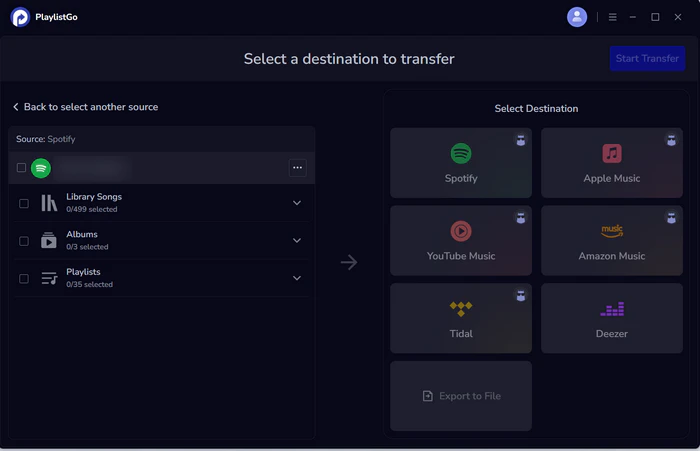
Select the source platform
Choose Spotify as the source and connect your Spotify account. Once connected, PlaylistGo loads your Spotify library, and you can move Liked songs, albums, playlists or the entire library. For Pandora to Spotify, pick Pandora here instead.
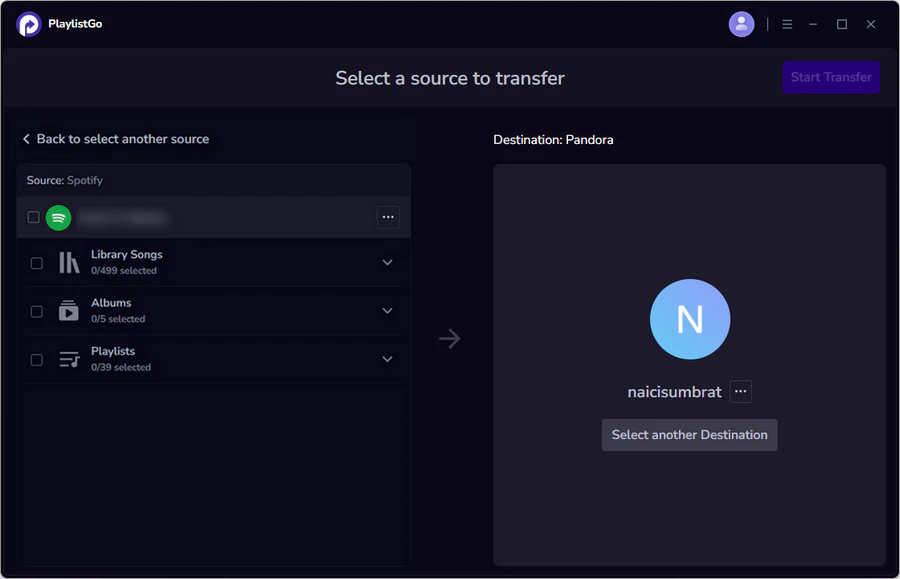
Choose the destination
Select Pandora as the destination and sign in to your Pandora account. Moving the other way, this is where you sign in to Spotify. Pandora only supports playlists on Premium, so you need a Premium account on that side to receive one.
Start the transfer
Click Start Transfer. PlaylistGo matches each track between the two catalogs and writes the result into your destination library.

FAQs about Spotify vs Pandora
Spotify vs Pandora: Final Verdict
Spotify and Pandora serve different listening habits, and the right answer depends on which habit is yours. Spotify is the pick for on-demand control, lossless audio, podcasts and audiobooks, device coverage, and anyone outside the US. Pandora is the pick for zero-decision radio, the cheapest ad-free tier, and the most precise discovery within a single style. Whichever way you lean, your playlists do not have to be rebuilt by hand: PlaylistGo moves playlists, liked songs and saved albums between Spotify and Pandora, while you test the new service for a month.

PlaylistGo – Best Desktop Transfer Tool
The fastest and most reliable way to move your Spotify library to Pandora, Apple Music, YouTube Music, TIDAL, etc. 100% offline • No Cloud Required • 99.2% success rate



 Language ▴
