



We tested TuneMyMusic across transfer speed, version-matching accuracy, and Auto-Sync reliability. It's fast and handles large libraries without crashing, but accuracy varies notably by destination platform, and Auto-Sync still requires manual triggering. Worth using for casual, one-time transfers; worth digging into the numbers first if precision matters to you.
TuneMyMusic is one of the most widely used playlist transfer tools, supporting 20+ streaming platforms entirely in your browser, with no installs or setup required.
But popularity doesn't answer the questions that matter most: Does TuneMyMusic transfer playlists accurately? Is it safe to use? And are there better alternatives worth considering in 2026? We put it through a hands-on test to find out.

YouTube Video: TuneMyMusic Review 2026
Part 1. What Is TuneMyMusic and What Does It Cost?
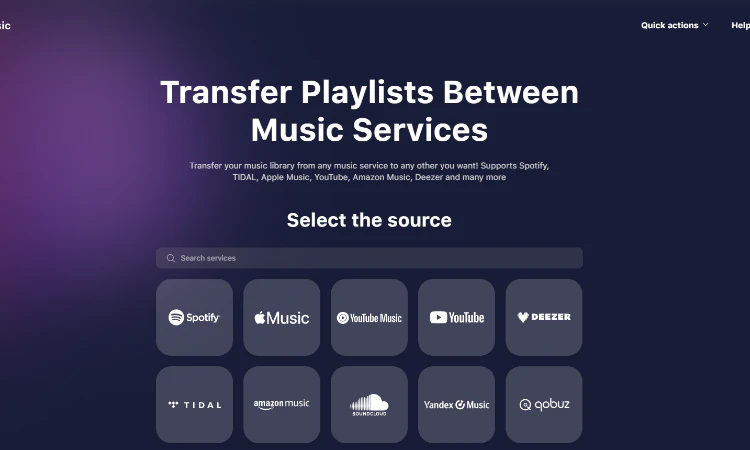
TuneMyMusic is a browser-based playlist transfer service that lets you move your music library between streaming platforms without rebuilding playlists from scratch. The service supports 20+ music platforms, including Spotify, Apple Music, YouTube Music, Amazon Music, TIDAL, Deezer, Pandora, SoundCloud, Qobuz, and Napster — covering the vast majority of music platforms.
TuneMyMusic Pricing: Free vs. Premium Plans
TuneMyMusic offers a free tier and a paid Premium plan, available on monthly or annual billing. Pricing is in USD and applies globally.
| Feature | TuneMyMusic Free | TuneMyMusic Premium |
|---|---|---|
| Price | $0 | $5.5/month $24/year |
| Track Limit | 500 tracks | Unlimited |
| Export to CSV/TXT/Excel | CSV & TXT only | ☑️ All formats |
| Auto-Sync | ❌ | ☑️ (up to 20 sync pairs) |
| AI Playlist Generation | Limited | ☑️ |
| Universal Share Links | ☑️ | ☑️ |
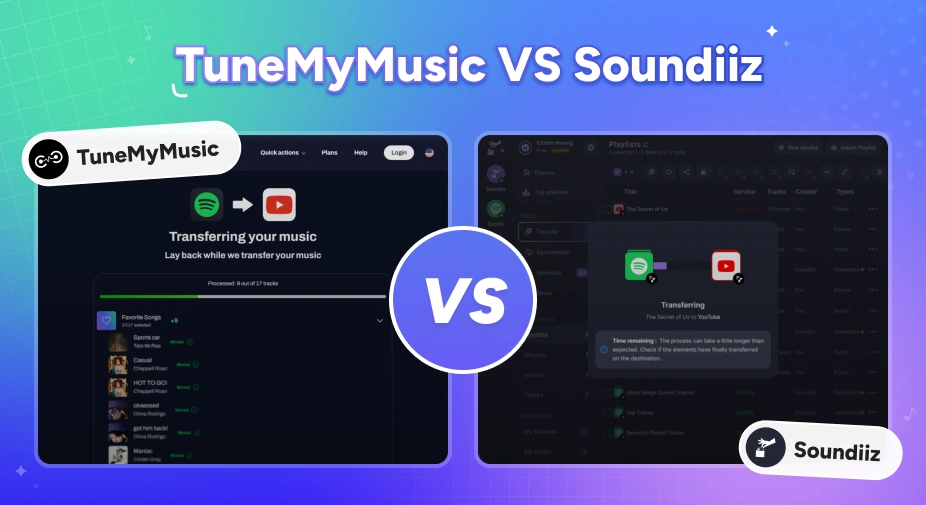
TuneMyMusic vs Soundiiz: Which Playlist Transfer Tool Is Better in 2026?
Moving music platforms? Compare TuneMyMusic vs Soundiiz—speed, accuracy, pricing, and which playlist transfer tool wins in 2026.
Part 2. TuneMyMusic Features: What Do You Actually Get?
TuneMyMusic goes beyond a basic transfer tool. Alongside core playlist migration, it offers several features that add value before, during, and after your move.
- Playlist Transfer: Moves your library across 20+ platforms by matching track title, artist, and album metadata.
- Auto-Sync: Keeps playlists updated across two platforms automatically — paid only, and requires ongoing account access.
- AI Playlist Generation: Generates playlists from a mood or genre description in plain language.
- Universal Share Links: Creates a single playlist URL that works across all supported platforms.
Pros
- Supports 20+ platforms, covering most platform combinations users need.
- Browser-based with no software download required.
- Free tier available for small libraries up to 500 tracks.
- Auto-Sync keeps your playlists updated across platforms without re-transferring from scratch.
Cons
- Reliability drops with larger libraries — some transfers get stuck or fail mid-way.
- Requires ongoing access to your streaming accounts, even after the transfer is done.
- Version mismatches go unreported — tracks may land on the wrong release without any warning.
- Auto-Sync isn't truly automatic. You still need to trigger it manually each time.
Part 3. TuneMyMusic Hands-On Test: Real Performance Results
To go beyond the marketing claims, we tested TuneMyMusic across several common transfer scenarios. Here's what we found across the dimensions users care most about.
Testing notes:
All transfers below used real playlists sourced from Tidal's trending charts. A track counts as a mismatch if it lands on a different version, remix, or release than the one in the source playlist — not just missing tracks.
Transfer Speed & Stability: How Fast Is TuneMyMusic?
1,000 tracks transferred in under two minutes with a failure rate below 1%.
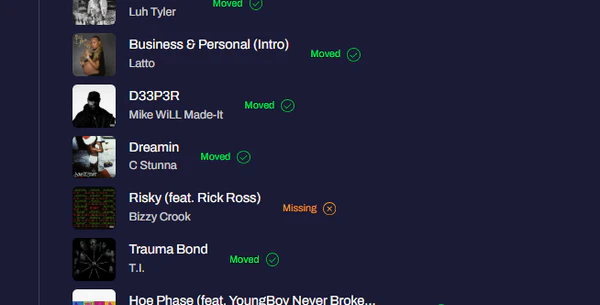
Speed is one of TuneMyMusic's strongest points. TuneMyMusic handles speed well across all tested library sizes. In our tests using a Tidal-to-Spotify transfer, a 100-track playlist completed in 20 seconds, 500 tracks finished in under a minute, and 1,000 tracks wrapped up in just over 90 seconds. None of the three runs crashed, stalled, or required a page refresh — the only failures were a handful of individual tracks that didn't transfer, detailed below.
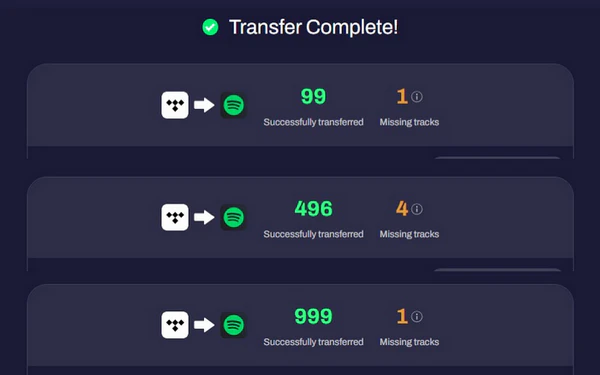
| Testing Tracks | Transfer Time | Tracks Transferred | Tracks Failed |
|---|---|---|---|
| 100 | 0:20 | 99 | 1 |
| 500 | 0:58 | 496 | 4 |
| 1,000 | 1:35 | 999 | 1 |
The failure rate stayed consistently low across all three sizes — between 0.1% and 1% — and TuneMyMusic flagged each failed track by name rather than silently dropping it, which makes manual follow-up straightforward. Based on this, you can add up to 1,000 songs without the tool slowing down or glitching.
Transfer Speed Is Fast — But What About Accuracy?
TuneMyMusic says the transfer is complete — but many tracks end up on the wrong version or release.
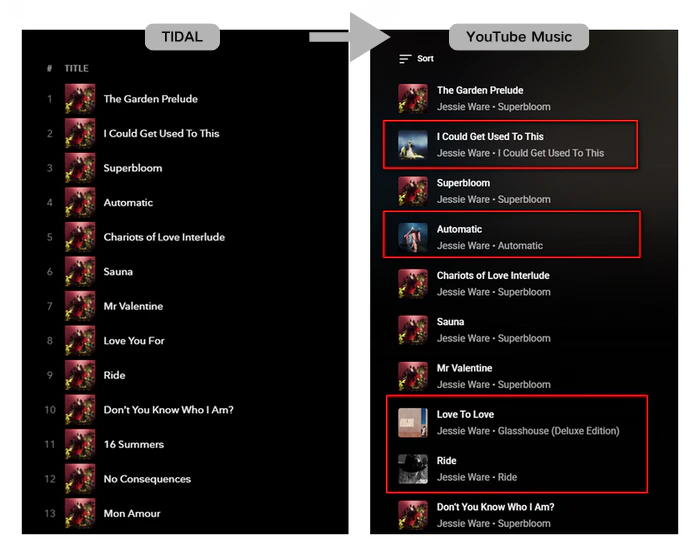
In our testing of a Tidal-to-YouTube Music transfer, while the correct songs landed in the destination playlist, several tracks were matched to the wrong release.
For example, when transferring the Superbloom album, "Ride" was pulled from a standalone release instead of the album version. The song-level match rate appeared high on the surface, but a closer look revealed a more common and easily overlooked problem: metadata mismatches.
This matters more than it might seem. If you care about streaming from a specific album version, a transferred playlist that looks complete can still be subtly wrong. The tracks play, but they're not quite the ones you saved. TuneMyMusic does generate an unmatched tracks report after each transfer, but it only flags missing songs — not version substitutions like these. This means these hidden mismatches won’t be noticed. You have to look through the playlist song by song yourself. If you've run into this, our guide to fixing matching errors walks through how to catch these substitutions manually.
Not Happy With The Accuracy? Try PlaylistGo! Try It Free
Move playlists between Spotify, Apple Music, YouTube Music and more with a 99.2% match rate.
Spotify vs YouTube Music vs Deezer: Which Platform Matches Better?
Spotify had the lowest mismatch rate at 15%. YouTube Music had the highest at 34%.
To test whether the choice of destination platform affects transfer quality, we ran the same 214-track playlist — sourced from Tidal's 2026 trending albums — across three destination platforms and tracked both unmatched rate and version accuracy.
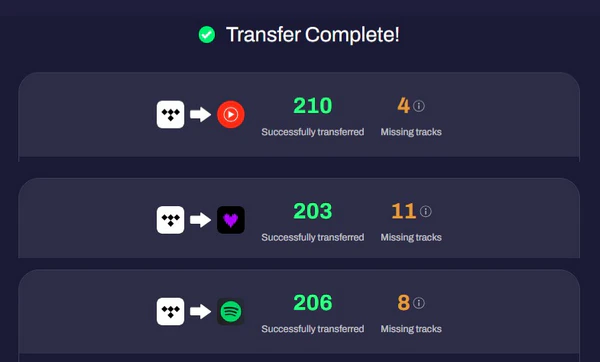
| Platform Pair | Transferred | Failed | Mismatches | Mismatch Rate |
|---|---|---|---|---|
| Tidal → Spotify | 206 | 8 | 32 | 15.5% |
| Tidal → Deezer | 203 | 11 | 59 | 29.1% |
| Tidal → YouTube Music | 210 | 4 | 72 | 34.3% |
The results show a clear gap between platforms. Spotify produced the fewest version mismatches at 15.5%, while YouTube Music had the highest at 34.3% — more than double. Deezer fell in between.
In most mismatch cases, TuneMyMusic substituted the album track with a single release; in others, it matched a deluxe edition track to the standard album version instead. This suggests that if album-accurate metadata matters to you, your choice of destination platform makes a difference.
Part 4. Auto-Sync: Is It Really Automatic?
Auto-Sync isn't truly automatic — you still need to trigger it manually every time.
TuneMyMusic offers an auto-sync feature, but it requires some manual setup to work as expected.
Auto-sync is off by default — you need to enable it in TuneMyMusic's settings. Even with auto-sync turned on, the tool does not detect source playlist changes automatically. When you add or remove tracks on the source platform, you still need to return to TuneMyMusic and click "Sync Now" manually. Once triggered, the sync typically takes one to two minutes to reflect on the destination.
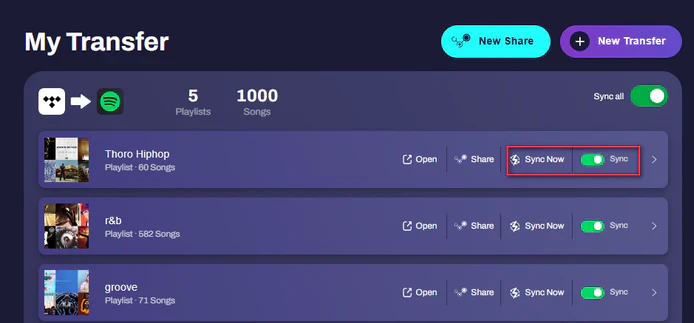
One thing to be aware of with repeat transfers: if you run a second transfer on a playlist that has already been migrated — without using the sync feature — TuneMyMusic will create an entirely new duplicate playlist on the destination platform rather than updating the existing one. If you want to keep a single playlist in sync over time, using the built-in sync function and remembering to trigger it manually is the cleaner approach.
Part 5. TuneMyMusic User Reviews: What Real Customers Are Saying
TuneMyMusic earns solid overall ratings on top review sites, but user feedback paints a more realistic picture. Here’s what real users are saying.
TuneMyMusic Trustpilot Reviews: What Users Are Saying
TuneMyMusic holds a strong rating on Trustpilot, currently around 4.5/5. Most positive reviews say the same thing: transfers are fast and the whole process takes minutes. One reviewer shared that transferring over 12,000 songs is effortless, when switching between Spotify, YouTube Music and Apple Music.
Critical reviews, however, surface two recurring concerns. The first is billing after cancellation: more than one reviewer reported being charged beyond their cancellation date, with little response from support. The second is matching accuracy — one reviewer noted that when a track wasn't available on the source platform, TuneMyMusic substituted random songs across their playlists without flagging it.
Reddit Reviews: Mixed Transfer Results & Privacy Concerns
The r/YoutubeMusic subreddit has discussed TuneMyMusic across multiple threads. The community consensus: it works well for popular tracks on major platforms but has trouble with regional versions and niche music. Multiple Redditors recommend manually reviewing the unmatched tracks list before considering a transfer complete.
Safety concerns have also surfaced across international Reddit communities. A thread on r/askhungary raised specific questions about data exposure when granting third-party apps access to streaming accounts. Many users never remember to turn off these permissions after moving their music, and this issue hits close to home for them.
Part 6. Best TuneMyMusic Alternative in 2026
TuneMyMusic works well for many users, but its limitations lead a growing number of users to explore alternatives. If TuneMyMusic's matching accuracy or permission handling doesn't meet your needs, PlaylistGo is the most directly comparable alternative and the one most worth evaluating first.
PlaylistGo: The Best TuneMyMusic Alternative for Accuracy and Privacy
PlaylistGo is a desktop playlist transfer tool with a more advanced matching engine than TuneMyMusic. Instead of relying on metadata alone, it cross-references multiple data points to deliver a 99.2% accuracy rate. This makes a real difference for transfers where TuneMyMusic often falls short: niche genres and regional releases. If you've run into many mismatches or wrong substitutions, accuracy is the main reason to switch.
PlaylistGo also takes a more careful approach to account security. It connects to your accounts using official OAuth with read-only access. Your passwords are never entered into or stored by PlaylistGo at any point. All transfer data is processed locally on your device and cleared once the transfer is complete. If you're cautious about third-party apps handling your account, this is a meaningful difference in practice.
PlaylistGo: The Best TuneMyMusic Alternative Try It Free
Higher accuracy, local processing, no ongoing account access — everything TuneMyMusic isn't.
| Item | Details |
|---|---|
| Compatible with | Windows, macOS |
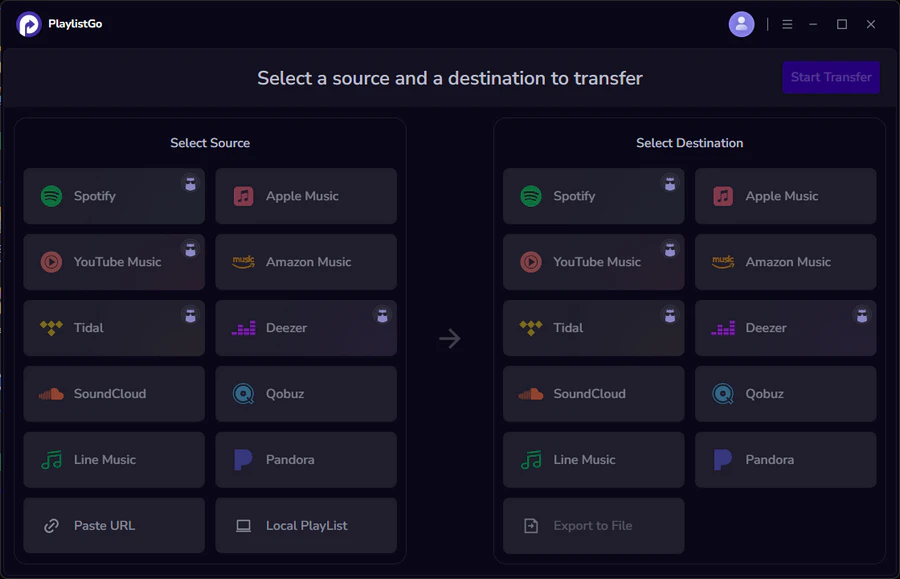
| Supported Platforms | Spotify, Apple Music, Amazon Music, YouTube Music, TIDAL, Deezer, and more |
| Transfer Objects | Liked songs, albums, playlists, full music library, local playlists, playlist URLs |
| Import & Export | Local files in M3U, M3U8, XSPF, XML, CSV, XLS, XLSX, JSON, TXT |
| Transfer Accuracy | Up to 99.2% matching accuracy |
| Transfer Speed | Fast and stable |
| Security | Safe and reliable. All transfers run locally |
| Feature | TuneMyMusic | PlaylistGo |
|---|---|---|
| Matching Accuracy | 65–85% (varies by platform) | Up to 99.2% |
| Matching Method | Metadata only | Multi-point cross-reference |
| Version Mismatch Report | ❌ | ✅ |
| Niche Genre Support | ⚠️ Limited | ✅ |
| Account Access | Persistent (required for Auto-Sync) | Read-only, cleared after transfer |
| Privacy | Cloud-based | Local only |
| Desktop App | ❌ | ✅ |
| Free Tier | ✅ (500 tracks) | ✅ |
| Pricing | $5.5/mo, $24/yr | $14.95/mo, $25.95/yr, $49.95 one-time |
Ready to give it a try? Here's how to get your playlists moved in three quick steps.
Tutorial: Transfer Spotify to Apple Music Using PlaylistGo [3 Simple Steps]
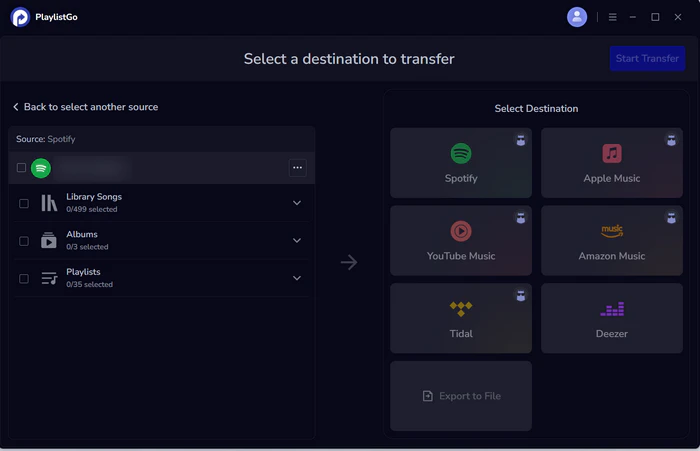
Select Spotify as the Source Platform
Launch PlaylistGo, choose Spotify as the source platform, and log in to your Spotify account. PlaylistGo will load your Spotify library.
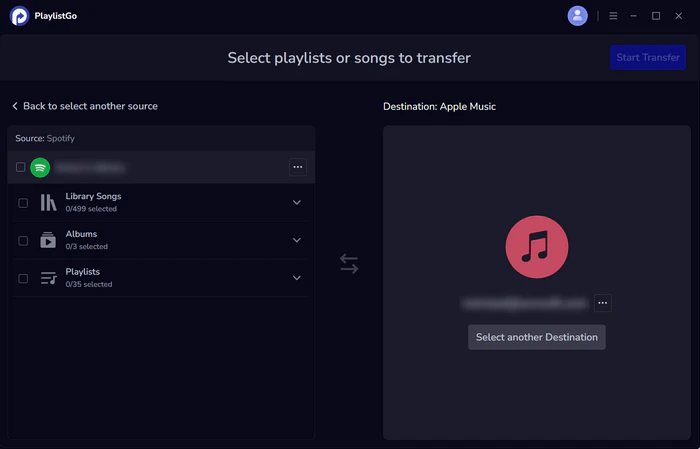
Select Apple Music as the Target Platform
Next, choose Apple Music as the destination platform and sign in with your Apple Music account.
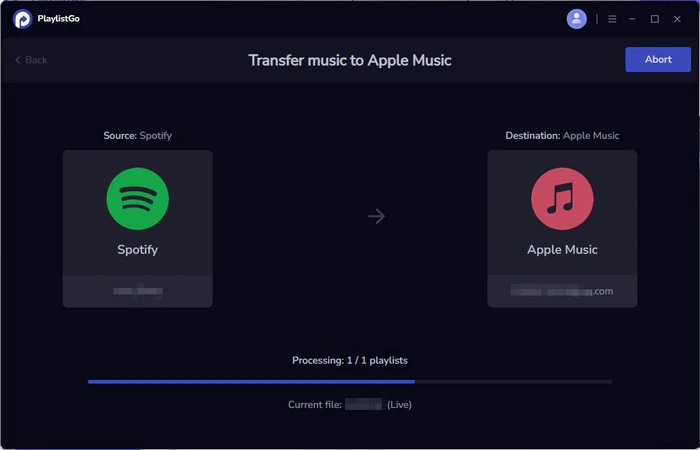
Start Transfer
Choose the entire music library, playlists or songs you want to transfer. Then click Start Transfer to begin. PlaylistGo will automatically match tracks and migrate them to Apple Music. once finished, you can open Apple Music to check the transferred playlists.
Best 8 Safe TuneMyMusic Alternatives in 2026
Looking for a safe and free TuneMyMusic alternative? List best 8 playlist transfer tools for Spotify, Apple Music, YouTube Music, and more in 2026.
FAQs about TuneMyMusic
Conclusion
TuneMyMusic earns its 4.5-star Trustpilot rating for good reason, even with the billing and accuracy complaints noted above. It's fast, easy to use, and genuinely gets the job done for the majority of straightforward playlist transfers. For casual listeners moving mainstream music between major platforms, it's a reliable choice.
However, if your music library is extensive and contains niche tracks, and you require more stable transfers along with higher matching accuracy, PlaylistGo is the most worthwhile alternative for you to evaluate.

PlaylistGo – Best Desktop Transfer Tool
The fastest and most reliable way to move entire Spotify library to Apple Music, YouTube Music, TIDAL, etc. 100% offline • No Cloud Required • 99.2% success rate



 Language ▴