



TuneMyMusic and FreeYourMusic are two of the most well-known playlist transfer tools — both have been around for years and both come up constantly when people search for ways to move music between Spotify, Apple Music, YouTube Music, and more. They cover similar ground, but work differently, cost differently, and suit different types of users.
This guide covers platforms, pricing, accuracy, and sync — so you can choose based on your situation. We also tested a desktop alternative, PlaylistGo, which handles some use cases better than either. More on that in Part 4.
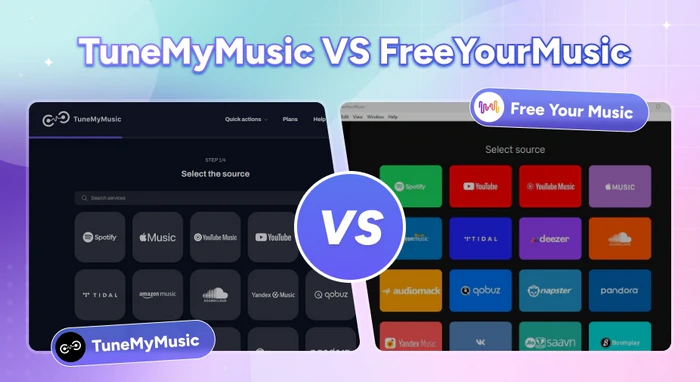
TuneMyMusic vs FreeYourMusic — Quick Comparison
| Feature | TuneMyMusic | FreeYourMusic |
|---|---|---|
| Platform | Web-based (browser only) | Desktop (Win/Mac/Linux) + Mobile (iOS/Android) |
| Free Tier | Up to 500 tracks | Up to 600 tracks |
| Paid Pricing | From $2/mo | From €3.33/mo |
| Auto-Sync Frequency | Daily auto-sync, up to 20 playlists | Every 15 minutes |
| Matching Accuracy | ~90% | ~90% |
| Rematch Feature | ❌ | ✅ |
| AI Playlist Generator | ✅ | ❌ |
Quick take: TuneMyMusic is simpler and cheaper to start with. FreeYourMusic has more features — particularly if you need frequent sync or want a mobile app.
Part 1. TuneMyMusic vs FreeYourMusic: What Each Tool Is Built For
TuneMyMusic is entirely browser-based so you can connect your source platform, pick a destination, and start the transfer directly in your browser. It supports 20+ streaming services including Spotify, Apple Music, YouTube Music, and TIDAL. The free tier covers up to 500 tracks; paid plans unlock unlimited transfers, daily auto-sync across up to 20 playlist pairs, cloud backup, universal sharing links, and an AI playlist generator. It's the simpler of the two — best suited for quick, one-time transfers.
FreeYourMusic (formerly Stamp) takes a different approach. It's a program available on Windows, Mac, Linux, iOS, and Android, so you can manage transfers from your phone as well as your computer. The free tier allows up to 600 tracks, and auto-sync runs every 15 minutes, compared to TuneMyMusic's once-daily schedule. It also includes a Rematch feature that lets you flag and re-attempt individual wrong matches without leaving the app.
In short, TuneMyMusic is lighter and cheaper to start with. FreeYourMusic has more surface area — cross-device support, more frequent sync, and better error correction — but that comes with more setup and a higher price. Both share the same core limitation: your data is processed on their servers, and large transfers may fail partway through.
TuneMyMusic vs Soundiiz: Which Playlist Transfer Tool Is Better in 2026?
Moving music platforms? Compare TuneMyMusic vs Soundiiz—speed, accuracy, pricing, and which playlist transfer tool wins in 2026.
Part 2. Key Differences Between TuneMyMusic and FreeYourMusic
Performance Comparison: TuneMyMusic vs FreeYourMusic
| 101 tracks, Spotify → YouTube Music | TuneMyMusic | FreeYourMusic |
|---|---|---|
| Transfer Speed | 58 seconds | 10 minutes |
| Missing Tracks | 0/101 | 1/101 |
| Metadata Accuracy (correct version matched) | 91/101 (transferred) | 90/100 (transferred) |
| Accuracy Rate | 90.1% | 90.0% |
| Error Correction | ❌ | ✅ Rematch button |
Transfer Speed & Missing Tracks
Winner: TuneMyMusic — faster and no missing tracks in our testing.
Testing with the same 101-track Spotify playlist transferred to YouTube Music, TuneMyMusic completed the transfer in 58 seconds with zero missing tracks. FreeYourMusic took 10 minutes for the same playlist, with 1 track failing to transfer.
For a one-time migration of a large library, TuneMyMusic is noticeably faster — and in this test, more complete.
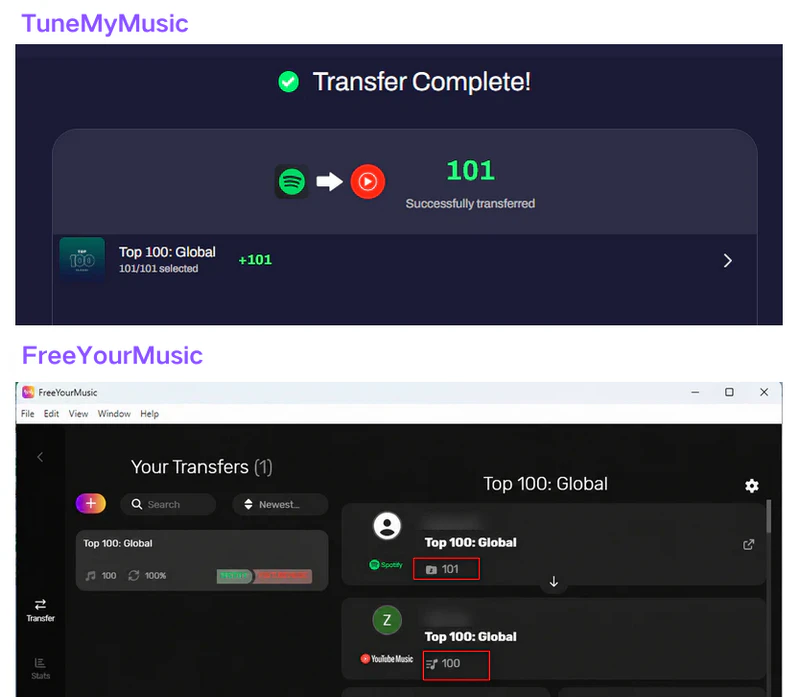
Match Accuracy & Error Correction
Winner: FreeYourMusic — same accuracy, but the Rematch feature makes it easier to fix mismatches after the transfer.
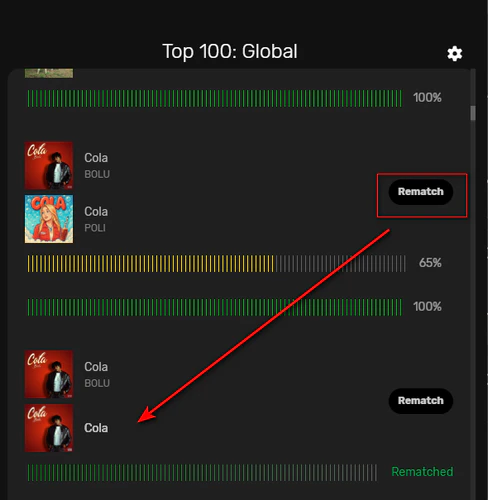
In our testing, both tools had the same number of metadata mismatches — 10 tracks were either matched to a different version, a remastered edition, an alternate album release, or a completely different song altogether. The difference is what you can do about it.
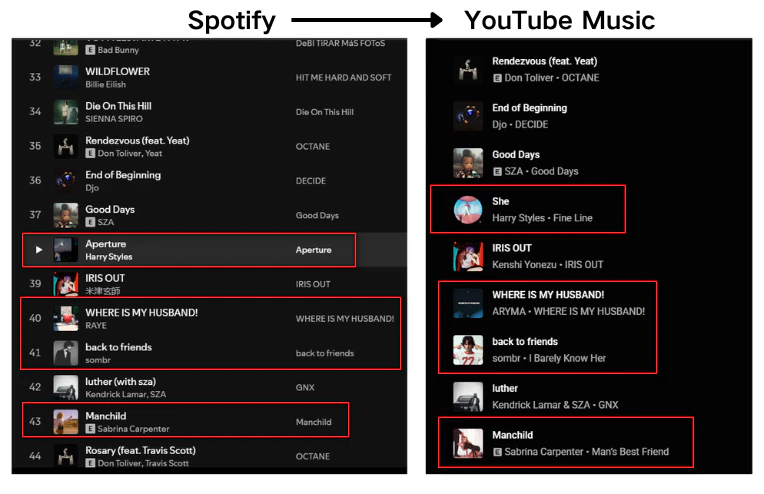
TuneMyMusic gives you no way to correct a wrong match from within the tool — you'd have to find and replace the track manually on the destination platform. FreeYourMusic's Rematch button lets you flag and re-attempt specific tracks without leaving the app.
Still Getting Wrong Matches? PlaylistGo Fixes That Try It Free
Up to 99.2% match accuracy, local processing only — no wrong versions, no server uploads.
Sync Frequency
Winner: FreeYourMusic — syncs more frequently, but in practice you'll likely trigger it manually either way.
Both tools advertise automatic sync — TuneMyMusic runs once a day, and FreeYourMusic claims every 15 minutes. In practice, the actual sync time depends on your network and how busy their servers are.
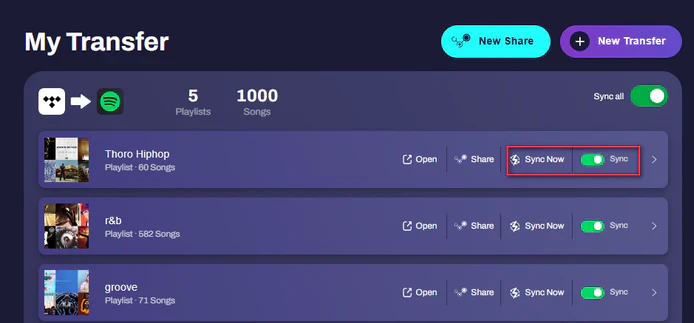
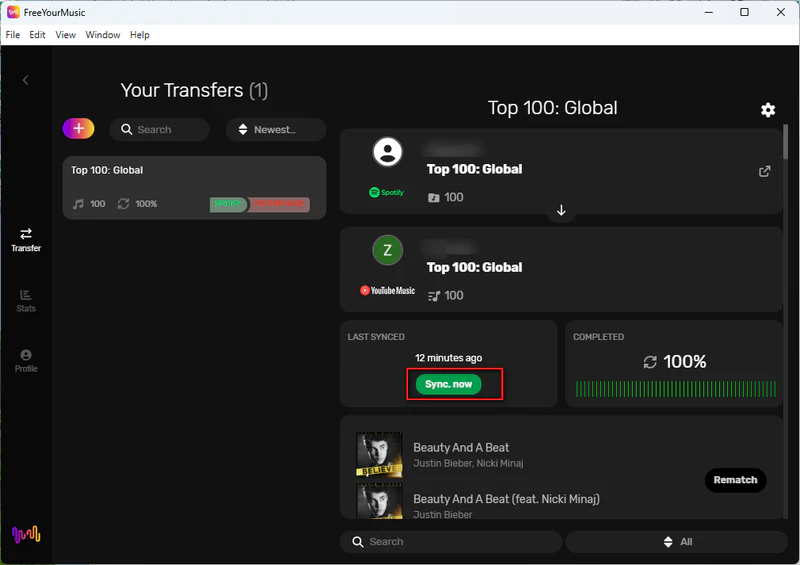
FreeYourMusic's sync can range from 15 minutes to a few hours depending on your network. If you need changes to show up quickly on the destination platform, the most reliable way with either tool is to trigger a manual sync yourself rather than waiting for the automatic one to kick in.
Pricing
Winner: Depends — TuneMyMusic for lowest ongoing cost; FreeYourMusic if you want a one-time payment.
TuneMyMusic offers two plans: $5.50/mo billed monthly, or $2/mo billed annually. No lifetime option. FreeYourMusic offers more flexibility across three plans.
| TuneMyMusic | FreeYourMusic | |
|---|---|---|
| Free Tier | 500 tracks | 600 tracks |
| Monthly | $5.50/mo | — |
| Quarterly | — | €5/mo (€14.99/quarter) |
| Annual | $2/mo ($24/yr) | €3.33/mo (€39.99/yr) |
| Lifetime | ❌ | €199.99 |
For ongoing use, TuneMyMusic is the cheaper option. If you'd rather pay once and be done with it, FreeYourMusic's Lifetime plan is the only option between the two — and at €199.99, it pays for itself after roughly eight years of annual billing.
Part 3. Best Alternative to TuneMyMusic and FreeYourMusic
TuneMyMusic and FreeYourMusic cover the basics well — but they share a few limitations worth knowing before you commit.
- Large library reliability. Both tools are cloud-based, and large transfers can freeze or stop halfway through, making you start over in smaller batches.
- Data privacy. Your playlist data passes through their servers during the transfer. If you want everything to stay on your own computer, neither tool can do that.
- Both tools offer basic export, but format options are limited — nothing like M3U or JSON that works across different media players.
If any of these are a problem for you, PlaylistGo is worth a closer look.
PlaylistGo — A Desktop Alternative Worth Considering
PlaylistGo is a desktop app for Windows and Mac that solves the problems that cloud-based tools like TuneMyMusic and FreeYourMusic can't. It does one thing and does it well: move your entire music library without losing anything.
It connects to all the major platforms — Spotify, Apple Music, YouTube Music, Amazon Music, TIDAL, and Deezer — and carries over not just the tracks, but the playlist order and full metadata too, with up to 99.2% match accuracy. Beyond transfers, it also works as a backup tool, letting you export your playlists in 10+ file formats including M3U, CSV, JSON, and XLSX, so you always have a copy that lives on your own device.
The biggest difference from the tools above: PlaylistGo runs entirely on your computer. Nothing is sent to a remote server — your account credentials and library data stay local the whole time.
PlaylistGo: Higher Accuracy Than Both Tools Try It Free
Local processing, 99.2% match rate, and a $49.95 lifetime option vs FreeYourMusic's €199.99.
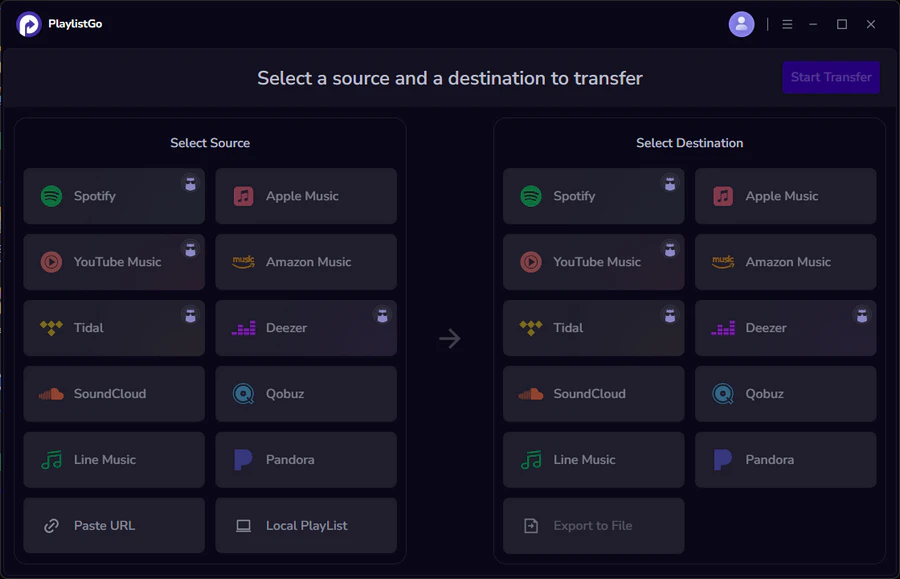
| Item | Details |
|---|---|
| Compatible with | Windows, macOS |
| Supported Platforms | Spotify, Apple Music, Amazon Music, YouTube Music, TIDAL, Deezer, and more |
| Transfer Objects | Liked songs, albums, playlists, full music library, local playlists, playlist URLs |
| Import & Export | Local files in M3U, M3U8, XSPF, XML, CSV, XLS, XLSX, JSON, TXT |
| Transfer Accuracy | Up to 99.2% matching accuracy |
| Transfer Speed | Fast and stable |
| Security | Safe and reliable. All transfers run locally |
TuneMyMusic vs FreeYourMusic vs PlaylistGo — Full Comparison
| Feature | PlaylistGo | TuneMyMusic | FreeYourMusic |
|---|---|---|---|
| Platform | Desktop (Win/Mac) | Web only | Desktop + Mobile |
| Matching Accuracy | ~99.2% | ~90% | ~90% |
| Large Library Support | ✅ | Limited | Limited |
| Local File Export | M3U, M3U8, PLS, XSPF, XML, CSV, XLS, XLSX, JSON, TXT | CSV only | CSV only |
| Local Processing | ✅ | ❌ | ❌ |
| Lifetime Plan | ✅ ($49.95) | ❌ | ✅ (€199.99) |
Part 4. Which One Should You Choose?
Here's a straightforward breakdown based on your situation:
Choose TuneMyMusic if:
- You want the simplest possible experience — no install, no setup
- You're doing a one-time or occasional transfer
- You want the lowest ongoing subscription cost
- An AI playlist generator is useful to you
Choose FreeYourMusic if:
- You need playlists to sync frequently (every 15 minutes matters to you)
- You want to manage transfers from your phone, not just your computer
- You sometimes get wrong song matches and want to fix them with a Rematch button
- You prefer paying once (€199.99) over a recurring subscription
Choose PlaylistGo if:
- You're migrating a large library and need the transfer to complete reliably in one go
- You want your data processed locally, not on a remote server
- You want the highest available match accuracy (up to 99.2%)
- You want to export your playlists as local files you actually own
FAQs about TuneMyMusic vs FreeYourMusic
Final Verdict
TuneMyMusic is the better pick for quick, one-time transfers — it's cheap, requires no installation, and gets the job done without any setup. FreeYourMusic suits users who need frequent sync throughout the day, want a mobile app, or prefer paying once with the Lifetime plan.
If you're doing a full library migration and want the transfer to go smoothly the first time, PlaylistGo is worth trying. It runs locally, handles large libraries without issues, and lets you keep a backup of your playlists as local files — something neither tool above can fully offer.

PlaylistGo – Best Desktop Transfer Tool
The fastest and most reliable way to move entire Spotify library to Apple Music, YouTube Music, TIDAL, etc. 100% offline • No Cloud Required • 99.2% success rate



 Language ▴