


Thinking about switching from Spotify to TIDAL for better audio quality? TIDAL offers hi-res FLAC up to 24-bit/192kHz, Dolby Atmos, and a catalog built around audiophile listening, going further than Spotify's lossless tier on resolution and spatial audio support. But years of curated playlists and Liked Songs don't move themselves.
Rebuilding a large Spotify library manually on TIDAL can take hours. This guide covers two working methods to move your Spotify playlists to TIDAL accurately, with full metadata and album structure preserved.
YouTube Video: Transfer Spotify Playlists to TIDAL in 2026
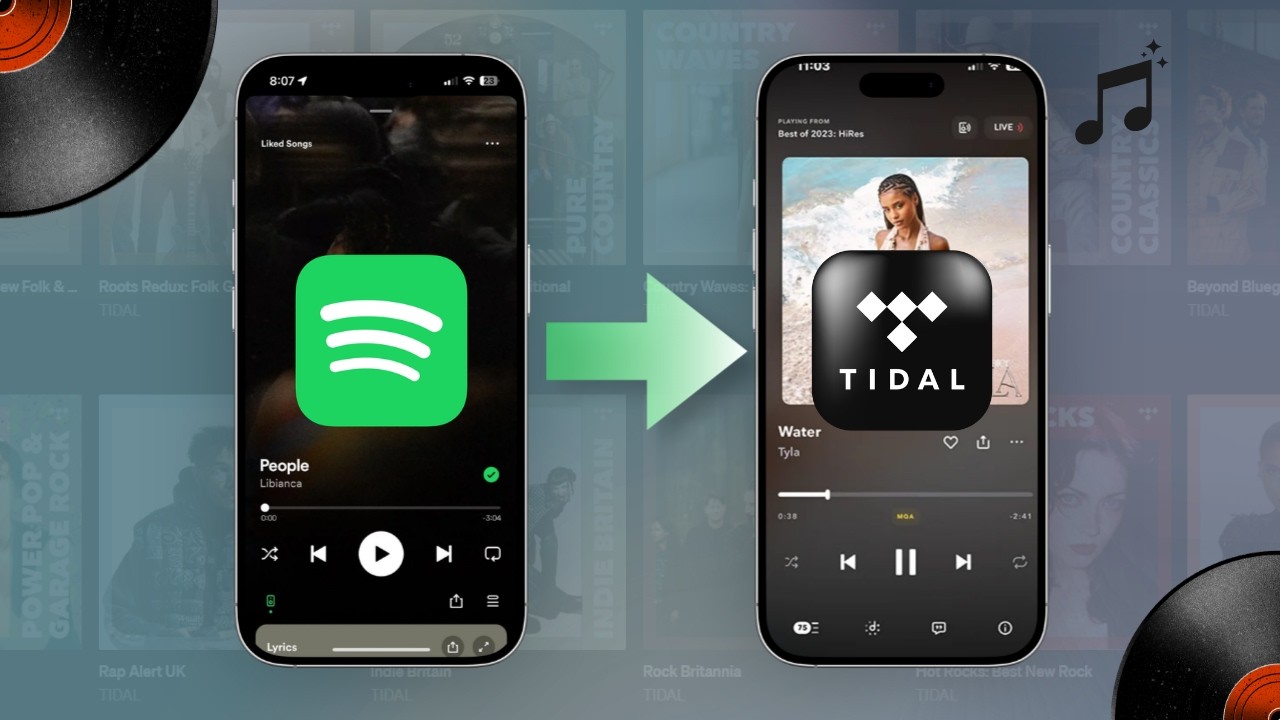
Why People Are Switching from Spotify to TIDAL in 2026
Spotify rolled out lossless FLAC audio for Premium users back in September 2025, catching up with TIDAL after years. But for audiophiles and listeners with high-end setups, lossless alone isn't the whole picture. TIDAL remains ahead when it comes to maximum audio resolution, spatial sound and Hi-Fi device compatibility.
A few reasons people still make the switch in 2026:
- Higher audio quality: Spotify’s lossless tops out at 24-bit/44.1kHz FLAC. TIDAL goes further — up to 24-bit/192kHz hi-res FLAC on its HiFi tier. That makes a real difference if you use a DAC or high-quality headphones.
- Dolby Atmos & spatial audio: TIDAL has an expanding Dolby Atmos music library, while Spotify doesn’t offer spatial audio yet.
- Hi-Fi device compatibility: TIDAL integrates natively with Roon, high-end DACs, Bluesound, and network streamers. Spotify Connect works with more consumer devices.
- Rich high-res music library: TIDAL has focused on high-res streaming for years and has far more hi-res FLAC tracks than Spotify.
- Artist-friendly platform: TIDAL pays artists more per stream, attracting users who want to support musicians.
| Feature | Spotify | TIDAL |
|---|---|---|
| Lossless FLAC | ✅ 24-bit/44.1kHz (Premium) | ✅ Up to 24-bit/192kHz |
| Hi-Res Audio | ❌ | ✅ |
| Dolby Atmos | ❌ | ✅ |
| Roon / DAC Integration | Limited | ✅ Native support |
| Podcast | ✅ Strong | Limited |
| Algorithm-Based Discovery | ✅ Strong | Moderate |
Can You Transfer Spotify Playlists to TIDAL Directly in 2026?
TIDAL doesn't offer a native Spotify import feature, and Spotify doesn't provide a built-in export tool for other platforms. To move your Spotify library, you'll need a third-party transfer tool.
Whether you're moving a small playlist or a 10,000-song library, including liked songs, Hi-Res collections, or Dolby Atmos albums, the process is the same. The difference is which tool you use and how accurately it handles version matching.
For most users, a desktop playlist transfer tool is the only practical option. Manual rebuilding takes hours for even a mid-sized library. The sections below cover what each method actually looks like.
Before Transferring Spotify Playlists to TIDAL
A few things worth checking before you begin:
- Duplicates songs: remove duplicates first to keep your TIDAL playlists tidy, as they’ll carry over directly.
- Private playlists: switch them to public, or they may fail to transfer.
- Explicit track settings: if you blocked explicit tracks on TIDAL, some songs won’t show up after import.
- Account regions: use the same region for both accounts. Different regions lower match rates due to licensing rules.
How to Transfer Spotify Playlists to Apple Music (2026 Guide)
Switching from Spotify to Apple Music? Learn how to move your playlists, liked songs, and albums without losing a single track.

Method 1. Best Spotify to TIDAL Playlist Transfer Tool
Best for: Users who want a clean, accurate Spotify-to-TIDAL transfer without the post-transfer cleanup.
PlaylistGo is a desktop tool built for full library migration. It matches tracks using ISRC codes alongside title, artist, and album metadata — achieving a 99.2% match rate between Spotify and TIDAL. When an exact match isn't found, the closest available version is flagged for your review rather than silently dropped or skipped.
For large libraries, PlaylistGo processes tracks in batches with automatic retry on first-pass misses. Compared to browser-based tools like Soundiiz and TuneMyMusic that can time out or lose progress mid-transfer, the desktop app maintains a stable connection throughout and picks up where it left off if interrupted, especially useful when moving collections of 2,000+ tracks.
Because PlaylistGo runs locally on your machine, your Spotify and TIDAL credentials are never uploaded to a third-party server. Compared to web tools that use their own servers, all matching and transfer logic happens on your device.
PlaylistGo supports transfers between Spotify, TIDAL, Apple Music, YouTube Music, SoundCloud, Deezer, and Amazon Music, including Spotify to Apple Music, Spotify to SoundCloud, and more.
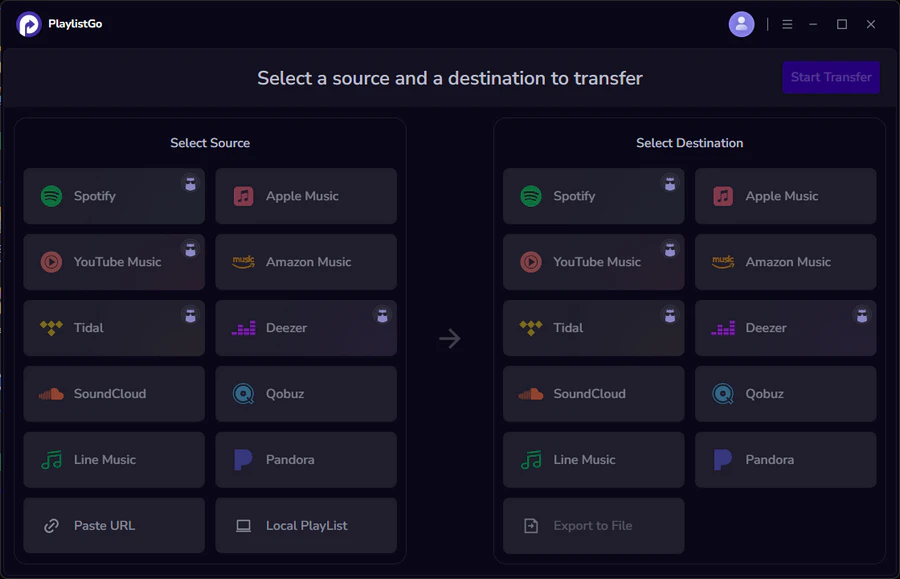
PlaylistGo: Transfer Playlists Across Platforms Try It Free
Move playlists between Spotify, Apple Music, YouTube Music and more in just a few clicks.
| Item | Details |
|---|---|
| Compatible with | Windows, macOS |
| Supported Platforms | Spotify, Apple Music, Amazon Music, YouTube Music, TIDAL, Deezer, and more |
| Transfer Objects | Liked songs, albums, playlists, full music library, local playlists, playlist URLs |
| Import & Export | Local files in M3U, M3U8, XSPF, XML, CSV, XLS, XLSX, JSON, TXT |
| Transfer Accuracy | Up to 99.2% matching accuracy |
| Transfer Speed | Fast and stable |
| Security | Safe and reliable. All transfers run locally |
Tutorial: How to Transfer Spotify Playlists to TIDAL with PlaylistGo
Most Spotify to TIDAL transfers finish within 3–10 minutes depending on library size. Large transfers of 2,000+ tracks may slow temporarily during peak API traffic from either platform.
Connect Your Spotify Account
Install and launch PlaylistGo on your computer. Select Spotify as your source platform and log in. PlaylistGo will load your full library — playlists, Liked Songs, and saved albums. Only read permissions are requested — PlaylistGo cannot modify your Spotify library.
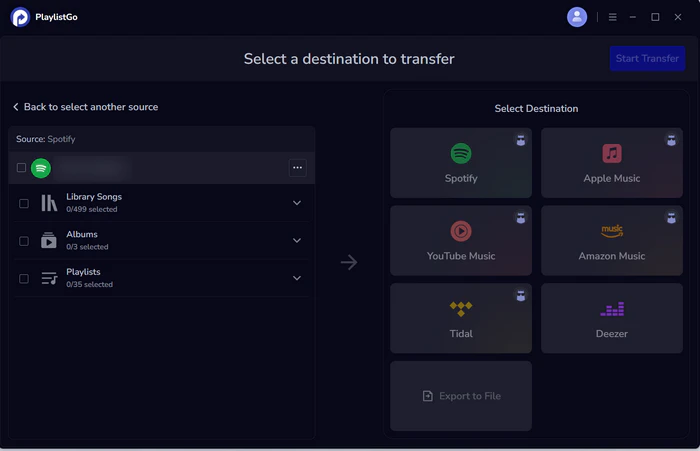
Connect Your TIDAL Account
Select TIDAL as the destination and log in through TIDAL's official OAuth flow. Your password is never stored in the app. Write access is required so PlaylistGo can create playlists and save tracks to your TIDAL library.
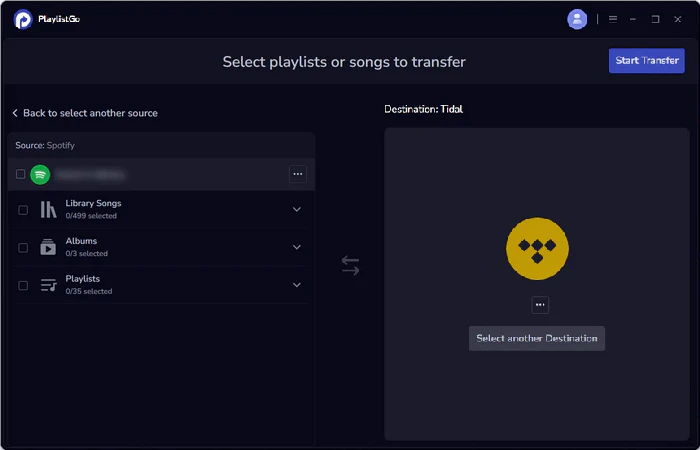
Select Playlists and Start Transfer
Choose which playlists, Liked Songs, or saved albums to move. You can transfer everything at once or select individual playlists. Click Start Transfer. PlaylistGo matches tracks in batches using ISRC codes and metadata, showing progress in real time. Anything that doesn't match is flagged in a transfer report for review — not silently dropped.
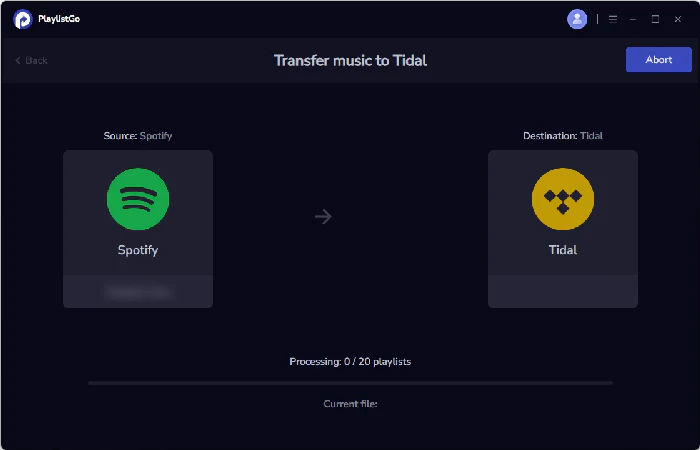
Method 2. Transfer Spotify Playlist to TIDAL Using CSV
Best for: Users who want to keep a local backup of their Spotify library before switching, or who are working from a previously exported file.
Exporting your Spotify library as a CSV file is a useful first step before any major platform switch. It gives you a complete, organized record of everything in your library — track names, artists, albums, durations, and ISRC codes — so you know exactly what you're working with before switching to a new platform.
TIDAL doesn't support direct CSV playlist imports on its own, so this method alone won't move your music automatically. Where it helps is as a permanent backup, a manual reference list, or a way to identify tracks that might have version differences on TIDAL before you run a full transfer.
PlaylistGo can generate this export directly from your Spotify account. It also reads M3U, CSV, JSON, XML, and XLSX as import formats, so the file doesn't need to come from any specific source.
How to import a playlist into TIDAL from a CSV file using PlaylistGo:
- Download and install PlaylistGo
- Open the app and select Import from File
- Choose your CSV (or M3U / JSON / XML / XLSX) file
- Select TIDAL as the destination platform
- Review the matched tracks in the pre-transfer preview screen
- Click Transfer to import the playlist into your TIDAL account
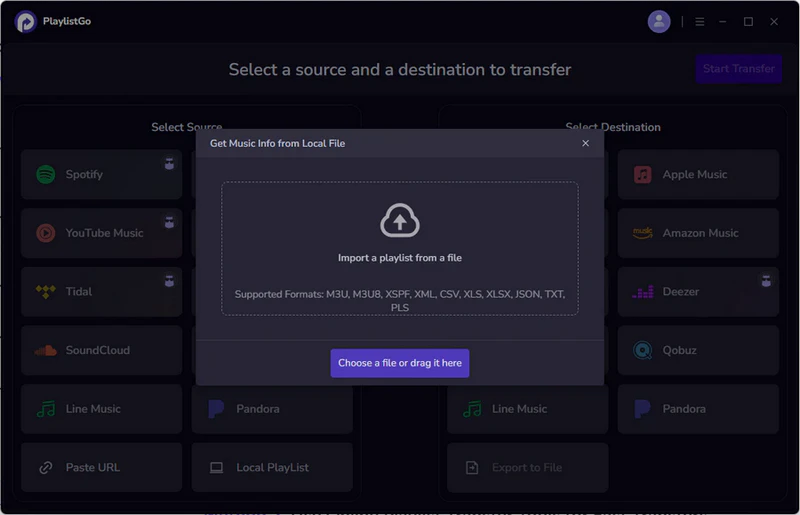
Limitations
- Match accuracy depends on how complete your CSV metadata is. Missing artist or track info will reduce results.
- Tracks not available on TIDAL will appear in the unmatched report but cannot be added automatically.
- TIDAL contains multiple editions of many releases. If ISRC codes are missing, the version it matches might not be exactly the same as your original file.
Import Any Playlist File into TIDAL with PlaylistGo Try It Free
PlaylistGo reads your CSV, M3U, or JSON file and matches tracks to TIDAL automatically.
How to Import CSV Playlists to Apple Music?
Learn how to easily import CSV playlists to Apple Music with this step-by-step guide.
How Accurate Are Spotify to TIDAL Transfers Really?
Match accuracy in a Spotify to TIDAL transfer depends heavily on which tool you use and what's in your library. Tools that match by title and artist name alone regularly land on wrong versions. ISRC-based matching solves most of these cases by targeting the exact recording rather than just the name.
In internal tests across 5,000-track Spotify libraries, PlaylistGo consistently matched over 99.2% of tracks on TIDAL. The small percentage of unmatched tracks typically fell into three categories:
- Tracks not licensed on TIDAL in the user's region
- Spotify-exclusive or distributor-limited releases not present on TIDAL's catalog
- Local files saved in Spotify that have no streaming equivalent
Example: Moving a 4,200-song Spotify Library to TIDAL
- 4,217 tracks scanned
- 4,181 matched automatically (99.1%)
- 23 unavailable on TIDAL due to regional licensing
- 13 flagged for manual review (version differences)
Transfer completed in approximately 7 minutes on a standard broadband connection.
What Usually Transfers Without Issues in a Spotify to TIDAL Transfer
- Mainstream releases from major and mid-size labels
- Albums available on both platforms in the same region
- Tracks with ISRC codes intact in Spotify's metadata
What May Need Manual Review After a Version Mismatch
- Heavily remastered catalogs with many editions (e.g. classic rock, jazz)
- Explicit vs. clean version mismatches
- Tracks where TIDAL carries a different release year or bundle edition
What Cannot Transfer from Spotify to TIDAL
- Spotify podcasts — not available on TIDAL
- Local files added to Spotify from your device
- Listening history and algorithmic playlists (Discover Weekly, Daily Mixes)
- Tracks not licensed on TIDAL in your region
No transfer tool can guarantee 100% catalog matching because Spotify and TIDAL license music independently. What matters is how unmatched tracks are handled. PlaylistGo flags them in a transfer report rather than silently skipping them, so you always know exactly what didn't carry over and can handle those tracks manually.
Spotify to TIDAL Transfer Methods Compared
| Method | Speed | Metadata Preservation | Handles Large Libraries |
|---|---|---|---|
| Manual Rebuild | Very slow | Variable | Not practical |
| CSV Import | Medium | Variable | Limited |
| PlaylistGo | Fast | High | ✅ |
The main limitation of manual rebuilding isn't accuracy — it's time. Searching and re-adding 500 tracks one by one takes several hours. CSV import tools can speed this up but often require format adjustments and still involve significant manual steps for larger libraries.
FAQs about Transferring Spotify Playlists to TIDAL
Final Words
Switching from Spotify to TIDAL is one of the cleanest playlist transfers you can make. Both platforms share the same licensed catalogs, which means match accuracy is high and missing tracks are rare. The main thing to watch for is version mismatches on heavily remastered catalogs, which PlaylistGo's ISRC-based matching handles more reliably than title-only tools.
The CSV export method works well as a pre-transfer backup, giving you a local record of your library before you make the switch. For the actual transfer, PlaylistGo handles the full process automatically — playlists, Liked Songs, and saved albums in a single session.

PlaylistGo – Best Desktop Transfer Tool
The fastest and most reliable way to move entire Spotify library to Apple Music, YouTube Music, TIDAL, etc. 100% offline • No Cloud Required • 99.2% success rate


 Language ▴