


Switching from Spotify to Deezer? Your playlists, liked songs, and saved albums don't have to stay behind. Deezer supports full library imports from Spotify, and with the right tool, the entire process takes a few minutes. No manual searching, no rebuilding from scratch.
This guide covers what transfers, whether Deezer is worth switching to, and how to move your Spotify library to Deezer accurately with playlist order and metadata preserved.
YouTube Video: Transfer Spotify Playlists to Deezer in 2026
Is Deezer Worth Switching To?
If you're still on the fence about switching, here's an honest look at who Deezer actually suits. Deezer feels more like a personal music library, while Spotify has increasingly shifted focus toward podcasts, audiobooks, and social discovery features. It's a genuinely different platform, not just a cheaper alternative.
Deezer is likely a good fit if:
- You want a cleaner app focused purely on music. Deezer has fewer podcasts and social tools than Spotify, with a layout all about songs.
- You're interested in Deezer Flow. Flow is Deezer's personalized continuous radio. It plays nonstop music based on all your listens and saved songs.
- You want HiFi audio on a budget. Deezer HiFi offers lossless FLAC audio at a competitive price, ideal if you don't need ultra-high quality or Dolby Atmos.
Worth knowing before you switch:
- Catalog differences: Deezer's overall catalog is slightly smaller than Spotify's in certain regions, especially for underground and regional tracks.
- Flow takes time to adapt: Deezer Flow takes weeks to adapt to your taste, unlike Spotify's instant suggestions. Imported music helps, but it won't work right away.
- Basic social features: If you actively use Spotify's collaborative playlists or share listening activity with friends, Deezer's social layer is more minimal.
- Lower cost: In many regions, Deezer's subscription is cheaper than Spotify's.
| Feature | Spotify | Deezer |
|---|---|---|
| Lossless Audio | ✅ 24-bit/44.1kHz (Premium) | ✅ FLAC (HiFi tier) |
| Hi-Res / Dolby Atmos | ❌ | ❌ |
| Personalized Radio | ✅ Discover Weekly, Daylist | ✅ Deezer Flow |
| Podcast Support | ✅ Strong | Limited |
| Social / Collaborative Playlists | ✅ Strong | Minimal |
| Price (US) | $12.99/mo | $11.99/mo |
What Transfers from Spotify to Deezer
Before you start, it's useful to know exactly what carries over, and how Deezer organizes it on the other side.
| Content | Transfers? | Where It Goes on Deezer |
|---|---|---|
| Playlists | ✅ Yes | Music → Playlists |
| Liked Songs | ✅ Yes | Favorites → Songs |
| Saved Albums | ✅ Yes | Favorites → Albums |
| Followed Artists | ✅ Yes | Favorites → Artists |
| Playlist Order | ✅ Preserved | — |
| Playlist Names | ✅ Preserved | — |
| Listening History | ❌ No | — |
| Podcasts | ❌ No | Not available on Deezer |
| Collaborative Playlist Settings | ⚠️ Partial | Content transfers, collaboration settings don't |
One thing worth noting: Deezer organizes your library differently from Spotify. Liked Songs become Favorites, and it's built more like a personal music collection instead of a regular streaming service. If you've been building playlists and saving albums for years, Deezer's approach suits that habit well.
Before Transferring Spotify Playlists to Deezer
A few things worth checking before you begin:
- Duplicate songs: remove duplicates from your Spotify playlists first, or they'll mess up your Deezer library.
- Private playlists: switch them to public before transferring, or they may fail to load correctly.
- Explicit track settings: if you have explicit content blocked on your Deezer, some tracks won't appear after import.
- Account regions: use the same region for both accounts where possible. Regional mismatches lower match rates due to licensing differences.
How to Transfer Spotify Playlists to Deezer
Deezer doesn't offer a native Spotify import feature, and Spotify doesn't provide a built-in export tool for other platforms. To move your Spotify library, you'll need a third-party transfer tool.
Browser-based tools can handle small single-playlist transfers, but for moving full libraries — multiple playlists, liked songs, and saved albums all at once — a desktop tool gives you better stability, no session timeouts, and no risk of losing progress mid-transfer.
PlaylistGo is a native desktop application for Windows and macOS that handles the entire transfer process on your computer — no cloud servers involved. Every Spotify track is identified using ISRC codes combined with title, artist, and album data, giving it a 99.2% match rate across the Spotify and Deezer catalogs. Unmatched songs will show up for you to check before transfer.
Moving a full Spotify library is where the desktop approach makes the biggest difference. Online tools like Soundiiz and TuneMyMusic run transfers on remote servers, which means a dropped connection can leave your transfer incomplete. PlaylistGo works entirely on your device. It stays stable no matter how many songs you transfer, whether you're moving 300 songs or 30,000.
PlaylistGo supports transfers between Spotify, Deezer, Apple Music, YouTube Music, TIDAL, SoundCloud, and Amazon Music, including Spotify to YouTube Music, Spotify to TIDAL, and more.
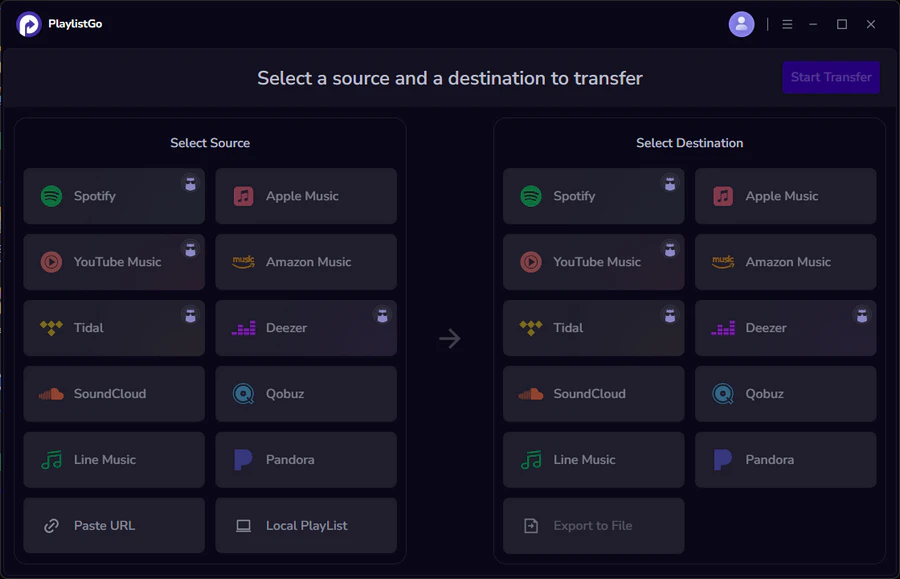
PlaylistGo: Transfer Playlists Across Platforms Try It Free
Move playlists between Spotify, Apple Music, YouTube Music and more in just a few clicks.
| Item | Details |
|---|---|
| Compatible with | Windows, macOS |
| Supported Platforms | Spotify, Apple Music, Amazon Music, YouTube Music, TIDAL, Deezer, and more |
| Transfer Objects | Liked songs, albums, playlists, full music library, local playlists, playlist URLs |
| Import & Export | Local files in M3U, M3U8, XSPF, XML, CSV, XLS, XLSX, JSON, TXT |
| Transfer Accuracy | Up to 99.2% matching accuracy |
| Transfer Speed | Fast and stable |
| Security | Safe and reliable. All transfers run locally |
Tutorial: How to Transfer Spotify Playlists to Deezer with PlaylistGo
Most Spotify to Deezer transfers finish within 3–10 minutes depending on library size. Large transfers of 2,000+ tracks may slow temporarily during peak API traffic from either platform.
Connect Your Spotify Account
Install and launch PlaylistGo on your computer. Select Spotify as your source platform and log in. PlaylistGo will load your full library — playlists, Liked Songs, and saved albums. Only read permissions are requested, PlaylistGo cannot modify your Spotify library.
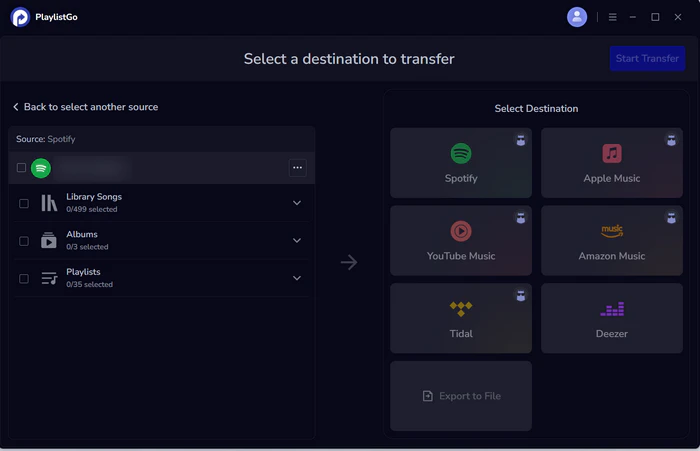
Connect Your Deezer Account
Select Deezer as the destination and log in through Deezer's official OAuth flow. Your password is never stored in the app. Write access is required so PlaylistGo can create playlists and save tracks to your Deezer library.
Select Playlists and Start Transfer
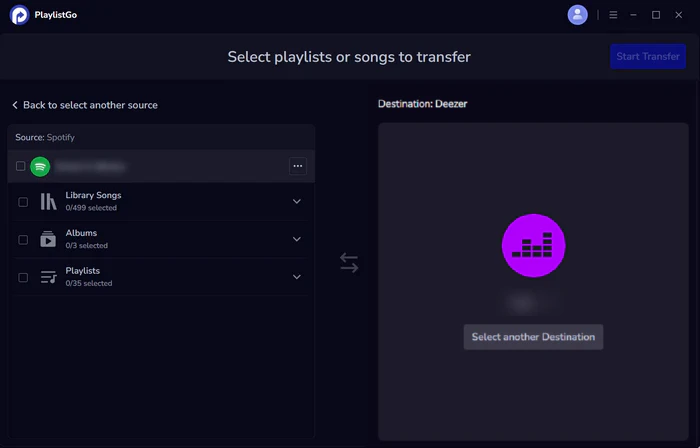
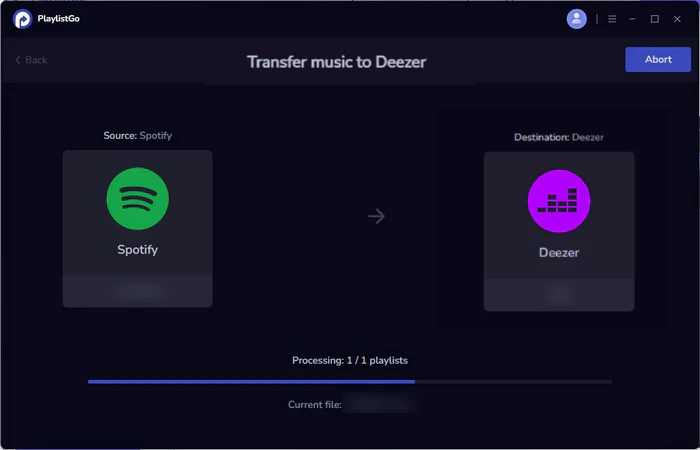
Choose which playlists, Liked Songs, or saved albums to move. You can transfer everything at once or select individual playlists. Click Start Transfer. PlaylistGo matches tracks in batches using ISRC codes and metadata, showing progress in real time. Anything that doesn't match is flagged in a transfer report for review — not silently dropped.
What to Expect After the Transfer
Once your library lands on Deezer, a few things are worth knowing to get set up quickly.
Finding your content:
- Playlists: appear under Music → Playlists in the Deezer sidebar
- Liked Songs: transferred into Favorites → Songs
- Saved Albums: go to Favorites → Albums
Setting up Deezer Flow:
Flow is Deezer's personalized radio that learns from your full library. Your transferred playlists and Favorites feed into Flow immediately, giving the algorithm a strong starting point from day one. Flow improves with active listening, so give it a week or two of real sessions before judging its recommendations.
Handling unmatched songs:
PlaylistGo generates a report of any tracks that didn't transfer. The two most common reasons on Deezer specifically are regional catalog differences and alternate versions. Regional catalog differences mean some tracks are licensed for streaming in certain countries, so a song available on your Spotify may not be cleared for Deezer in your region. Alternate versions occur when Deezer carries a remastered or live release of a track where Spotify had the studio original. You can manually search for these on Deezer or mark them as missing.
How to Fix Matching Errors in Music Transfer (2026)
Wrong songs, live versions, or covers showing up after a playlist transfer? Here's how to fix matching errors — and how to avoid them before they happen.
How Well Do Spotify and Deezer Catalogs Overlap?
One of the most common questions before switching platforms is simple: will my music actually be there?
Both Spotify and Deezer license from the same major labels and most large independent distributors, which means their catalogs overlap heavily for mainstream music. For everyday listening across pop, rock, hip-hop, electronic, and mainstream international music, the vast majority of your Spotify library will be available on Deezer without issue.
The differences tend to show up in more specific areas:
- Regional licensing: some tracks available in certain countries may not stream in another. Deezer actually has stronger catalog coverage in parts of Africa, Latin America, and French-speaking regions.
- Distributor-exclusive deals: Some indie artists have exclusive partnerships with either Spotify or Deezer, so their music may only appear on one app.
- Underground and niche releases: certain rare, local and experimental tracks are often missing on both platforms due to licensing limits.
- Alternate versions: the same song may have remasters, edited cuts or alternate releases, which can cause match errors during transfers.
For most Spotify libraries, nearly all tracks transfer over to Deezer smoothly. You'll mainly miss regional exclusives, indie releases and niche music. PlaylistGo lists every missing track right after the transfer, any track that couldn't be placed on Deezer is listed so you can check manually, so you won't find gaps while listening later.
How to Transfer Spotify Playlists to Apple Music (2026 Guide)
Switching from Spotify to Apple Music? Learn how to move your playlists, liked songs, and albums without losing a single track.

FAQs about Transferring Spotify Playlists to Deezer
Final Words
Spotify and Deezer have largely overlapping music catalogs, so nearly all of your tracks will transfer across accurately and very few will be left out. You'll just need to note regional restrictions and remastered versions. PlaylistGo's ISRC matching is far more reliable than basic title-based tools for these cases.
Once your library is in, Deezer Flow starts working immediately. Your playlists and saved songs help it learn your taste instantly. PlaylistGo can transfer all your playlists, liked tracks and albums automatically, and it will show you a full report for any items you need to fix manually.

PlaylistGo – Best Desktop Transfer Tool
The fastest and most reliable way to move entire Spotify library to Apple Music, YouTube Music, TIDAL, etc. 100% offline • No Cloud Required • 99.2% success rate


 Language ▴