



A Spotify playlist exporter is a tool that lets you save your playlist data — such as song titles, artists, and albums — to CSV, Excel, TXT, JSON, or other file formats. Spotify doesn't offer a simple way to export a playlist as a clean file. Its built-in data request gives you JSON files with various account data, rather than an easy-to-use playlist file.
This guide compares 6 popular Spotify playlist exporters. We ran each tool through the same export and checked the resulting file for column count, populated fields, and encoding accuracy, so you can find the one that best fits your needs.

Best Spotify Playlist Exporters at a Glance
| Tool | Type | Export Formats | Full-Library Batch Export | Processing | Best For |
|---|---|---|---|---|---|
| PlaylistGo | Desktop (Win/Mac) | CSV, XLS, XLSX, TXT, JSON, XML, M3U, M3U8, PLS, XSPF | ✅ | Local (Device) | Full-library export + later transfer |
| Exportify | Web (open source) | CSV | ✅ | Local (Browser) | One-off CSV backups |
| TuneMyMusic | Web | CSV, TXT | ✅ | Cloud | Quick browser-based export of playlists |
| Chosic | Web | CSV, TXT | ❌ | Cloud | Fast export of a single playlist without logging in |
| Spotlistr | Web | CSV, plain text | ❌ | Cloud | Choosing exactly which fields to export |
| Playlist Exporter | Web | XLSX | ✅ (Premium) |
Cloud | Simple Spotify-to-Excel conversion |
Before getting into each tool, here are the criteria we used to evaluate every exporter in this guide. Each review below follows this same set of dimensions, so you can compare the tools directly rather than relying on marketing claims:
- Export formats: which file types the tool can produce (CSV, XLSX, TXT, JSON, XML, M3U, etc.)
- Full-library batch export: whether the tool can export multiple playlists or your whole library in one run
- Processing location: whether your playlist data is processed locally on your device or uploaded to the tool's servers
- Data completeness: how many columns/fields the exported file contains
- Accuracy: whether special characters and track data came through cleanly, without encoding errors or garbled text
- Access requirements: whether the tool requires a Spotify login, and whether full export features are free or paywalled
Formats and column counts only tell part of the story, so we exported the same 50-track playlist through these tools and opened every resulting file to check what actually came through.
1. PlaylistGo — Spotify Playlist Exporter Supporting 10+ File Formats
Recommend level: ★★★★★
Website: https://www.playlistgo.io/
Best for: Exporting a full Spotify library locally to the widest range of file formats
PlaylistGo is a desktop application for Windows and Mac that exports Spotify playlists, Liked Songs, and saved albums to CSV, Excel (XLS/XLSX), TXT, JSON, XML, and playlist formats like M3U, M3U8, PLS, and XSPF. Most web tools on this list only support two or three file types, but PlaylistGo works with 10 different formats. It can also transfer your library directly to another streaming service.
We exported a 50-track playlist to CSV to check the actual output, and the file carries 24 columns — more raw fields than any other tool here, including album artwork thumbnails, album and platform IDs, and disc/track numbers. All the processing runs locally on your computer. It won't send your playlist data up to an external server, which is worth knowing if you don't want your playlist info shared with third-party cloud services.
Export Your Spotify Library with PlaylistGoTry It Free
Export Spotify playlists to CSV, Excel, TXT, JSON, M3U, and more. Keep a local backup or use your playlists across different platforms.
| Format | Typical Use |
|---|---|
| CSV | Opening in Excel or Google Sheets |
| XLS / XLSX | Spreadsheet editing and analysis |
| TXT | Plain tracklists |
| JSON | Structured data for scripts or other tools |
| M3U / M3U8 | Media players like VLC |
| PLS | Playlist compatibility with older software |
| XSPF | Cross-platform playlist sharing |
How to Export a Spotify Playlist with PlaylistGo
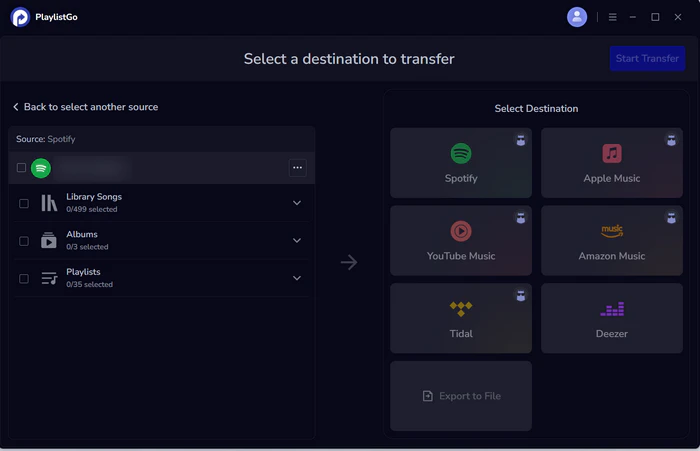
Launch PlaylistGo and Choose Spotify as the Source
Download and launch PlaylistGo on Windows or Mac. Select Spotify as the source platform and log in — PlaylistGo loads your playlists, Liked Songs, and albums.
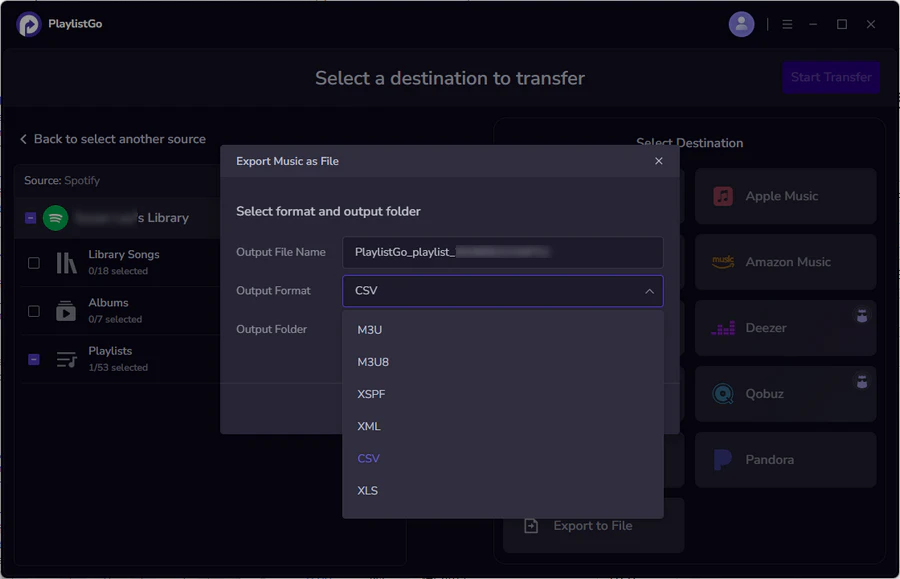
Choose "Export to File" and Pick a Format
In the destination area, select "Export to File", then choose your preferred format (e.g., CSV or XLSX). You can also customize the output name and storage location.
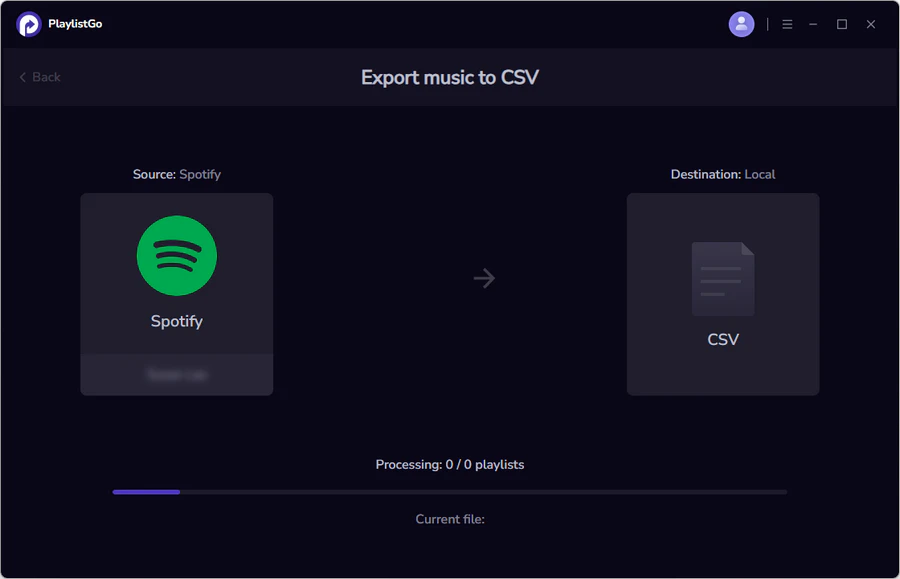
Start the Export
Click Start Transfer. PlaylistGo compiles all track metadata into the file format you chose and saves it to your computer. Once complete, you can open the file in a spreadsheet app or use it to import your playlist elsewhere.
Pros
- Widest format selection of any tool in this list
- Export your entire Spotify library in one run
- Most raw columns per track of any tool tested
- Local processing — playlist data isn't uploaded to a server
- The same tool can also transfer playlists directly between streaming services
Cons
- Requires downloading and installing a desktop application
- Only available for Windows and Mac — no Linux or mobile client
2. Exportify — Free Open-Source CSV Exporter
Recommend level: ★★★★
Website: https://exportify.net/
Best for: A free, no-login-hassle CSV Spotify export with the richest track data of any tool tested
Exportify is a free, open-source, browser-based tool that exports Spotify playlists to CSV using Spotify's Web API, and it runs entirely in your browser without saving any of your data on a server.
We tested Exportify on the same 50-track playlist. The CSV we got back had 24 populated columns per track — full audio features like danceability, energy, tempo, key, and loudness, plus record label and the Spotify user ID of whoever added each track. The only gap was the Genres column, which came back empty for about a third of tracks. If all you need is to save your Spotify playlist as a CSV file or dig into your own listening data, Exportify is hard to beat for a free tool.
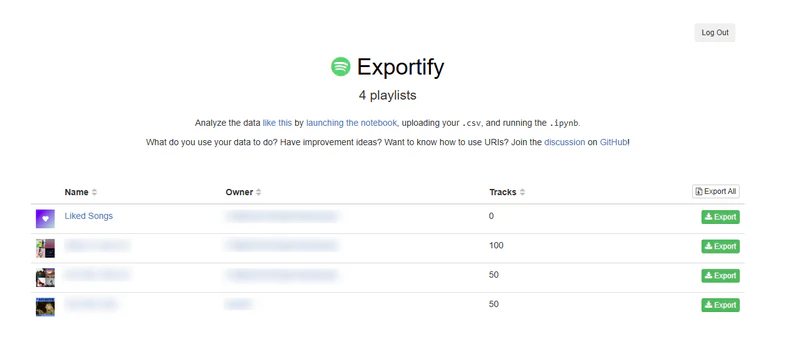
How to Export a Spotify Playlist with Exportify
- Go to exportify.net and click "Get Started", then grant Exportify read-only access to your Spotify playlists.
- Find the playlist you want in your library, or use the search bar to locate it.
- Click "Export" on that playlist to download it as a CSV file — or click "Export All" to download every playlist in your account as a ZIP of individual CSV files.
Pros
- Completely free with no premium tier
- "Export All" downloads every playlist in your account as a ZIP in one click
- Richest populated dataset we tested: full audio features, record label, and added-by user ID
- Open-source and runs entirely in the browser
Cons
- Only outputs CSV — no Excel-native, TXT, JSON, or M3U option
- Genres column came back empty for roughly a third of tracks in our test
- Bulk "Export All" runs on large libraries can hit Spotify's API rate limits and slow down
3. TuneMyMusic — Browser-Based Spotify to CSV and Text Exporter
Recommend level: ★★★★
Website: https://www.tunemymusic.com/transfer/spotify-to-file
Best for: A quick, no-install browser export of an entire Spotify library to CSV or TXT
TuneMyMusic is a web tool that reads your Spotify library and exports playlists, Liked Songs, followed artists, and saved albums into a downloadable CSV or TXT file, with no destination account required.
The CSV it produced was noticeably leaner than Exportify's or Chosic's — just 7 columns covering track name, artist, album, playlist name, type, ISRC, and Spotify ID — but every single field was populated with no gaps in our test. You can also select your entire library, and export them together in a single pass. TuneMyMusic suits anyone who wants a quick web-based export and doesn't need more than CSV or plain text.
How to Export a Spotify Playlist with TuneMyMusic
- Go to TuneMyMusic, choose Spotify as the source, and sign in to connect your account.
- Select what to export — playlists, Liked Songs, followed artists, saved albums, or your whole library.
- Choose "Export to file" as the target, pick CSV or TXT, and start the transfer. Download the file once TuneMyMusic finishes matching and compiling your songs.
Pros
- Export your whole library at once, not just one playlist at a time
- Every field came back populated in our test — no empty cells despite the leaner column set
- Works entirely in the browser — no software installation
Cons
- Exports far fewer data fields per track
- Format options are limited to CSV and TXT
- Larger or repeated exports may require a paid plan — see TuneMyMusic alternatives if that's a dealbreaker
- Cloud-based — your library data is processed on TuneMyMusic's servers
4. Chosic — No-Login Spotify Playlist Exporter
Recommend level: ★★★★
Website: https://www.chosic.com/spotify-playlist-exporter/
Best for: Grabbing one playlist fast from just a Spotify URL, without logging in
Chosic is a free web tool that exports a Spotify playlist to CSV or TXT simply by pasting the playlist's URL, without requiring you to log in or authorize access to your Spotify account. Chosic only processes the first 1,000 tracks in any playlist and prompts you to upgrade beyond that, so it's better suited to regular-sized playlists instead of huge libraries with thousands of songs.
One thing is worth knowing before you rely on it: we found genuine text-encoding issues in our export: special characters in the musical key field and in some song titles came through as garbled question marks — for example, "G#/A??? Major" and "Taylor??s Version" instead of the correct apostrophe, so if you need that data to be clean for further processing, you may need to fix the encoding afterward.

How to Export a Spotify Playlist with Chosic
- Copy your Spotify playlist's share URL, then paste it into Chosic's input field and click Start.
- Choose your export format — CSV for Excel/Google Sheets, or TXT for plain text.
- Optionally clean the playlist by removing unwanted songs, then download the file. (Log in with Spotify instead if you want to browse and export from your full library or Liked Songs.)
Pros
- Can export an accessible playlist without requiring a Spotify login
- Offers an option to clean or filter the playlist before exporting
Cons
- We found text-encoding issues in our export
- Caps out at the first 1,000 tracks of a playlist before prompting an upgrade
- A separate login flow is available if you want to export from your full library or Liked Songs
Need More Than CSV or TXT?Try It Free
PlaylistGo exports the same playlist to 10+ formats — including Excel, JSON, and M3U — with fuller track data, processed locally on your computer instead of the cloud.
5. Spotlistr — Field-Customizable Spotify Export Tool
Recommend level: ★★★
Website: https://www.spotlistr.com/convert/spotify-to-export
Best for: Picking exactly which fields end up in your export
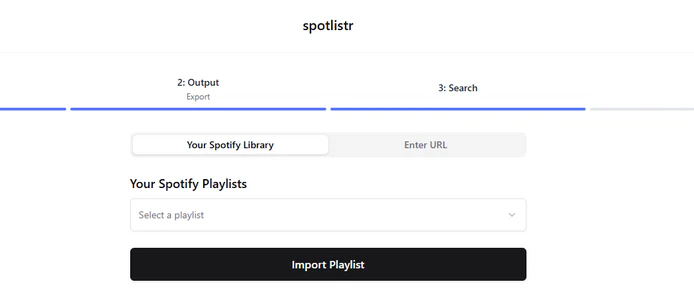
Spotlistr is a web tool that lets you export a Spotify playlist to CSV or copyable plain text. Unlike basic exporters that give you a fixed set of columns for you to clean up later, Spotlistr displays your playlist in a table first. You can tick only the fields you need for your final file.
In our test export, the resulting CSV had 10 columns — artist, track, album, release date and year, length, Spotify ID, ISRC, popularity, and explicit flag — and every field was fully populated with no gaps. We found this helpful when we needed ISRC codes for cross-checking. It also preserves your original playlist order in the export.
How to Export a Spotify Playlist with Spotlistr
- Choose a Spotify playlist from your library, or paste a Spotify playlist URL directly into Spotlistr.
- Review the playlist in the table view, then use the field picker to select which columns you want — artist, track, album, release date, track length, Spotify ID, ISRC, popularity, or explicit flag.
- Copy the result as plain text, or download it as a CSV file.
Pros
- Pick which fields appear in the output rather than exporting a fixed set of columns
- Every field came back fully populated in our test — no empty cells and no encoding issues
- Displays the playlist in a table first, so you can review it before exporting
- Preserves the original playlist order in the export
Cons
- Built around exporting one playlist at a time rather than bulk-exporting an entire library
- Only outputs CSV or plain text — no Excel-native, JSON, or M3U formats
- Private or unavailable playlists can produce incomplete exports until they're visible to your connected account
6. Playlist Exporter — Simple Spotify-to-Excel Tool
Recommend level: ★★★
Website: https://www.playlist-exporter.com/
Best for: A basic, single-purpose Spotify-to-Excel conversion
Playlist Exporter is a small web tool built specifically to convert a Spotify playlist into an XLSX spreadsheet.
We logged in, chose a playlist from the list, and got an XLSX file in just a few seconds. The spreadsheet is bare: just four columns — name, artists, album, and year — with every cell filled in and nothing left blank. If all you want is to export a Spotify playlist into an Excel file and nothing else, Playlist Exporter gets that done easily, no complicated menus to work through.

How to Export a Spotify Playlist with Playlist Exporter
- Go to playlist-exporter.com and log in with your Spotify account.
- Select the playlist you want to export from your library.
- Click Export to generate and download the playlist as an XLSX file.
Pros
- Outputs directly to XLSX, ready to open in Excel
- Every cell in our test file was filled in — no missing data despite the minimal column count
- Built as a straightforward, single-purpose tool rather than a larger platform
Cons
- Only 4 columns of data — far less detail than most other tools on this list
- Only exports to XLSX — no CSV or JSON option
- Focused on individual playlists rather than bulk or whole-library exports
Which Spotify Playlist Exporter Should You Choose?
- You'd rather your Spotify playlist data stay on your own computer instead of a server → PlaylistGo
- You want a full-library export you can later use to switch streaming services → PlaylistGo or TuneMyMusic
- You just want to grab one playlist fast, without Spotify logging in → Chosic
- You want a free, no-cost CSV Spotify export for data analysis → Exportify
- You specifically want an Excel file and nothing more → PlaylistGo or Playlist Exporter
- You want to choose exactly which columns end up in your file → Spotlistr
- You don't want to install any software → TuneMyMusic, Chosic, or Spotlistr
Best Spotify Playlist Exporter for Batch ExportTry It Free
PlaylistGo handles local processing, full-library batch export, and Excel output all in one app — so you don't have to switch tools depending on what you need.
What Can You Do with an Exported Spotify Playlist?
Back Up Your Spotify Playlists
An exported file is a standing copy of your playlist that survives even if Spotify removes a track for licensing reasons or you accidentally delete the playlist itself. Since most exports include the Spotify track URI, you can typically recreate the playlist by pasting those URIs back into a new one.
Export Spotify Playlists to Excel or Google Sheets
A CSV or XLSX export opens directly in any spreadsheet app, which makes it easier to sort by artist, remove duplicates, or reorder hundreds of tracks than doing the same work inside Spotify's own playlist editor.
Save a Spotify Playlist as a TXT File
A TXT export is the simplest way to get a readable tracklist you can paste into a document, email, or message — useful for sharing a playlist with someone who doesn't use Spotify.
Export a Spotify Playlist to M3U for Media Players
Formats like M3U and M3U8 are recognized by media players such as VLC, so exporting to one of these formats lets you use your Spotify tracklist alongside locally stored audio files. If you're looking to go a step further and get actual audio files rather than just track references, converting your exported Spotify CSV to MP3 is a related workflow worth a look.
Transfer Your Spotify Playlist to Another Music Service
An exported file can also be the first step toward switching platforms. PlaylistGo and TuneMyMusic, can import that same data or transfer it directly into Apple Music, YouTube Music, TIDAL, and other services.
FAQs about Spotify Playlist Exporters
Conclusion: Which Spotify Playlist Exporter Should You Use?
All 6 tools can get your Spotify playlist into a file — the real differences come down to format support, whether you can export your whole library at once, and how clean the resulting data is.
PlaylistGo stood out in our testing for combining the widest format selection, full-library batch export, local processing, and the most complete per-track data. If you just need a quick, free CSV and don't mind logging in and staying in the browser, Exportify or TuneMyMusic cover that well.

PlaylistGo – Best Desktop Transfer Tool
The fastest and most reliable way to move entire Spotify library to Apple Music, YouTube Music, TIDAL, etc. 100% offline • No Cloud Required • 99.2% success rate



 Language ▴