




A Spotify playlist maker is any tool that turns a starting idea into a playable playlist in your Spotify library. The starting point can be a short description of a mood, scene or occasion, a favorite artist or song, or a set of parameters such as genre, decade and tempo. Some tools generate new recommendations based on your taste, while others only organize music you already own.
This guide compares the best Spotify playlist makers available in 2026, explains what each one is good for, and helps you pick the right one for the way you build playlists.

Which Spotify Playlist Maker Is Right for You?
The tools on this page solve different jobs, so the quickest way to choose is to start from what you want to do rather than from feature lists. The table below matches common ways people build playlists to the tool that handles that job best.
| What you want to do | Pick this tool |
|---|---|
| Describe a mood and get tracks instantly | Playlistable, TuneMyMusic |
| Get picks based on your listening taste, not a generic hit collection | Spotify Built-In AI, Playlistable, TuneMyMusic |
| Control genre, artist, decade and audio features | sptfy.bio, TuneMyMusic, MixMoose, Chosic |
| Use what Spotify already offers | Spotify Built-In AI |
| Try it free without a subscription | Spotivibly, Chosic, sptfy.bio |
| Control BPM, energy and track order | MixMoose |
| Reorganize a library you already own | Organize Your Music |
| Import CSV, M3U or playlists from other services | PlaylistGo |
Need to bring an existing playlist into Spotify?Try It Free
Import a local playlist file to Spotify without rebuilding track by track.
1. Spotify Built‑In AI Playlist Maker
Spotify AI Playlist (Prompted Playlists)
| Official page | support.spotify.com/article/ai-playlist; support.spotify.com/article/prompted-playlists |
|---|---|
| Price | Included with Spotify Premium |
| Availability | Premium, mobile app only, English only, beta |
| Best for | Premium subscribers who want AI playlist creation inside Spotify without installing a third-party tool. |
Spotify's native AI playlist feature lets you create playlists using prompts that describe a vibe, scenario, mood, genre, artist or decade. With AI Playlist, you can pick a suggested prompt or write your own, add or remove tracks before saving, and refine the result by editing the prompt. Prompted Playlists builds on this with scheduled daily or weekly refreshes, and recommendations that continuously adapt to your listening habits.
The feature is mobile-only, English-only, and exclusive to Spotify Premium. That said, Spotify retains control over the output. Beta users are subject to limits on how many playlists they can create.
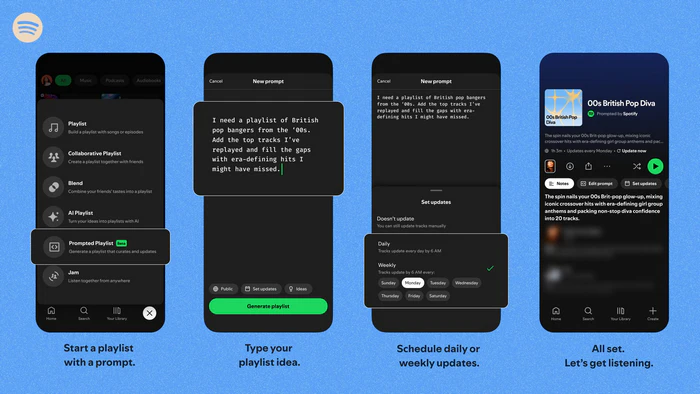
- Open Your Library in the Spotify mobile app and tap Create.
- Choose Prompted Playlist, then pick a suggested prompt or describe the music you want.
- Add or remove suggested tracks, or set the playlist to refresh daily or weekly.
- Tap Create or Generate playlist, then use Refine or Edit prompt to adjust it.
Spotify in ChatGPT
| Official page | chatgpt.com/apps/spotify |
|---|---|
| Price | Free to use with a ChatGPT account; custom AI-generated playlists require Spotify Premium. |
| Best for | ChatGPT users who plan a mood, trip or theme in conversation and want Spotify picks inside that chat. |
The Spotify plugin for ChatGPT is an official Spotify integration that operates directly inside ChatGPT conversations. Simply mention Spotify in your prompt, link your Spotify account on first use, and request songs, artists, albums, playlists or podcasts based on a mood, theme or trip. Free Spotify users get recommendations from existing Spotify playlists including Discover Weekly and New Music Friday, while Spotify Premium users can turn detailed prompts into brand-new personalized selections.
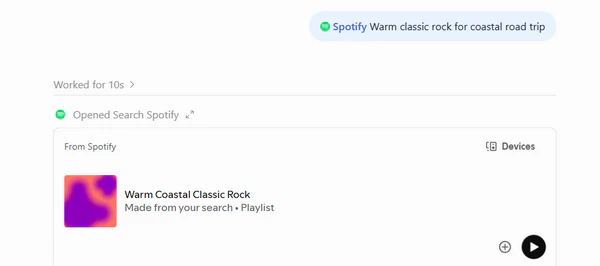
- Open ChatGPT Settings, go to Plugins, and choose Browse plugins.
- Search for Spotify, select the Spotify plugin, and add it with the + button.
- Connect your Spotify account when prompted; the connection is opt-in and can be removed anytime.
- Start a chat, mention Spotify, and describe the mood, theme, artist or occasion you want.
- Review the returned tracks or playlist, then use Preview or open it in Spotify; playlist creation and advanced requests need Spotify Premium.
Pros
- Included with Spotify Premium; no separate playlist-maker subscription.
- Explains why each track was chosen
- ChatGPT entry keeps the recommendation inside an existing conversation
Cons
- In-app feature is Premium, mobile and English only
- Beta usage limits on how many playlists you get
- ChatGPT entry needs a ChatGPT account; free Spotify users only get existing playlists
2. Playlistable — Prompt‑Based Spotify Playlist Maker
| Official page | playlistable.io |
|---|---|
| Price | $2.99/week · $6.99/month · $49.99/year, 3-day free trial |
| Output | Up to 50 tracks saved to Spotify or Apple Music |
| Best for | Users who want a mood, artist or seed song turned into a ready-to-play Spotify playlist in under a minute. |
Playlistable builds a Spotify playlist from a short description, an artist name or a single song, and saves up to 50 matched tracks straight to your library. It works with Spotify and Apple Music, reads your listening history to personalize picks, and lists a 3-day free trial with plans at $2.99 per week, $6.99 per month or $49.99 per year.
Onboarding took me about a minute: connect your Spotify account, type something like "90s nostalgia", and review the result. The picks matched the prompt well enough, though a handful felt generic. It works best as a fast first draft rather than a finished curation tool.
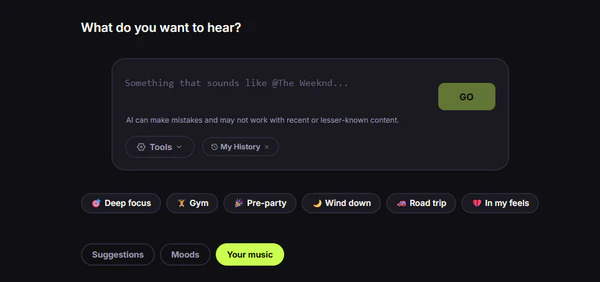
- Open playlistable.io and start the free trial.
- Connect your Spotify or Apple Music account.
- Describe a mood, or enter an artist or song as the seed.
- Review the generated tracks and save them to your library.
Pros
- Fast prompt-to-playlist turnaround
- Works across Spotify and Apple Music
- Personalizes from listening history
Cons
- Subscription required after the 3-day trial
- Occasional generic picks
- No file import or cross-platform transfer
3. TuneMyMusic — AI Spotify Playlist Generator for Mood
| Official page | tunemymusic.com/features/playlist-generator |
|---|---|
| Price | Free generation with limits; paid plans unlock more |
| Platforms | Spotify, Apple Music, YouTube Music, TIDAL |
| Best for | Users who want AI generation plus cross-service compatibility in a single tool. |
TuneMyMusic's AI Playlist Generator turns either a text prompt or vibe sliders for genre, mood and era into a playlist for Spotify, Apple Music, YouTube Music or TIDAL. It also includes a Similar Song Finder, a Random Song Generator and a Playlist Name Generator.
I found the sliders more predictable than free text: Rock plus Energetic plus 2000s produced a usable playlist on the first attempt. The page is packed with secondary tools and upgrade prompts, and the generator itself remains in beta. It's a useful choice if you want to generate playlists now and transfer them between supported streaming services later.
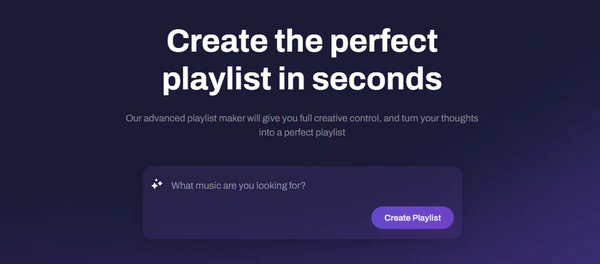
- Open the page and click Create Playlist.
- Type a prompt, or set the genre, mood and era controls.
- Connect the music service you want the playlist saved to.
- Generate the playlist and export it to your library.
Pros
- Works across Spotify, Apple Music, YouTube Music and TIDAL
- Both sliders and free-text prompt input
- Useful extras such as similar-song search and playlist naming
Cons
- Generator still in beta
- Busy interface with many upsells
- Best features tied to a paid plan
Move playlists from other streaming services to Spotify?Try It Free
Transfer from Apple Music, YouTube Music, TIDAL and more, with tracks matched automatically.
4. Spotivibly — Free Spotify Playlist Maker Without Login
| Official page | spotivibly.com/spotify-playlist-creator |
|---|---|
| Price | Free to generate; Spotify login needed to save |
| Platforms | Spotify only |
| Best for | Users who want to try AI playlist creation for free before connecting a Spotify account. |
Spotivibly is a browser-based Spotify playlist generator that works from natural-language prompts. Spotify account connection is only required when you're ready to save. It checks suggested tracks against the Spotify catalog before displaying the list, reducing songs that end up unavailable. This generate-first, connect-later workflow is the main reason it's worth trying.
I tried it without an account, and that alone made it easier to recommend than subscription tools. Since it runs in the browser with no trial countdown, there's no pressure to rush a decision. The trade-off is fewer customization controls than the paid competitors and Spotify-only output.
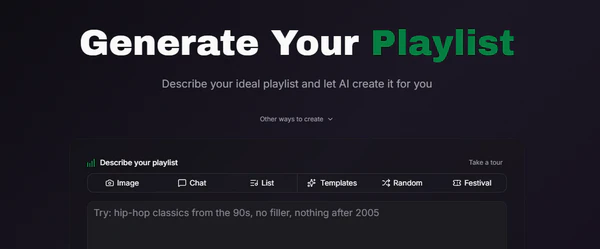
- Open the Spotivibly playlist creator in your browser.
- Type a prompt describing the playlist you want.
- Review the generated tracks against the Spotify catalog.
- Connect Spotify to save the playlist to your library.
Pros
- Free to use
- No login needed to generate a playlist
- Checks tracks against the Spotify catalog
Cons
- Limited advanced customization
- Spotify-only output
- Generated playlists first live on Spotivibly's public curator accounts until you connect Spotify
5. Chosic — Free Similar Song Spotify Playlist Generator
| Official page | chosic.com/playlist-generator |
|---|---|
| Price | Free, no sign-up to generate |
| Output | Up to 100 tracks per playlist, preview on page, save to Spotify |
| Best for | Users who want a free, no-login Spotify generator built around seed songs, artists or genres. |
Chosic's playlist generator builds a Spotify playlist from a song, artist, genre, mood, or pasted Spotify link, and lets you combine up to five seed inputs for a single playlist. The Options+ panel lets you set energy, danceability, acousticness, tempo, instrumentalness and track count before generating. You can play 30-second previews on the page, open any track in Spotify, YouTube, Apple Music or Amazon Music, and save the finished list to Spotify.
Compared with prompt tools, Chosic starts from something you already like rather than from a written mood, so the results stay close to the seed track's sound. It does not read your listening history, and saving to your own Spotify library asks for a Spotify connection, but generation itself needs no account.
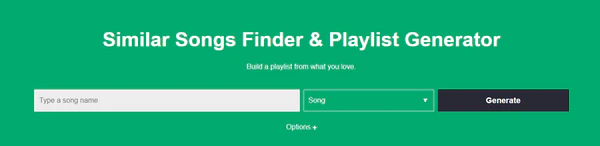
- Open the Chosic playlist generator.
- Add up to five seeds: songs, artists, genres or a Spotify link.
- Set energy, danceability, tempo, instrumentalness and track count in Options+.
- Preview the tracks, then save the playlist to Spotify.
Pros
- Free with no sign-up to generate
- Mixes up to five song, artist and genre seeds
- Audio-feature filters including energy, tempo and danceability
Cons
- No listening-history personalization
- Saving to Spotify requires connecting an account
- Plain interface with few advanced editing tools
6. sptfy.bio — Build Spotify Playlists by Artist & Genre
| Official page | sptfy.bio/ai-playlist-generator |
|---|---|
| Price | Free for up to 5 playlists per day; paid tier adds more |
| Output | 10–25 tracks, copyable to Spotify, Apple Music or YouTube Music |
| Best for | Users who would rather pick options from a form than write a free-text prompt. |
sptfy.bio's AI Playlist Generator builds Spotify playlists from parameters instead of sentences: you enter favorite artists, preferred genres, a mood, a decade and a target length, then choose whether to include discoveries or stick to popular tracks. Output targets Spotify, Apple Music and YouTube Music, and free accounts are limited to 5 generated playlists per day. The site also offers a link-in-bio service for artists.
Filling out the form was faster than writing a good prompt, since every option is visible and adjustable. The results matched the selected genre closely but lacked the nuance a well-written description can deliver. It suits people who already know what they want and prefer not to explain it.
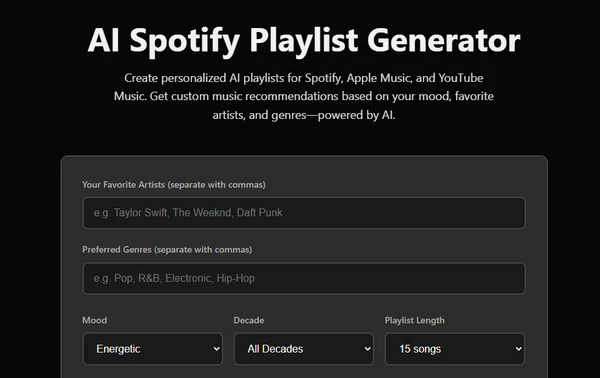
- Open the AI Playlist Generator on sptfy.bio.
- Enter your artists, genres, mood and decade.
- Set the playlist length and choose whether to include discoveries.
- Generate the playlist, then copy it into Spotify.
Pros
- Clear, structured option pickers
- Adjustable playlist length
- Free daily generations
Cons
- Less expressive than a free-text prompt
- Fewer filters than a dedicated editor
- Manual copying into Spotify
Got a playlist file you want in Spotify?Try It Free
Load the local file, match each track to Spotify, and save the playlist without retyping the list.
7. MixMoose — Build Spotify Playlists by BPM & Energy
| Official page | mixmoose.com |
|---|---|
| Price | Free with a Spotify account |
| Platforms | Spotify only |
| Best for | Users who care about track order, energy flow and audio-feature detail, not just which songs are picked. |
MixMoose is a free Spotify playlist generator and editor that starts from artists, songs, genres or an existing playlist, then lets you set length, release years, exclusions and audio features such as BPM and energy. Generated results can be sorted, filtered and reordered by dragging.
What stood out in use was the post-generation control, not the initial generation itself: charts, stats and manual reordering turn a rough list into a properly sequenced playlist. It has a noticeable learning curve, because the interface surfaces more data than casual listeners need. If you've complained that AI playlists pick the right songs in the wrong order, this is the tool that addresses it.
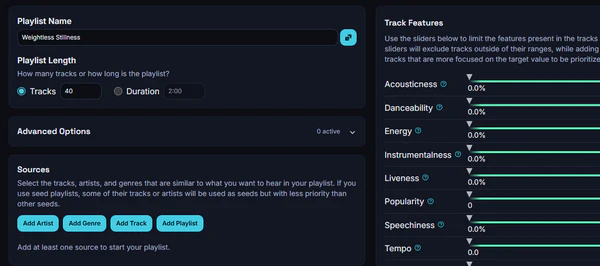
- Open MixMoose and sign in with Spotify.
- Go to Generate Playlist and choose your sources: artists, songs, genres or an existing playlist.
- Set length, release years, exclusions and audio-feature ranges.
- Sort or drag the tracks, then save the playlist to Spotify.
Pros
- Strong sorting and reordering tools
- Audio-feature filters including BPM and energy
- Free with a Spotify account
Cons
- Steep learning curve
- Spotify only
- Denser interface than simple prompt tools
8. Organize Your Music — Spotify Playlist Organizer
| Official page | organizeyourmusic.playlistmachinery.com |
|---|---|
| Price | Free |
| Sorting options | Genre, year, BPM, energy, danceability, loudness, valence and more |
| Best for | Users with a large Spotify library who want to turn songs they already own into well-sorted playlists. |
Organize Your Music sorts your Spotify saved songs, playlist tracks or whole library into groups by genre, year, BPM, energy, danceability, popularity and other audio features. It plots tracks on charts, plays previews, and collects selections into a staging playlist when you click save. Your existing library is never modified; the tool only creates new playlists on request.
When I ran it on a mid-sized Spotify library, the genre and decade bins surfaced tracks I had forgotten I owned — a genuinely different outcome from generating brand-new playlists. It remains the best free choice for reorganizing your Spotify library instead of generating new playlists.
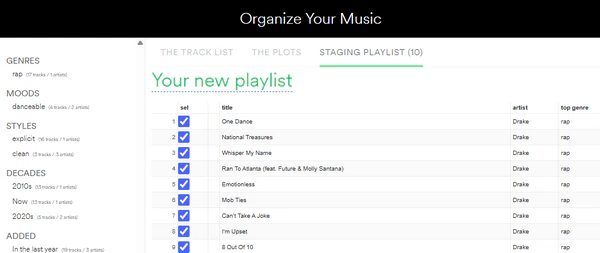
- Click Organize your Music and log in with your Spotify account; the tool sorts your tracks into bins by genre, mood, decade, BPM, energy, danceability and more.
- Pick a category in the left sidebar, then review the tracks in The Track List, or switch to The Plots to view them as a scatter chart.
- In The Track List, tick the sel checkbox next to the tracks you want; in The Plots, use the plot select control to draw a selection around a cluster of tracks. Selected tracks are added to the Staging Playlist.
- Open the Staging Playlist tab to review your picks, then save the playlist to Spotify.
Pros
- Sorts by more than a dozen audio properties
- Visual charts and track previews
- Never modifies your existing playlists
Cons
- Slow with very large libraries
- Dated interface
- No prompt-based generation
Pro Tips: How to Import Playlist Files or Move Playlists to Spotify
One gap runs through every tool above: Spotify itself cannot import a CSV or M3U file, and it cannot move a finished playlist to another service. PlaylistGo fills that gap as a desktop app for Windows and macOS. It reads playlist files in 10 formats — M3U, M3U8, PLS, XSPF, XML, CSV, XLS, XLSX, JSON and TXT — and writes them back into the same formats for backup or editing in Excel.
PlaylistGo also transfers playlists between all major music services including Spotify, Apple Music, and YouTube Music, matching each track by title, artist, album and ISRC for a 99.2% match rate. Everything runs locally on your computer, and it handles libraries of 100,000+ tracks without timing out.
PlaylistGo: Import Files or Move Playlists Into Spotify Try It Free
Load a CSV, M3U or another streaming-service playlist, match the tracks automatically, and create the Spotify playlist in minutes.
How to Import CSV file or Move Playlists to Spotify
Choose Your Source in PlaylistGo
Open PlaylistGo and pick your source: select Local Playlist to browse a CSV, M3U, M3U8 or another supported file, or choose another streaming service and sign in to connect it. PlaylistGo reads the source and displays a preview of every detected track.
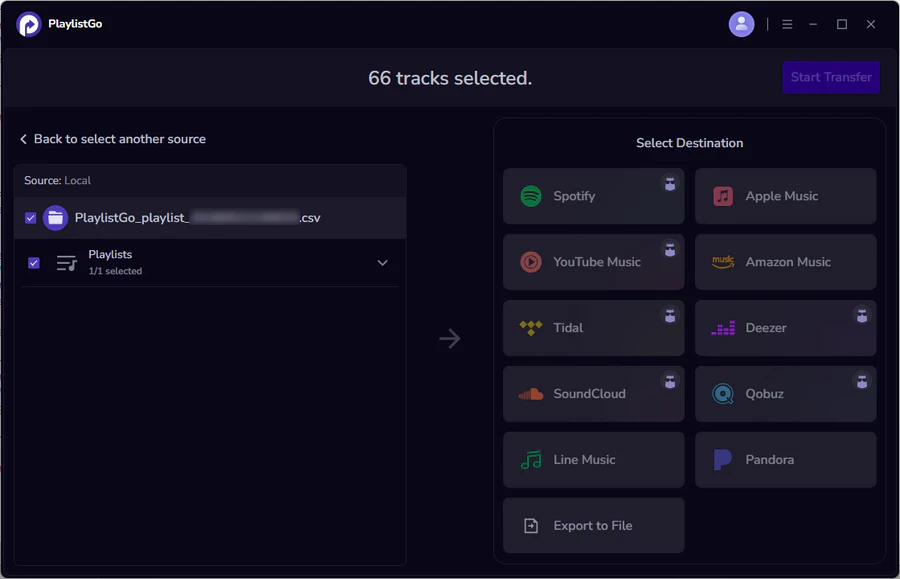
Select Spotify and Review the Matches
Choose Spotify as the destination and sign in. PlaylistGo matches each entry by title, artist, album and ISRC, then shows which tracks matched.
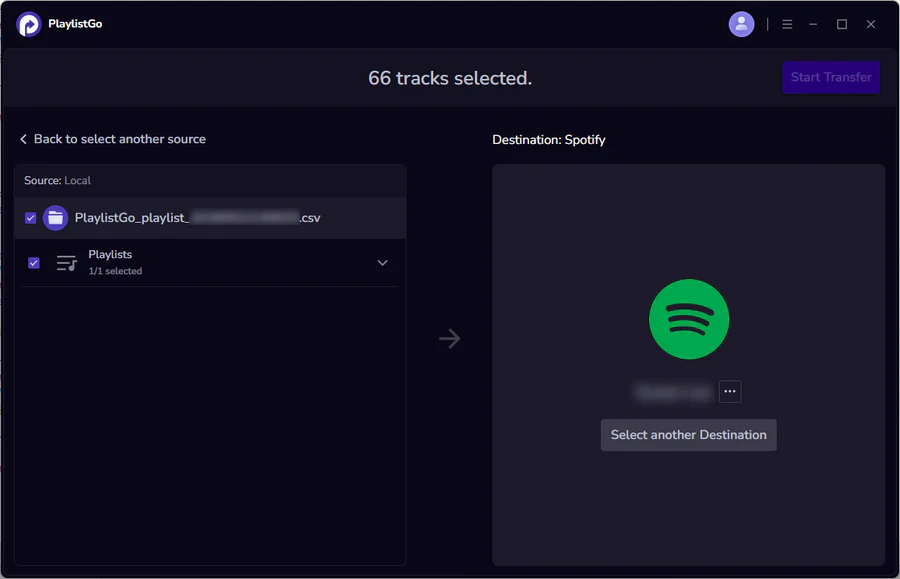
Create the Playlist in Spotify
Click Start Transfer. PlaylistGo creates the playlist in your Spotify library and keeps the original track order. To go the other way, export an existing Spotify playlist to CSV for a spreadsheet or backup.
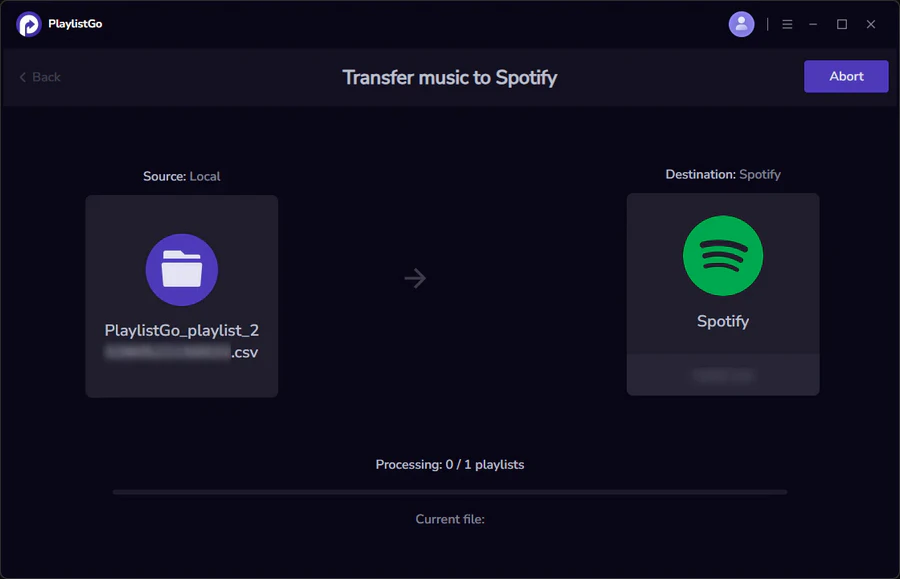
Spotify Playlist Makers Compared Side by Side
The table below compares each Spotify playlist maker: how it makes playlists, free features, Spotify connection method, and its best use case. Pick the row matching your goal.
| Tool | Generation Method | Free Option | Spotify Integration | Best For |
|---|---|---|---|---|
| Spotify AI Playlist | AI Prompt | Premium | Native | AI creation inside Spotify |
| Spotify in ChatGPT | Conversational AI | Limited | Connected app | Chat-based discovery |
| Playlistable | AI Prompt | Trial | Direct connect | Personalized playlists |
| TuneMyMusic | AI + sliders | Limited | Direct connect | Cross-platform playlists |
| Spotivibly | AI Prompt | Free | Connect to save | Free generation |
| Chosic | Song / artist seeds | Free | Connect to save | Similar songs |
| sptfy.bio | Structured form inputs | Limited | Copy / export | Genre-based playlists |
| MixMoose | Seeds + audio filters | Free | Direct connect | BPM and sequencing |
| Organize Your Music | Library analysis | Free | Direct connect | Library organization |
FAQs about Spotify Playlist Makers
Conclusion: Which Spotify Playlist Maker Should You Use?
If you have nothing but an idea, a prompt generator saves the most time; if you already have songs somewhere else, an import tool saves the most work.
Spotify's built-in AI Playlist is the simplest route if you want to stay inside the Spotify app. Playlistable and TuneMyMusic can factor your listening history for a faster, more personalized first draft. Spotivibly or Chosic let you test the idea before paying anything.
MixMoose covers BPM, energy, exclusions and reordering in one place, sptfy.bio lets you pick genre, artist and decade from a form.
PlaylistGo handles CSV, M3U and cross-platform transfers, and Organize Your Music re-sorts a library that is already inside Spotify.
Whichever tool you use to build your playlist, keeping a backup in CSV or M3U format makes it easier to recreate it on another music service later. PlaylistGo lets you export Spotify playlists to these formats and import them again whenever you need.

PlaylistGo – Best Desktop Transfer Tool
The fastest and most reliable way to move entire Spotify library to Apple Music, YouTube Music, TIDAL, etc. 100% offline • No Cloud Required • 99.2% success rate



 Language ▴
