


An M3U playlist is a plain text file that stores a list of audio or video stream links, or local file paths, so a media player can load and play them in order without opening each one individually.
This guide covers where to find free, working M3U playlist URLs for IPTV — from global channel indexes to platform-specific sources like Pluto TV and Samsung TV Plus — how to open them in VLC, Kodi, and dedicated IPTV apps, and how to bring a music M3U file into a real streaming service like Spotify.
What Is an M3U Playlist?
M3U playlists exist in two forms. One is a local .m3u or .m3u8 file stored on your device. Media players read these offline without internet to load the list. The other is a web M3U URL, which fetches the latest playlist from a remote server every time you open it and requires internet access. M3U8 is a UTF-8 encoded variant of the M3U playlist format, making it better suited to playlists containing non-Latin characters.
A basic M3U entry commonly consists of an #EXTINF metadata line followed by the stream URL or local file path. IPTV playlists may also include additional metadata or player-specific tags.
#EXTM3U
            #EXTINF:-1 tvg-id="cnn.us" tvg-logo="https://example.com/logo2.png" group-title="News",CNN
            https://stream.example.com/cnn/index.m3u8
M3U Playlists for IPTV and Streaming
M3U playlists let you group live TV, sports streams, movies, news and online radio into one single list. Players such as VLC or Kodi can load everything from this list at once, so you do not need to add each stream link manually one after another.
M3U Playlists for Music
For music, M3U playlists organize your local audio files and make the same track list portable across different players. Since M3U is plain‑text and widely supported, it is also commonly used as a lightweight backup to help move playlists between music apps.
Back Up Your Streaming Playlists as M3U with PlaylistGo!Try It Free
PlaylistGo turns your Spotify, Apple Music, or YouTube Music playlists into portable M3U files in a few clicks — no manual track-by-track work needed.
Best Free M3U Playlist URLs
If you're looking for a free M3U playlist, you want a working, publicly available link you can paste into VLC, Kodi, or an IPTV app to start streaming right away. Below are the most reliable, actively maintained sources, with copy-ready URLs.
| Source | Best For | Coverage | Update Frequency | Format |
|---|---|---|---|---|
| iptv-org | Largest channel selection | Worldwide | Frequent | M3U |
| Free-TV/IPTV | Curated, working free channels | Worldwide | Regular | M3U8 |
| Pluto TV / Samsung TV Plus | FAST channels | Regional | Daily (automated) | M3U |
| Plex TV / Roku | FAST channel variety | Regional | Daily (automated) | M3U |
| Apsattv (LG / Vizio / Xumo) | Smart TV channels | Mostly US | Varies | M3U |
1. iptv-org — Best for Worldwide Channel Coverage
iptv-org is a community-maintained open-source project that collects publicly available IPTV stream links from broadcasters and other public sources. You won't get one huge combined file; channels are sorted by country, language, and channel type, so you only download the channels you need.
https://iptv-org.github.io/iptv/index.m3u
By Category
https://iptv-org.github.io/iptv/categories/movies.m3u
https://iptv-org.github.io/iptv/categories/news.m3u
https://iptv-org.github.io/iptv/categories/sports.m3u
https://iptv-org.github.io/iptv/categories/music.m3u
https://iptv-org.github.io/iptv/categories/kids.m3u
https://iptv-org.github.io/iptv/categories/documentary.m3u
https://iptv-org.github.io/iptv/categories/entertainment.m3u
https://iptv-org.github.io/iptv/categories/weather.m3u
By Country
https://iptv-org.github.io/iptv/countries/us.m3u
https://iptv-org.github.io/iptv/countries/gb.m3u
https://iptv-org.github.io/iptv/countries/ca.m3u
https://iptv-org.github.io/iptv/countries/au.m3u
https://iptv-org.github.io/iptv/countries/de.m3u
https://iptv-org.github.io/iptv/countries/fr.m3u
https://iptv-org.github.io/iptv/countries/es.m3u
By Language
https://iptv-org.github.io/iptv/languages/eng.m3u
https://iptv-org.github.io/iptv/languages/spa.m3u
2. Free-TV/IPTV — Best for Curated Free Channels
Free‑TV/IPTV puts quality ahead of quantity. For each channel, it stores just one working stream link and favors HD streams over SD. It only adds officially‑free content, including free‑to‑air broadcasts and ad‑supported services such as Pluto TV, Samsung TV Plus, Plex TV, and Roku TV.
Compared with larger, less curated playlists, most of its streams actually work. It is a great pick if you prefer a short, reliable channel list rather than a huge playlist filled with dead links.
https://raw.githubusercontent.com/Free-TV/IPTV/master/playlist.m3u8
3. Pluto TV & Samsung TV Plus — Best for FAST Channels
Pluto TV and Samsung TV Plus are free ad‑supported streaming services with their own live channels. Pluto TV is owned by Paramount, while Samsung TV Plus comes built into Samsung smart TVs and also works on any media player. The app-m3u-generator project pulls channel data from both services daily via a scheduled GitHub Action (03:00 UTC) and outputs it as region-specific M3U files.
https://raw.githubusercontent.com/BuddyChewChew/app-m3u-generator/main/playlists/plutotv_us.m3u
https://raw.githubusercontent.com/BuddyChewChew/app-m3u-generator/main/playlists/plutotv_all.m3u
Samsung TV Plus (choose a region: us, gb, de, fr, es, ca, it, in, kr, at, ch, or all)
https://raw.githubusercontent.com/BuddyChewChew/app-m3u-generator/main/playlists/samsungtvplus_us.m3u
https://raw.githubusercontent.com/BuddyChewChew/app-m3u-generator/main/playlists/samsungtvplus_all.m3u
_us for any region code above, or use _all to load every region combined into one file.4. Plex TV & Roku — Best for FAST Channel Variety
Beyond its well-known media server, Plex also runs its own free ad-supported live channel lineup, and Roku offers a similar free tier through The Roku Channel. You don't need their hardware to watch either service. The same app-m3u-generator project keeps both playlists up‑to‑date alongside its Pluto TV and Samsung TV Plus files.
https://raw.githubusercontent.com/BuddyChewChew/app-m3u-generator/main/playlists/plex_us.m3u
https://raw.githubusercontent.com/BuddyChewChew/app-m3u-generator/main/playlists/plex_all.m3u
The Roku Channel (US lineup)
https://raw.githubusercontent.com/BuddyChewChew/app-m3u-generator/main/playlists/roku_all.m3u
5. LG Channels, Vizio WatchFree & Xumo — Best for Smart TV Channels
LG Channels, Vizio WatchFree, and Xumo are free ad-supported channel lineups built into their respective smart TV brands. Still, you can play all three on any M3U‑compatible player — you do not need the actual TV sets. Apsattv maintains a collection of community-curated M3U links for various FAST and smart-TV channel services. Update frequency varies by playlist, so check the listed update date before relying on a source.
https://www.apsattv.com/uslg.m3u
Vizio WatchFree
https://www.apsattv.com/vizio.m3u
Xumo
https://www.apsattv.com/xumo.m3u
How to Create an M3U Playlist
How to Create an M3U Playlist for IPTV Channels
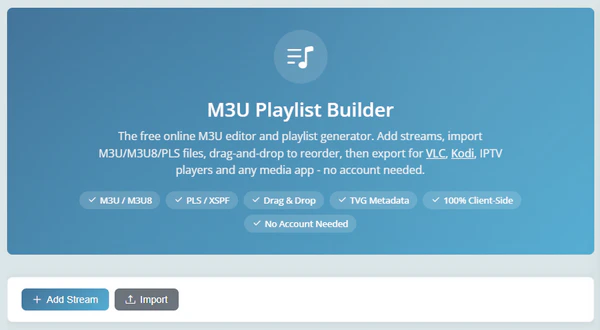
Manually writing M3U syntax is tedious. You have to collect stream URLs, add channel names and metadata like logos or group tags for each entry, then save everything as an .m3u file.
A free browser-based tool like Free-Codecs' Playlist Builder does it for you instead. It runs fully on your browser with no account needed: add streams manually or import an existing M3U/M3U8/PLS file, drag and drop entries to reorder them, attach TVG metadata like channel logos and group titles, preview streams in its built-in player before exporting, then download the finished file in M3U, M3U8, PLS, or XSPF format ready for VLC, Kodi, or any IPTV app.
https://www.free-codecs.com/app/playlist-builder/
How to Create an M3U Playlist for Music from Spotify or Apple Music
For music, creating an M3U playlist usually starts from a playlist you already have on a streaming service, since Spotify, Apple Music, and similar platforms don't let you export playlists as M3U directly. PlaylistGo solves this in a few simple steps: it connects to your streaming account, then reads the tracks in a chosen playlist and writes them out as a standard M3U file with correct titles, artists, and track order preserved. It works the same way whether you're exporting one playlist or backing up your entire library. Here's how it works:
PlaylistGo: Export a Music Playlist to M3U Try It Free
Turn any Spotify, Apple Music, or YouTube Music playlist into a standard M3U file in a few clicks.
Choose Your Streaming Service as the Source
Launch PlaylistGo and select your streaming service — Spotify, Apple Music, YouTube Music, and more — as the source platform.
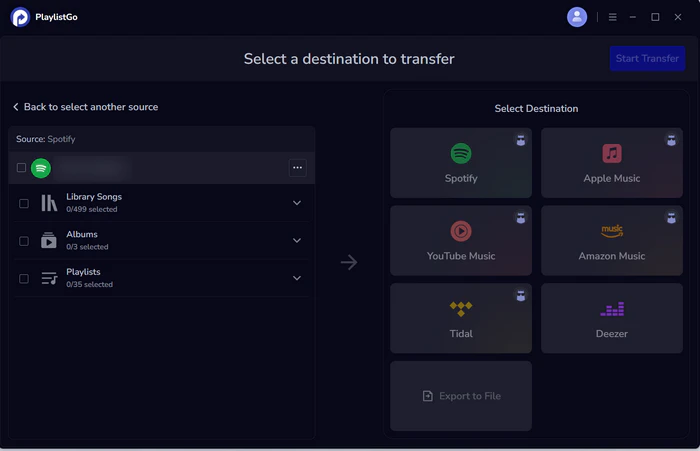
Choose the Playlist and Set the Export Format to M3U
Select the playlist you want to export, then select "Export to File" in the destination area. Set the export format to M3U (or M3U8 if your library includes non-English track names).
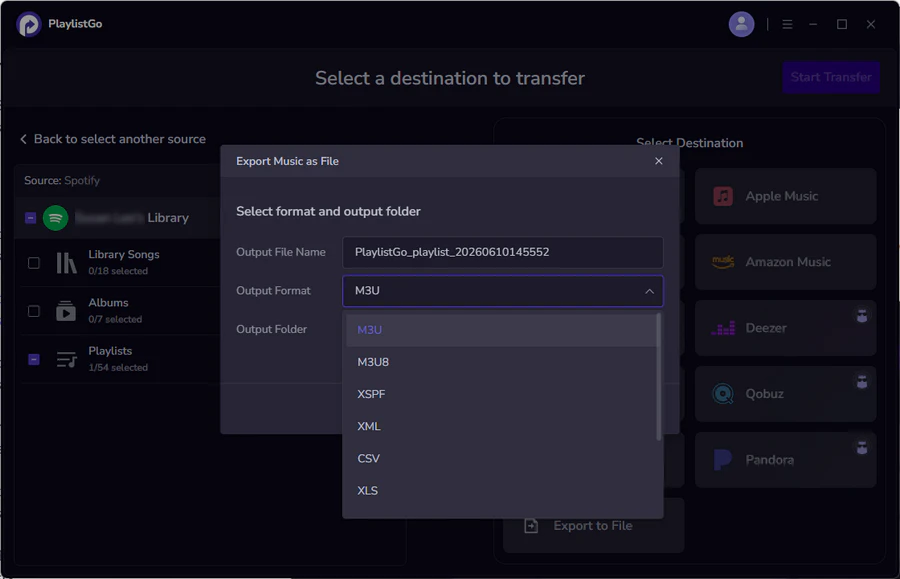
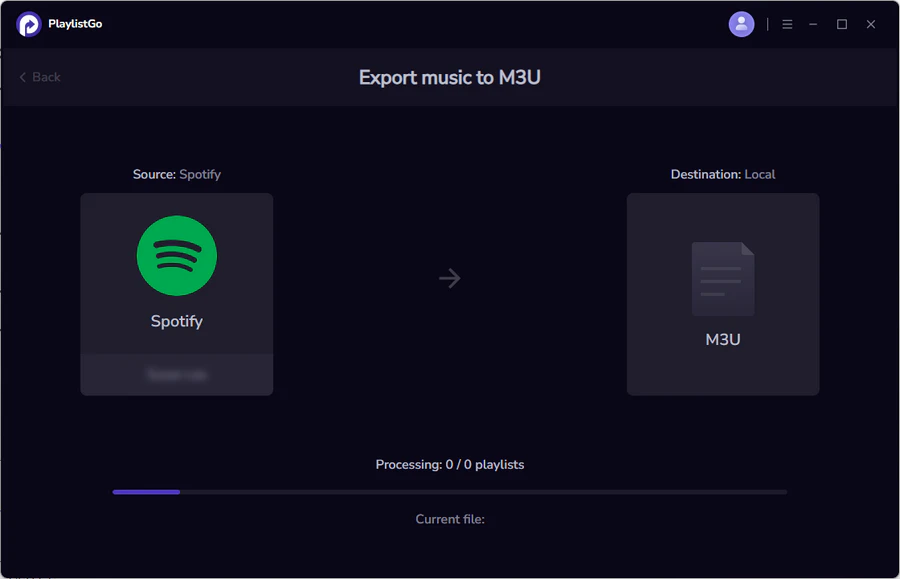
Export Spotify Playlists to M3U File
Start the export and save the M3U file to your computer. The result is a standard M3U file you can open in any compatible player, keep as a local backup, or bring into a different platform later.
How to Use M3U Playlist
1. Use M3U Playlist on VLC Media Player
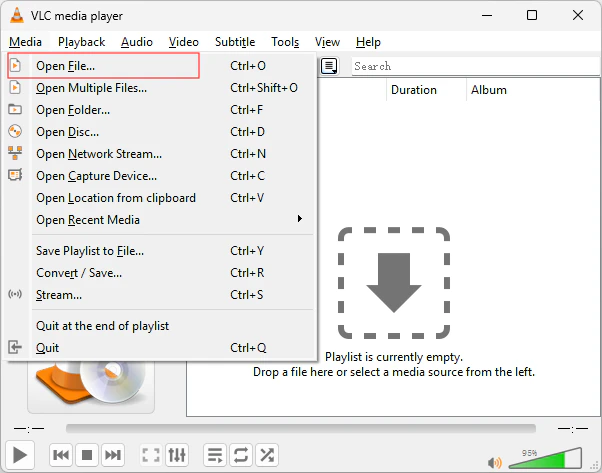
VLC handles both local M3U files and remote M3U URLs. For a downloaded file, go to Media > Open File (Ctrl+O on Windows, Cmd+O on Mac), or simply drag the file into the VLC window. For a URL, go to Media > Open Network Stream (Ctrl+N on Windows, Cmd+N on Mac), paste the link into the Network tab, and click Play. Once loaded, press Ctrl+L (Cmd+L on Mac) to open the full playlist view and browse channels.
2. Import M3U Playlist on Kodi (PVR IPTV Simple Client)
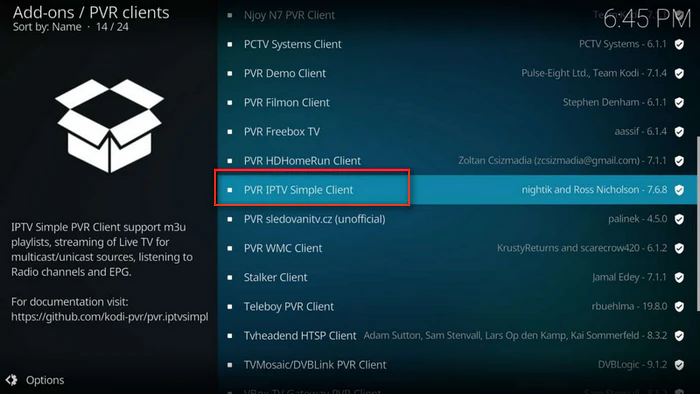
Kodi needs the PVR IPTV Simple Client add-on to read M3U playlists. Go to Add-ons > My Add-ons > PVR Clients > PVR IPTV Simple Client, enable it, then open Configure. Under the general settings, set Location to Remote path if you're using a URL and paste it into the M3U Playlist URL field, or switch to Local path and browse to the file if you've downloaded it. Save the configuration and enable the PVR add-on to start browsing channels through Kodi's Live TV section.
3. Open M3U Playlist on IPTV Players
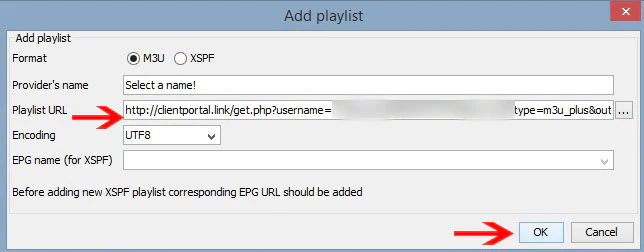
Dedicated IPTV apps like TiviMate, IPTV Smarters, GSE Smart IPTV, and Perfect Player are built specifically to load M3U playlists. The general steps are the same across most of them: open the app's playlist or source settings, choose to add a new M3U source, paste the playlist URL (or select a local file if you've downloaded one), and save. These apps typically also support the EPG feed some playlists provide, so you get an on-screen program guide alongside the channel list — something VLC and Kodi don't offer out of the box.
If a channel won't load, it's usually not the whole playlist that's broken:
- One channel failing to play is normal for free public streams. Try a different channel before assuming the playlist is dead.
- VLC saying "unable to open the MRL" usually means the URL wasn't copied in full, or there's no internet connection.
- An empty Kodi channel list typically happens when its Location setting (Remote / Local path) mismatches your URL or downloaded file.
- Slow‑loading playlists are often overly large. Switch to a category or country-specific M3U file.
4. Add M3U Playlist to Music Players (Winamp, foobar2000 & More)
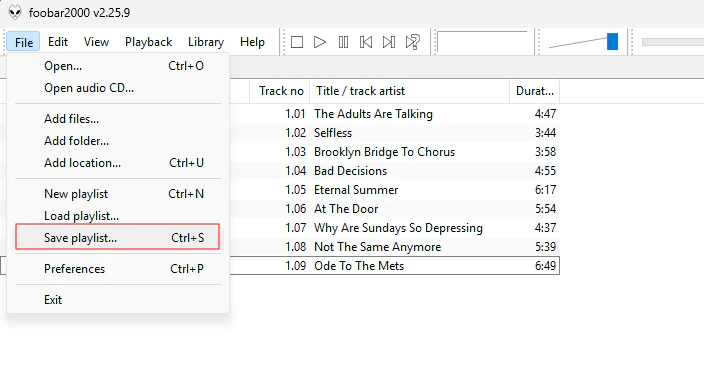
If your M3U file isn't a channel list but a music playlist, most desktop players read it the same simple way: drag the .m3u file directly into the player's playlist panel, or use the app's "Open File" or "Import Playlist" option. Winamp and foobar2000 both support this natively, and it works the same whether the M3U file lists local audio tracks or, in some cases, streaming radio URLs.
Pro Tips: How to Import an M3U Playlist into Spotify and Other Music Services
If you have a music playlist saved as an M3U file and want it inside Spotify, Apple Music, YouTube Music, Amazon Music, TIDAL, or Deezer, there's a catch: most streaming platforms don't accept M3U files directly, so you'd otherwise be stuck manually searching for and re-adding every track by hand.
PlaylistGo handles this automatically. It reads a local M3U file, matches each track against your target platform's catalog using title, artist, album, and ISRC code, and rebuilds the playlist there — reaching a 99.2% match rate even for less common tracks.
PlaylistGo: Transfer an M3U Playlist to Any Streaming Service Try It Free
Move your M3U playlist into Spotify, Apple Music, YouTube Music, and more in a few clicks, with a 99.2% match rate.
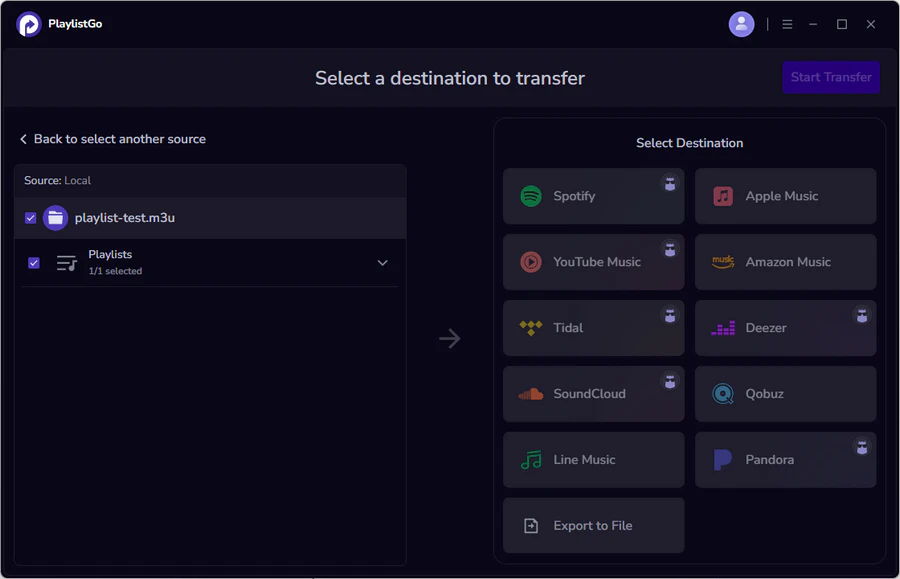
All processing happens locally on your Windows or Mac computer, with no login credentials or playlist data uploaded to a server. PlaylistGo currently supports 10 platforms, including Spotify, Apple Music, YouTube Music, Amazon Music, TIDAL, Deezer, Qobuz, SoundCloud, Pandora, and LINE MUSIC.
Beyond working with local M3U files, PlaylistGo can also transfer playlists directly between any of these streaming services. For example, moving your library straight from Spotify to Apple Music without exporting a file at all.
Frequently Asked Questions About M3U Playlists
Conclusion
For IPTV, iptv-org and Free-TV/IPTV are the two most reliable all‑around sources, while the Pluto TV, Samsung TV Plus, Plex TV, Roku, and LG Channels playlists cover specific free ad-supported services. Once you have a URL or file, VLC, Kodi, and dedicated IPTV apps work similarly: just paste, add, and load.
For music, PlaylistGo export playlists as M3U for backup or transfer, or read an existing M3U file to recreate the playlist on any of its 10 supported platforms. Everything runs locally on your device, so none of your data gets sent outside.

PlaylistGo – Best Desktop Transfer Tool
The fastest and most reliable way to move entire Spotify library to Apple Music, YouTube Music, TIDAL, etc. 100% offline • No Cloud Required • 99.2% success rate



 Language ▴