Is it worth switching from Spotify to Tidal? TIDAL or Spotify? Any difference? The answer is simple: TIDAL is a music platform, Spotify is a media/social platform. This guide will compare TIDAL and Spotify in sound quality, price, music discovery, music search, UI, connect feature, so you can choose the best music service based on your preference!
And transferring between TIDAL and Spotify is easy even with over 10k songs, PlaylistGo provides a fast and reliable way to move large playlists, and it can also back up the missing songs during the transfer.
Part 1. How to Transfer Between TIDAL and Spotify?
If you're looking for a playlist transfer tool to move music between Spotify and Tidal music, you're in the right place. The honest truth is that there isn’t a completely free tool that allows unlimited playlist transfers. The built-in transfer tool in Tidal, like TuneMyMusic, only allows about 500 songs to be transferred for free . Besides, web-based transfer tools can be slow and unstable when transferring thousands of songs. In that case, a stable and fast transfer tool that works well for large music library would save a lot of trouble — that’s why we recommend Playlistgo.
Best Large Playlist Transfer Tool: PlaylistGo
PlaylistGo is a desktop playlist transfer tool designed to move music between all major streaming platforms such as Spotify, Tidal, Apple Music, YouTube Music, Amazon Music, Deezer and more. It allows users to transfer playlists, liked songs, saved albums, artists, and entire music library in a few clicks. PlaylistGo runs as a desktop app, providing a more stable transfer experience, especially when moving large music library over 10k+ songs (tested).
| Features | PlaylistGo |
|---|---|
| Compatible with | Windows, macOS |
| Supported Platforms | Spotify, Apple Music, Amazon Music, YouTube Music, TIDAL, Deezer, and more |
| Transfer Objects | Playlists, liked songs, saved albums, followed artists, full library, Local Playlist, Playlist URLs |
| Free Plan | Free trial available |
| Song Matching | 99% song matching accurate rate |
| Backup | Back up & export untransferred songs |
| Playlist Order | Original playlist order preserved |
| Other Features | Playlist export/import to M3U, M3U8, PLS, XSPF, XML, CSV, XLS, XLSX, JSON, and TXT |
| Best For | Users who want a stable, hassle-free tool for transferring large music library between multiple music platforms, with local processing for better privacy and reliability. |
Download PlaylistGo 100% Free to start
Safely download entire playlists from Spotify, YouTube, Apple Music and 50+ platforms
How to Transfer Spotify Playlists to Tidal?
Install PlaylistGo on your computer
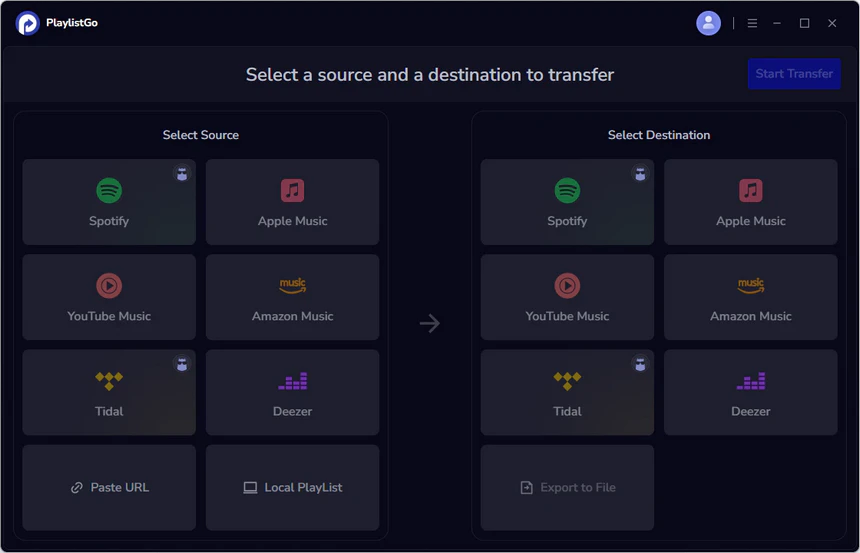
Download and install PlaylistGo, then launch the application. The main interface displays all supported source and destination platforms.
Source supported: Spotify, Apple Music, YouTube Music, Amazon Music, Tidal, Deezer, paste playlist URL, or import local playlist files.
Destination supported: Spotify, Apple Music, YouTube Music, Amazon Music, Tidal, Deezer, or export playlists to files such as M3U, M3U8, PLS, XSPF, XML, CSV, XLS, XLSX, JSON, and TXT.
Select Spotify as the source
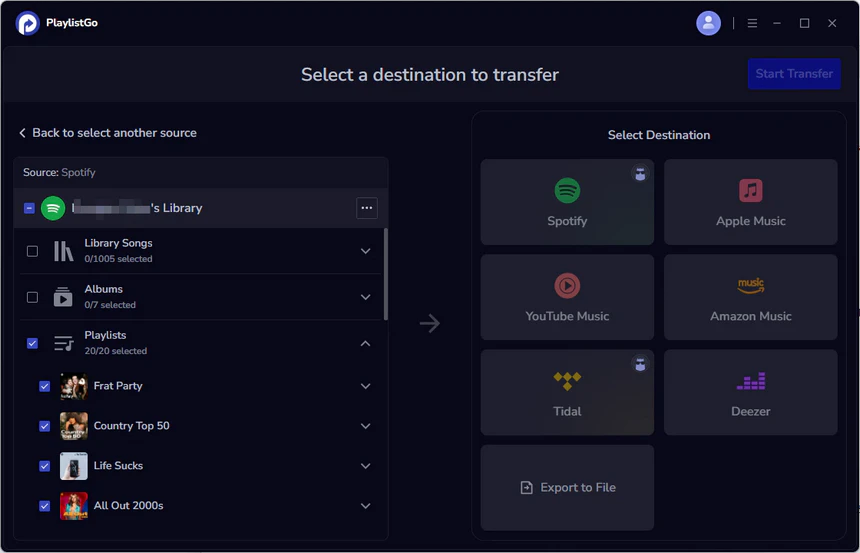
Choose Spotify as the source platform and connect the Spotify account. Once connected, PlaylistGo loads the Spotify library. Available transfer objects include: Liked Songs, Albums, Playlists, Full music library.
Choose TIDAL as the destination
Select TIDAL as the destination platform and sign in to your TIDAL account.
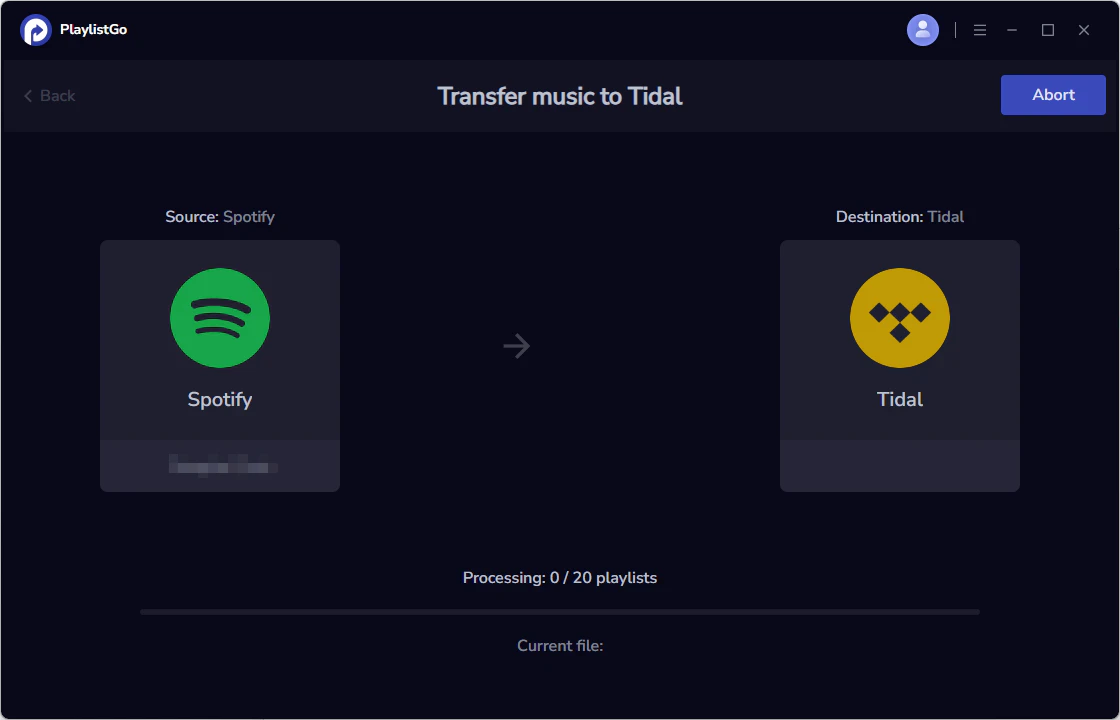
Start the transfer
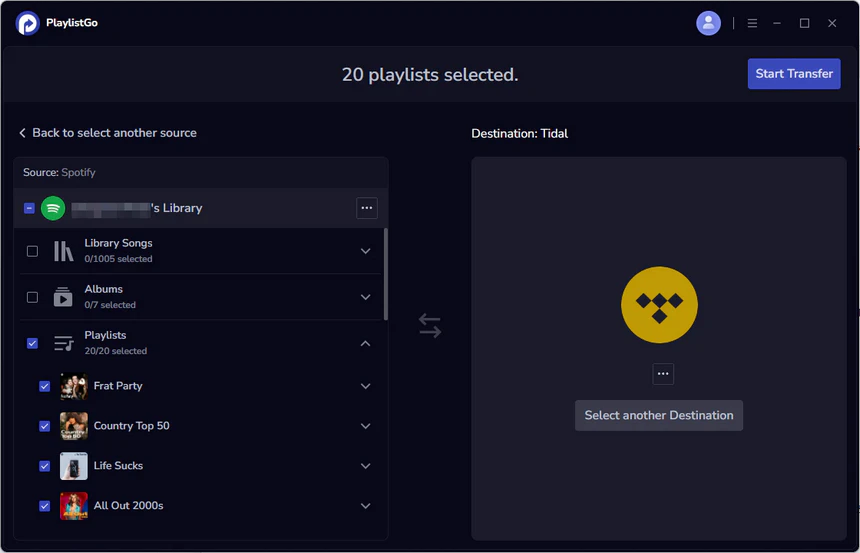
Click Start Transfer to begin the process. PlaylistGo automatically matches songs between Spotify and Tidal.
Review the transfer result
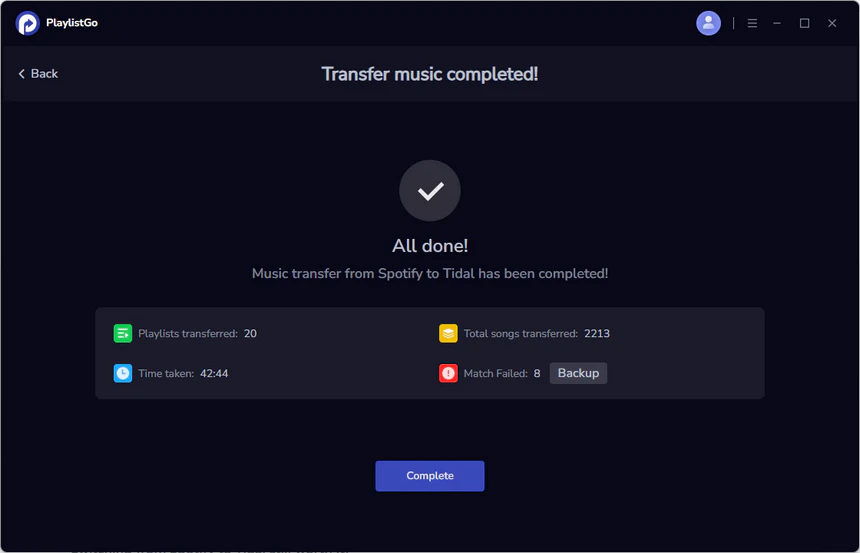
After the transfer is completed, PlaylistGo generates a transfer report showing the number of transferred tracks. And you can review and back up the missing songs.
Part 2. Sound Quality
Does TIDAL actually sound better than Spotify? The answer depends on how you listen. With Bluetooth earbuds or casual listening, the difference between Tidal and Spotify is small. However, TIDAL has a high music quality ceiling. Even though Spotify now supports lossless, its maximum resolution goes up to 24-bit / 44.1 kHz, while TIDAL offers Hi-Res FLAC up to 24-bit / 192 kHz. With wired headphones, external DACs, or Hi-Fi systems, TIDAL can deliver more detail and higher fidelity. TIDAL generally offers the higher sound quality overall.
| Compare | Spotify | TIDAL |
|---|---|---|
| Max Audio Quality | Up to 24-bit / 44.1 kHz lossless | Up to 24-bit / 192 kHz Hi-Res FLAC |
| Standard Streaming Quality | 320kbps lossy compression | FLAC 16-bit / 44.1 kHz CD quality |
| Audio Format | Ogg Vorbis / AAC | FLAC / Hi-Res FLAC |
| Hi-Res Audio Support | Limited | ☑️ up to 192 kHz |
| DAC Support | Standard system output | ☑️ Desktop Exclusive Mode |
| Immersive Audio | Standard stereo | ☑️ Dolby Atmos |
| Bluetooth earbuds | Similar for most listeners | Similar for most listeners |
| Wired headphones | Good quality | Higher fidelity |
| Hi-Fi system | Limited by compression | Full Hi-Res playback |
Part 3. Price and Plan
TIDAL is cheaper in all paid plans, including Individual, Student and Family subscription, which makes TIDAL a more affordable option for use who simply want a music service. Spotify, on the other hand, offers more various plan and bundle, such as Free plan, Duo plan, and additional benefits such as audiobook listening time and Hulu access for student subscribers. TIDAL offers a cheaper, music-first experience, while Spotify is slightly more expensive but provides a more complete ecosystem with extra features and bundled content.
| Compare | Spotify | TIDAL |
|---|---|---|
| Free Plan | ☑️ Available | ❌ |
| Individual Plan | $12.99/month | $10.99/month |
| Student Plan | $6.99/month | $5.49/month |
| Duo Plan | ☑️ $18.99/month for 2 people | ❌ |
| Family Plan | $21.99/month, up to 6 members | $16.99/month, up to 6 members |
| Extra Add-Ons | 15 hours/month audiobooks listening; Hulu access in Student plan | DJ Extension add-on for $9/month |
Part 4. Music Library and Discovery
Both Spotify and TIDAL has large music library with over 100 million tracks. However, the catalogs are not identical. Some reginal music available on Spotify are not included in TIDAL. This is particularly noticeable with Japanese music, as TIDAL is not officially available in Japan, while Spotify have J-pop, anime soundtracks, and other regional releases.
In terms of music discovery, both platforms perform well. Spotify has mature recommendation system such as Discover Weekly, Release Radar, and AI DJ, which can help users find new artists and trending music. TIDAL also offers personalized discovery playlists like My Daily Discovery and track radio which can also accurately grasp music preferences and recommend songs.
| Compare | Spotify | TIDAL |
|---|---|---|
| Music Library | Over 100 million tracks | Over 100 million tracks |
| Music Coverage | Broad global music coverage | Broad catalog |
| Japanese Music | ☑️ Strong J-pop and anime catalog | ❌ Not available in Japan |
| Music Discovery Tools | Discover Weekly, Daily Mix, Release Radar, Radio, AI DJ, AI Playlist | My Daily Discovery, Suggested Tracks, Track Radio |
| Recommendation Algorithm | More mature and accurate | Less consistent |
| AI-Generated Content | Increasing AI-generated music in recommendations | Less AI playlist |
Part 5. Device Ecosystem and Platform Experience
User Interface (UI)
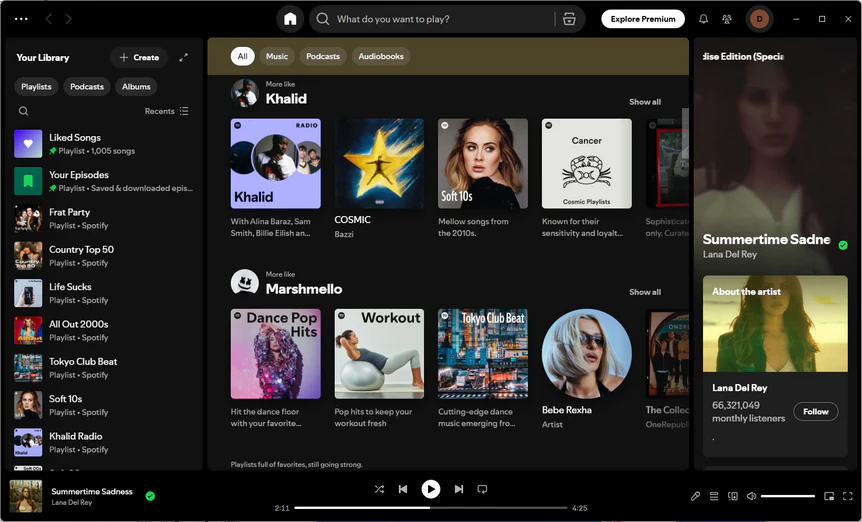
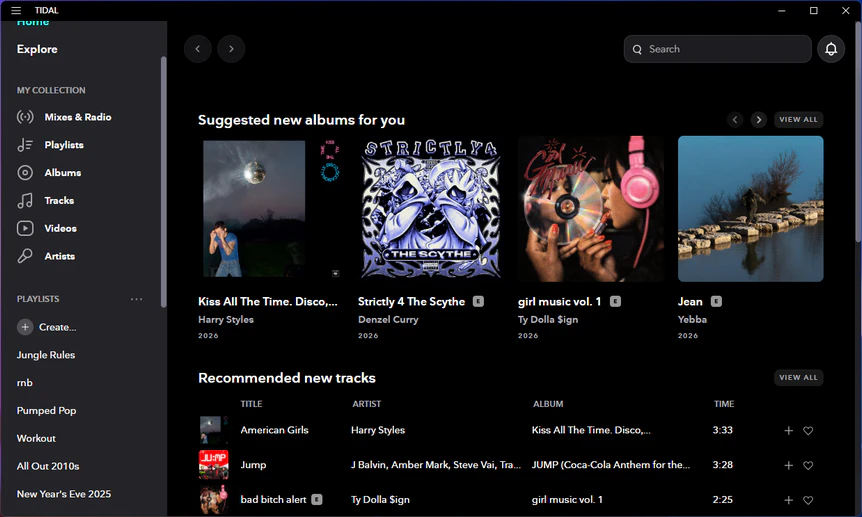
Spotify offers a feature-rich interface with many functions, while Tidal focuses more on music itself. Spotify includes additional content such as audiobooks and podcasts, whereas Tidal provides a more music-centered experience that is easier to navigate.
Spotify UI Review
Pros
- Easy and polished to use
- Feature-rich with integrated services like podcasts and audiobooks
- Familiar workflow for long-term users
Cons
- Interface can feel cluttered for users who only want a music service
- Extra AI features in the UI can distract from music listening
- Limited full-screen listening experience
TIDAL UI Review
Pros
- Clean interface focused on music itself
- Minimalist design that is easy to navigate
- Less visual clutter compared to Spotify
Cons
- Less polished and mature feature set
- Buggy or inconsistent on some platforms/devices
- Some UI updates hide useful functions
Search and Playback Expreience
Spotify provides a more reliable and convenient search and playback experience. You can quickly find the right song in Spotify search system. In addtion, Spotify Connect is a major advantage which allows users to remotely control playback on different devices and seamlessly switch between phones, computers, car systems, and speakers without interrupting the music.
TIDAL has less flexible and weaker music search function. You must specify the exact spelling of the artist and track, and usually you must enter the correct order, including dashes, otherwise you simply won't find what you want. TIDAL Connect is also more limited and depends more heavily on compatible hardware and the same network environment. As a result, cross-device playback control is less seamless, and some occasional playback interruptions or app inconsistencies are often reported.
Spotify Review
Pros
- Music search is easier to use and more intelligent
- Spotify Connect allows seamless and remote control between your phone, computer, car system and other devices
- Playback across devices is smooth and seamless
Cons
- Search UI changes are not always user-friendly
- Lossless playback still depends on connection conditions
TIDAL Review
Pros
- TIDAL Connect allows streaming music to compatible speakers and audio systems
- Basic search and playback work fine
Cons
- Less smart music search
- TIDAL Connect is more limited which usually requires the same Wi-Fi or network
- Cross-device playback sync is weaker
- Playback interruptions and bugs happen more often