

If you are switching to Spotify but already built playlists on Amazon Music, adding songs to playlists manually can take a long time. Instead, you can directly transfer almost all custom playlists on Amazon Music to Spotify using several available methods. There are ways to migrate Amazon Music to Spotify without losing created playlists, such as Amazon Music to Spotify music one-click service transfers, downloading Amazon Music songs, exporting playlists as CSV files, or syncing music libraries.

Part 1. Spotify vs Amazon Music
Amazon Music is known for its impressive audio quality, reaching up to 3,730 kbps. Spotify, in contrast, offers more advanced personalization features, easier access, and a broader range of pricing options.
| Category | Amazon Music | Spotify |
|---|---|---|
| Free Tier | ✗ | ✓ |
| New User Free Trial | 30 days of Amazon Music Unlimited | 3 months Premium for $0 |
| Monthly Pricing |
Prime member included / Student $5.99 Individual $11.99 / Family $19.99 |
Student $6.99 Individual $12.99 / Duo $18.99 / Family $21.99 |
| Library Catalog | 100M tracks, Audible audiobooks | 100M+ tracks, 5M+ podcasts and audiobooks |
| Playlist Curation | My Discover Mix every Monday | Discover Weekly, Daily Mix |
| Music Quality |
Ultra HD Lossless 24-bit/192 kHz (3730 kbps) HD (850 kbps). |
AAC (128/160/256 kbps) Very high 320 kbps (Ogg Vorbis) Lossless 24-bit/44.1kHz FLAC |
| Offline Download |
Full catalog downloads only for Unlimited subscribers Unlimited downloads per device Multiple devices supported |
Up to 10,000 tracks per device Up to 5 devices Verify online every 30 days |
| User Interface | Clean, simple, and more functional design | Modern, intuitive, and discovery-focused |
Part 2. Wireless Transfer Amazon Music Playlists to Spotify
Playlists from Amazon Music can now be transferred directly to the Spotify platform. Several tools, including PlaylistGo, Soundiiz, FreemyMusic, and SongShift, are designed to perform this task. These services read the metadata from source playlists, match the corresponding tracks in the destination service, and then recreate the playlists there.
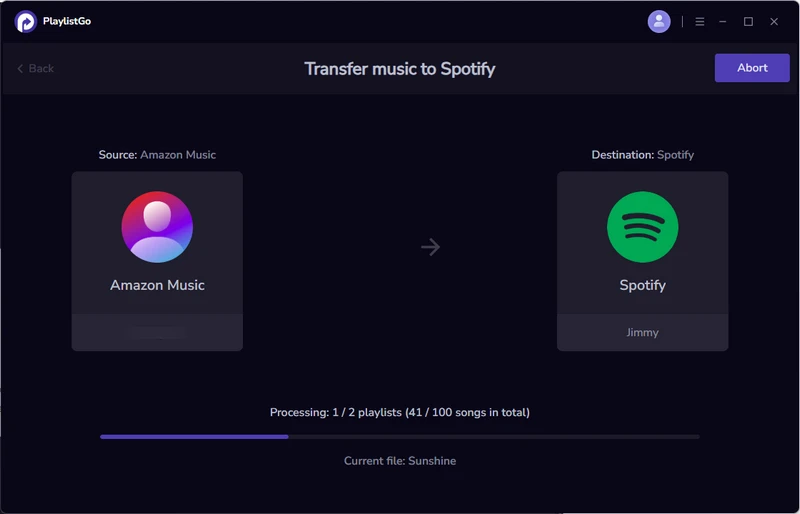
1. PlaylistGo
PlaylistGo is a playlist transfer tool that supports six leading music platforms, including Spotify, Apple Music, Amazon Music, Tidal, YouTube Music, and Deezer. With PlaylistGo, created playlists, liked songs, and albums on Amazon Music platform can be directly migrated to Spotify, with no limits on the number of playlists or tracks.
The Amazon Music transfer program features intelligent track matching with up to 99% accuracy to make sure music is sent correctly. Besides, PlaylistGo can be used to export Amazon Music playlists for backup or import playlist files to restore or manage music library on other platforms. It outputs multiple file formats, including M3U, M3U8, PLS, XSPF, XML, CSV, XLS, XLSX, JSON, and TXT, enabling flexible music playlist management between Spotify and Amazon Music.
Main Features
*Transfer everything (liked songs, personal playlists, curated playlists, etc.) on Amazon Music to Spotify.
*Preserve Spotify track title, artist name, playlist order and album info after transfer.
*Move playlists in bulk from Amazon Music to Spotify.
*Export Amazon music playlist as CSV and other file formats for backup and restore.
*Save all unmatched tracks to a separate file for future migration.
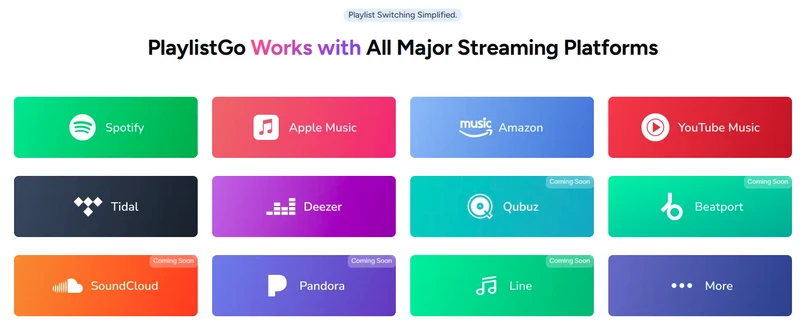
Download PlaylistGo 100% Free to start
Safely transfer entire playlists between Spotify, YouTube, Apple Music and other platforms
Steps to Transfer Entire Amazon Music Library to Spotify
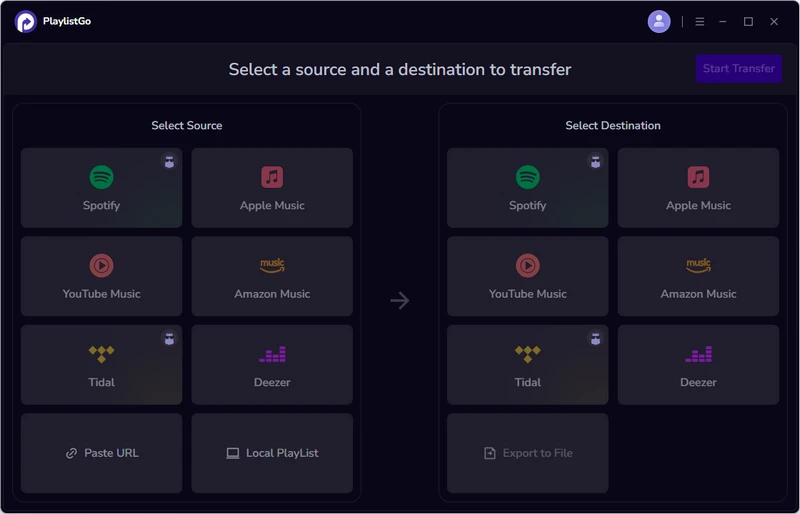
Select the Source Platform: Amazon Music
Open PlaylistGo and select Amazon Music in the left panel as the source platform. Log in to your Amazon Music account, load the Amazon Music playlists, albums and liked songs, and select the specific playlists or catalog items for migration.
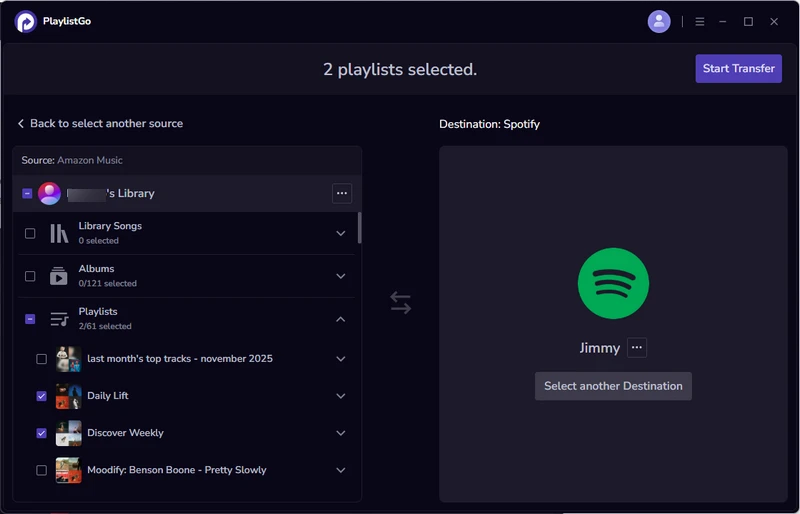
Select the Destination Platform: Spotify
In the right panel, select Spotify as the destination platform. Log in to the Spotify account to establish connection with PlaylistGo. At the same time, check the songs and playlists that you want to transfer from Amazon Music to Spotify library.
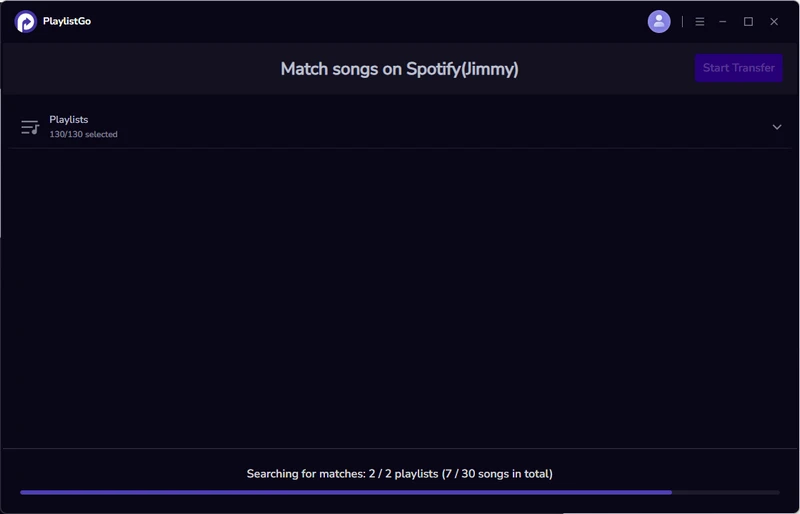
Match Amazon Playlist Songs to Spotify
Click "Start Transfer." PlaylistGo will match the songs from Amazon Music to Spotify. Matched tracks are queued for transfer. Unmatched tracks are listed separately. Option to backup unmatched songs locally is available for preservation or future import to another platform.
Start the Transfer from Amazon Music to Spotify
After reviewing selected playlists, click "Start Transfer" to begin the full music service migration.
2. Soundiiz
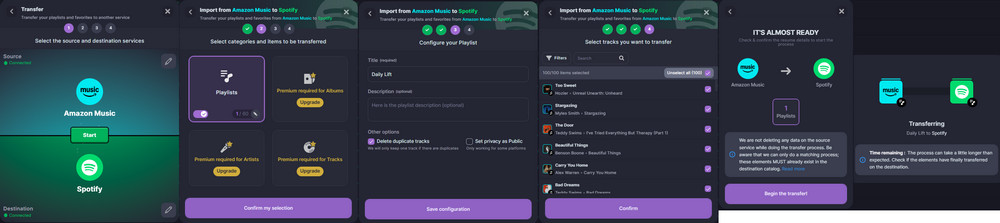
Soundiiz is an online music playlist migration service that supports more than 40 streaming platforms. Two core features are commonly used when moving playlists between Amazon Music and Spotify. The Transfer feature allows users to move playlists or even an entire music library from Amazon Music streaming platform to Spotify. The Synchronization feature can keep playlists updated across platforms with scheduled syncing (daily, weekly, or monthly). So playlists can stay updated across platforms after the initial Amazon Music to Spotify transfer.
Main Features
* Platfrom to platfrom music playlists transfer across 40+ more.
* Set playlists sync frequency (daily/weekly/monthly) between music streaming services.
* Merge playlists or split playlist into multiple parts.
* AI-created playlists, album or artist lists based on tags (genre, mood, decade) or custom text prompts.
* Manual transfers limited to ~200 tracks per playlist on free plan.
* Premium ($4.50/month or $36/year) for unlimited transfers, auto-sync, and large playlists (~20,000).
Pros & Cons
Pros
- Extensive compatibility (41 services).
- Batch transfers.
- Scheduled automatic syncing.
- Detect duplicate songs before transfer.
Cons
- 3.3 ratings on trustpilot review site.
- Premium required for albums, artists, and tracks transfer.
Transfer Amazon Music Library to Spotify Using Soundiiz
Go to Soundiiz and sign up, then in the dashboard go to Transfer, select Amazon Music as the source and log in, next select Spotify as the destination and authorize Soundiiz.
Choose the playlists, albums, or full library you want to transfer.
Start the transfer. After that, open Spotify to verify that playlists and tracks have been transferred correctly.
3. TuneMyMusic
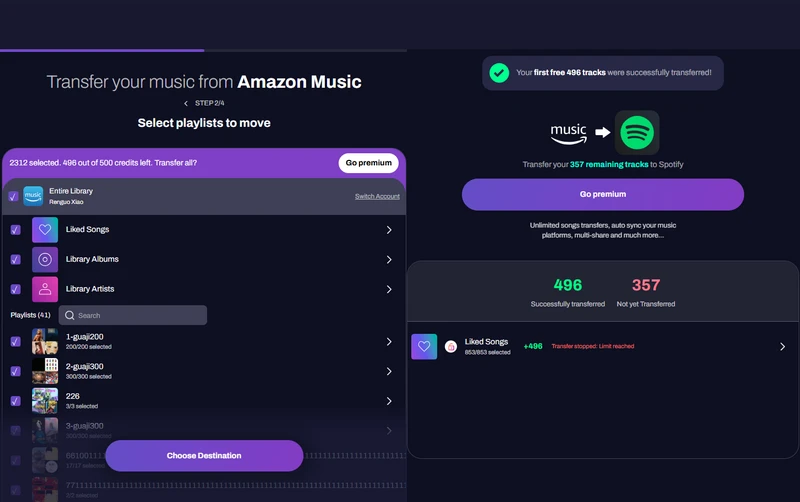
TuneMyMusic is an online playlist transfer program that can read playlists from Amazon Music, locate matching tracks, and reproduce playlists on Spotify by matching tracks in Spotify's catalog.
Main Features
* Transfer: Move music libraries and playlists across 20+ services.
* Export: Save music as TXT, CSV, M3U, M3U8, PLS, WPL, XSPF, or XML files.
* Auto-sync: Keep playlists and libraries updated between two services.
* Backup: Store all music to keep playlists, albums, and tracks safe and restorable.
* AI-playlist Generator: Create playlists automatically based on music taste.
* Free: Transfer up to 500 songs and share music.
* Premium $2/Month: Unlimited transfers, up to 20 daily auto-syncs, and cloud backup.
Pros & Cons
Pros
- Web workflow to import playlists from Amazon Music to Spotify.
- Multiple playlists transferring at once.
- Export playlists as files for backup or migration.
- Works across 20+ different music platforms.
Cons
- Unable to transfer curated playlists to targeted platforms.
- Song matching may fail for some tracks.
- Limited playlist size and track transfers in free version.
Steps to Batch Transfer Amazon Music to Spotify
Go to the TuneMyMusic website and sign in with a Google account or create a new account. Navigate to the Transfer feature page and click Transfer Your Music.
Choose Amazon Music as the source and authorize TuneMyMusic to access the Amazon Music library. Connect the Spotify account and select playlists or songs for transfer.
Select Spotify as the destination platform and click Start Transfer. After completion, verify that all selected playlists and songs appear in Spotify.
4. SongShift
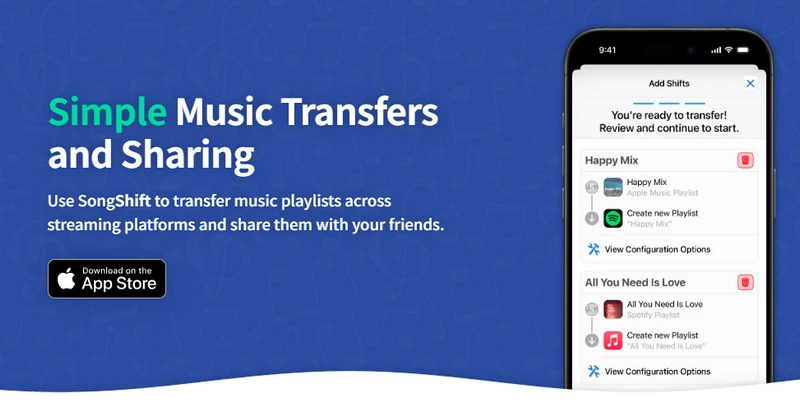
SongShift is an iOS playlist transfer application. It works straight on iPhone and iPad. The app supports Amazon Music and Spotify integration inside iOS system. It scans playlists from the source service and attempts to find the same songs on the destination platform.
Main Features
* Transfer Amazon Music playlists, songs, or albums to Spotify on iPhone or iPad.
* Merge multiple playlists or media into a single destination playlist.
* Auto-sync playlists to match new songs on the target platform.
* Share playlists and receive them from friends.
* Pro $6.99/month or $29.99/year: Unlimited transfers, file export/import, batch setup, and more.
Pros & Cons
Pros
- iOS perfect playlists transfer.
- Easy way to transfer Amazon Music to Spotify playlists.
- Automatic song matching between music services.
Cons
- Certain features may require a paid plan.
- Transfers rely on catalog availability across platforms.
Steps to Copy Amazon Music to Spotify
Install SongShift from the App Store. Open the app and connect the Amazon Music account.
Choose the playlist to transfer and select Spotify as the destination. Review the track matches suggested by the app.
Confirm the shift process to start the transfer. Once complete, check Spotify to ensure all songs have been moved correctly.
Part 3. Export Amazon Music Playlist CSV format and Import to Spotify
Another option is to export playlist from Amazon Music as a CSV file and then import it into Spotify. A CSV playlist file contains editable metadata, which means you can review and adjust the information before importing it to Spotify. For example, you can correct track names, fix artist details, sort songs by album or artist, remove duplicate tracks, or replace songs that may not be available on Spotify.
This approach is particularly useful for large, carefully curated playlists that may include hundreds or even thousands of songs. Another advantage is platform independence. Once exported, the playlist is no longer tied to a specific streaming service. The same CSV file can later be used to restore or migrate the playlist on multiple platforms, including Spotify, Apple Music, YouTube Music, or Tidal.
1. PlaylistGo: How to Export Amazon Music as CSV and Import to Spotify
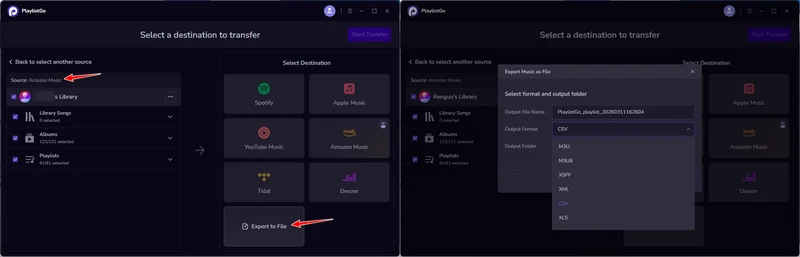
Run PlaylistGo and in the Select Source panel, choose Amazon Music. Sign in to connect the account and select the playlists or liked songs to export.
In the Select Destination panel, choose Export to File. Pick the output format (CSV, M3U, etc.), set the playlist file name and output folder on the computer, then click Export.
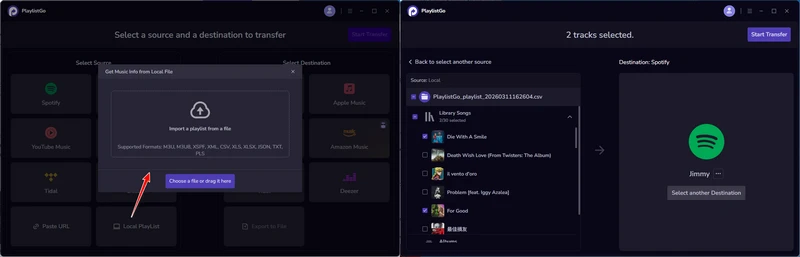
To import the exported file to Spotify, select Local Playlist as the source and choose the file exported in Step 2.
Select Spotify as the destination platform and click Start Transfer.
After the songs are matched, click Transfer to move the Amazon Music playlist to Spotify successfully.
2. TuneMyMusic: How to Backup Amazon Music as CSV and Restore on Spotify
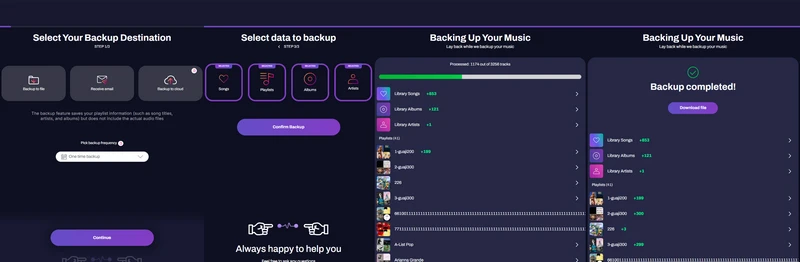
Go to the TuneMyMusic website and sign up or log in to your account.
Click the “Quick Actions” tab in the top-right corner of the page, choose “Backup” from the drop-down menu, and then select “Backup Your Music.”
When asked to choose a backup destination, select “Back to File.” This option exports your music data into a file. Note that the backup only includes playlist information such as song titles, artists, and albums, and does not contain the actual audio files.
Select Amazon Music as the backup source, then sign in to your Amazon Music account and authorize the connection with TuneMyMusic.
Choose the type of data you want to export, such as Songs, Playlists, Albums, or Artists. You can select everything or only the items you want, then click “Confirm Backup.”
After the process starts, wait for the server to finish generating the backup. When it is completed, a window will appear allowing you to download the file, which is saved as a CSV file containing your Amazon Music library information.
Part 4. Download Amazon Music to MP3 and Upload to Spotify
Sidify Amazon Music Converter
This method works differently from typical playlist transfer tools. Playlist transfer usually rebuilds a playlist inside another streaming service by matching songs in its catalog. The download-and-upload approach by Sidify Amazon Music Converter, however, deals with the actual audio files. In this process, Amazon Music tracks are first converted into common formats such as MP3, AAC, or FLAC and saved on the local computer. After that, Spotify can read these files through its local files feature and include Amazon Music in Spotify music library. The Amazon songs are stored locally, so the process does not rely on catalog matching between platforms. At the same time, the downloaded files act as a enduring backup of Amazon Music collection in case songs disappear from the streaming catalog or licensing changes occur in the future.
Main Features
Sidify Amazon Music Converter – Best Amazon Music Library Transfer Downloader 2026
Download and convert Amazon Music playlists to MP3, AAC, ALAC, AIFF, WAV, and FLAC formats.
- Export and download Amazon Music to MP3 for permanent backup and seamless transfer.
- Download Amazon Music with lyrics, album artworks, and ID3 tags.
- Preserve Amazon Music original HD and Ultra HD sound quality.
- Batch download Amazon Music playlists at 10x faster speed.

Pros & Cons
Pros
- Music becomes independent of an active Amazon Music subscription.
- Still play the songs that are not available on Spotify.
- No risk of mismatched tracks caused by song-matching algorithms.
Cons
- Need local storage space.
Steps to Download and Import Playlists from Amazon Music to Spotify
Add Amazon Music Playlists to Converter
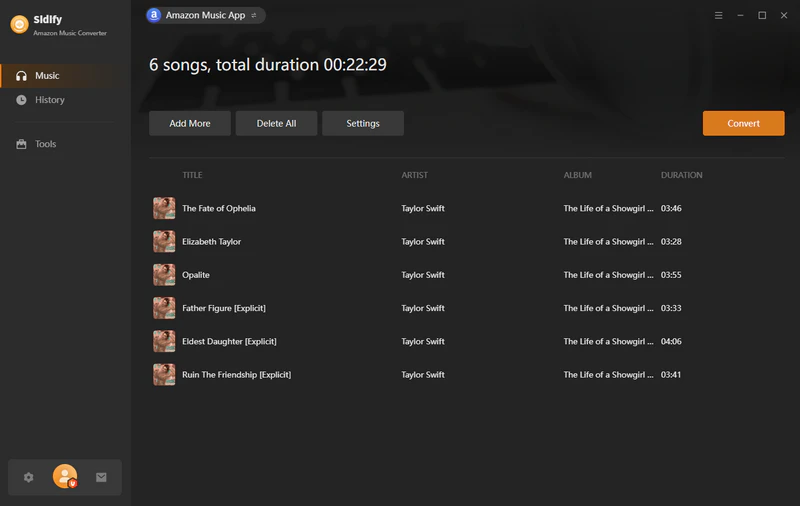
Download the latest version of Sidify Amazon Music Converter and run when the Amazon music app will start at the same time.
From the Amazon Music app, simply drag and drop the Amazon music playlists to the converter. And make a specific music selection to add your desired songs to convert.
Customize Amazon Music Download Format
Enter the converter settings, set up the Amazon music download format to MP3, for example, and customize the download location, file name and whether to save the lyrics or not.
Start Amazon to MP3 Conversion
Click the Convert button to start the Amazon music downloading process. And go to the History section and find all the downloaded Amazon music files in local path.
Import Amazon Music Downloads to Spotify
Open the Spotify desktop app and go to Settings. Scroll to Local Files, turn on Show Local Files, and click Add a Source to select the folder that contains your downloaded Amazon Music files.
After Spotify scans the folder, the tracks will appear under Local Files in your library. Select the songs and add them to a playlist so you can play them inside Spotify.
FAQs about Amazon Music Playlists, Albums, Artists, Songs to Spotify
Conclusion: Fast Transfer All Playlists from Amazon Music to Spotify
Switching from Amazon Music to Spotify does not mean starting a music library from scratch. In most cases, a playlist transfer tool simply reads the song information from the Amazon Music playlist, finds the same tracks on Spotify, and organize the songs into playlists again. For extra safety, backing up Amazon Music playlists as CSV files is a good option. Downloading Amazon Music tracks as offline local audio files is also a practical way to keep a long-term backup of the Amazon music library.

PlaylistGo – Best Desktop Transfer Tool
The fastest and most reliable way to move entire Spotify library to Apple Music, YouTube Music, TIDAL, etc. 100% offline • One-time payment • 99.7% success rate

