

This article reviews two popular playlist transfer tools aimed to move music library or bulk playlists across streaming services, such as transfer Spotify playlists to Apple Music. Soundiiz has a rich set of transfer, syncs, ai playlists and creator playlist management features. PlaylistGo keeps it simple, focusing on core transfer function with advanced options. Both with a wide range of music services available, while the right tool can make all the difference in how to organize, sync, and share music playlists.
For music enthusiasts managing multiple accounts or curators looking for an effective tool to achieve basic playlist migration, here provides an in-depth comparison of PlaylistGo and Soundiiz to help make an informed decision. We will explore each product's features, pricing and etc. to guide you towards the best option.
Part 1. Oveall Comparison of PlaylistGo vs. Soundiiz
First of all, let's just see which features shine between PlaylistGo and Soundiiz.
| Feature | PlaylistGo | Soundiiz |
|---|---|---|
| Compatibility | Desktop (Windows, macOS) | Web (All Browsers) |
| Integration | 6 services, Spotify, Apple Music, Amazon Music, Tidal, Deezer, and YouTube Music | 41 services,Spotify, Apple Music, YouTube Music, Amazon Music, Tidal, Deezer, Qobuz, SoundCloud, Audiomack, Napster, Yandex Music, YouSee Musik, Jellyfin, LiveOne, Brisamusic, Movistar Música, etc. |
| Link Accounts | 6 | 6 |
| Key Features |
✔ Transfer Playlists |
✔ Transfer Playlists ✔ AI Generate Playlists ✔ Sync Playlists ✔ Create Sharable Links |
| Success Rate | 99% | ~80% |
| Price and Plans | Premium: $14.95/M, $24.95/Y, $47.90/L |
✔ Premium: $5/M, $39/Y, Transfer+ Syncs ✔ Creator: $9.5/M, $75/Y, Transfer + Syncs + Smartlinks features |
| Free Trial | 10 songs per playlist | 200 tracks per playlist + one active Sync |
| Best For | Users on mainstream music platforms. Simple and easy to use. |
Users on niche or less common platforms. Slightly more complex. |
Part 2. PlaylistGo vs. Soundiiz: Platform Support
PlaylistGo
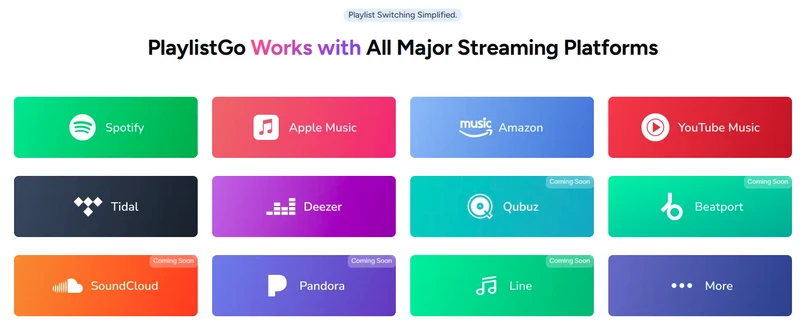
PlaylistGo supports songs, albums, URLs, playlists migration from one service to another, including Spotify, Apple Music, Amazon Music, Tidal, Deezer, and YouTube Music. This is sufficient for music lovers who primarily use one or two leading platforms. Furthermore, PlaylistGo's straightforward design and easy-to-use interface meet most needs without unnecessary complexity.
Soundiiz
Soundiiz has an edge for its extensive platform support. It enables transfers, imports, exports and synchronization across 41+ music services, including major ones such as Spotify, Apple Music, YouTube Music, Amazon Music, TIDAL, Deezer, plus many niche, regional or less‑common services. Because of this breadth, Soundiiz is particularly well-suited for users with multiple streaming subscriptions.
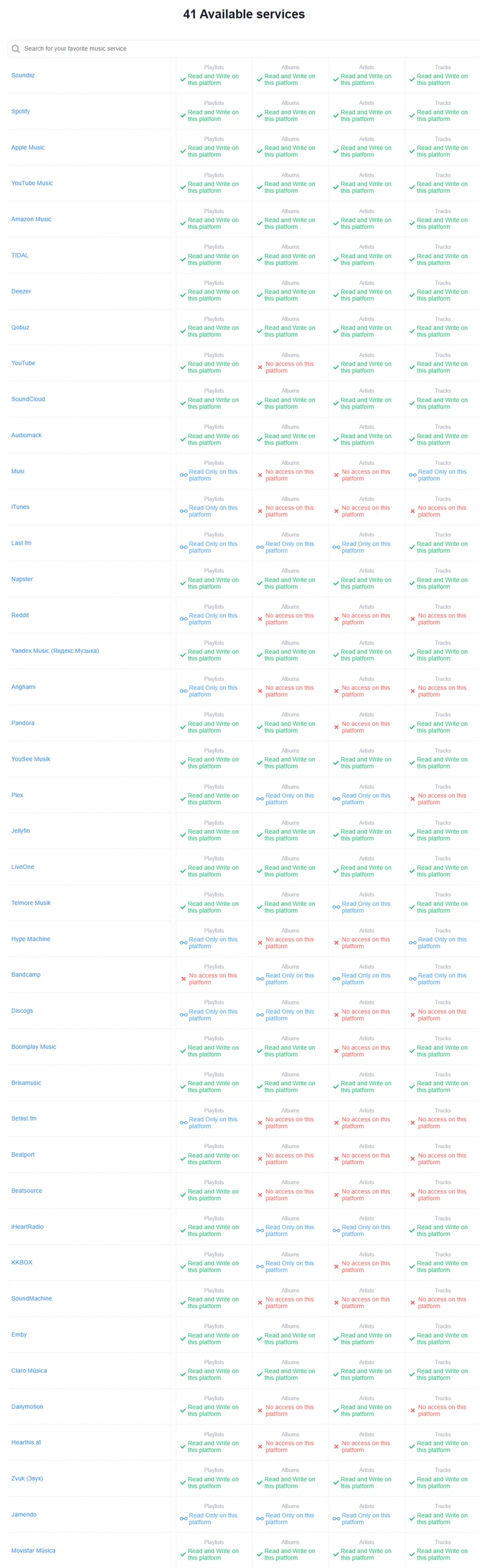
💡NOTE: Full transfers are not available on every listed platform by Soundiiz. In some cases, Soundiiz is only able to read data or transfer individual tracks. Playlists or albums are not be transferable on some services.
Catalog differences across services can lead to incomplete transfers, such as missing tracks when the tool fails to find a match. Soundiiz, for instance, sometimes encounters issues where certain songs may not transfer correctly due to discrepancies in platform catalogs. To ensure the tool works as expected, it's best to run a test transfer. Start by testing with a small playlist to see if all the tracks and metadata (like album art or track names) carry over correctly. This helps identify any potential issues before transferring larger, more complex playlists.
Download PlaylistGo 100% Free to start
Safely transfer entire playlists between Spotify, YouTube, Apple Music and other platforms
Part 3. PlaylistGo vs. Soundiiz: Key Features
Transfer Music Playlists
Both Soundiiz and PlaylistGo work as powerful playlist converter and transfer, where users can move music playlists between diverse streaming platforms. Still, the way this feature works varies by tool.
| Playlist Transfer Features | PlaylistGo | Soundiiz |
|---|---|---|
| Songs, playlists, albums transfer | ✔ | ✔ + followed artists |
| Import playlist file, or web links | M3U, M3U8, PLS, XSPF, XML, CSV, XLS, XLSX, JSON, and TXT | EXCEL, TEXT, M3U, XSPF, WPL, JSON, XML, NML, PLS, and text input |
| Export playlist as files | M3U, M3U8, PLS, XSPF, XML, CSV, XLS, XLSX, JSON, and TXT | CSV, TXT, XSPF, JSON, XML, and URL |
| Maintain track metadata (track names, album art, and artist info) | ✔ | ✔ |
| Backup unmatched songs | ✔ | × |
| Merge or split music playlists | × | ✔ |
| Shuffle a playlist tracklist order | × | ✔ |
| Delete duplicate tracks in playlists | × | ✔ |
Sync Playlists
Sync Playlists is an automation feature in Soundiiz that keeps playlists updated across services on a Daily, Weekly, or Monthly schedule. Instead of relying on a one-time transfer, Soundiiz continuously mirrors changes from a source playlist to a destination playlist. You can set up a Sync activity to either copy or fully replace a playlist. For instance, when syncing a Spotify playlist to Apple Music, and Soundiiz can schedule playlist updates on a set frequency whenever new tracks are added to the Spotify playlist.
This is especially useful for maintaining active or frequently updated playlists across multiple platforms, as it removes the need for manual repeated transfers and keeps libraries consistent over time.
Free: One active sync slot for testing the feature.
Premium: 20 active sync slots
Pros
- Full replacement and append-only sync modes with flexible scheduling.
- Keeps playlists always updated across different services
- Great for Curators and heavy listeners
Cons
- One-direction sync only
- Not supported for liked songs
Ener the Synchronize section on Soundiiz, select a source playlist (where updates originate) and a destination playlist (where updates are applied). Tap "Confirm and continue".
Schedule the synchronization method, exact start date and update frequency ( Daily, Weekly, or Monthly) you would like.
Add Tracks: Add the playlist source tracks at the end of the destination playlist.
Replace Tracks: Replace the destination playlist tracks with the source playlist tracks.
Once set, Soundiiz runs the new synchronization automatically in the background. You can check or get notifies if Soundiiz encounters issues with your music accounts.

Generate Playlists
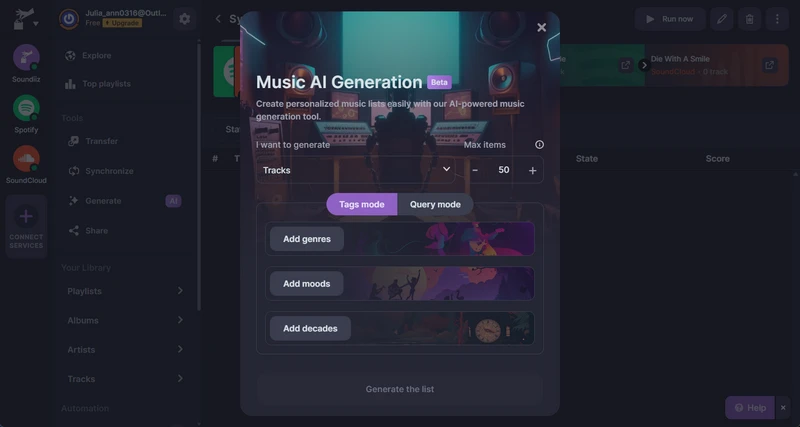
Embedded with an AI-powered model, Soundiiz can help build new music playlists, groups of albums or artists based on keywords or phrase, moods, genres, and decades categories, without manually picking every track. After generation, Soundiiz send the playlist in seconds to streaming platform (Spotify, Apple Music, Deezer, etc.) or keep it within Soundiiz to export or manage later. You can also opt to sync the AI-generated playlist every day.
Free: Up to 20 per 24 hours
Premium: Unlimited
Pros
- Time saving to discover playlists that fit your desired vibe or theme.
Cons
- Recommendations are based solely on the provided criteria, not on past listening habits.
Access Playlist AI tool in Soundiiz. With Tags mode, you can choose from categories like genre, mood, or decade. The AI combines these to create a playlist. In Query mode, enter a custom keyword or phrase (e.g., "chill workout mix" or "90s jazz vibes"). The AI generates a playlist based on your input.
After the playlist is generated, you get four options: Import Playlist, Import Tracks, Synchronize or Export as a file (Premium).
Choose "Import Playlist" and add it as a new playlist to your destination service.
Create Smartlinks
Smartlinks is a unique feature in Soundiiz designed specifically for playlist curators and music promoters. It allows you to create a single, unified link that gives users access to your playlists or releases across multiple streaming platforms. This eliminates the need to share different links for each service (Spotify, Apple Music, Deezer, etc.) by consolidating them into one easily shareable Smartlink.
Free: Create shareable Smartlinks for playlists and new releases.
Premium: Create and Standard analytics for Smartlinks.
Creator: Generate Smartlinks, advanced analytics, custom subdomains and shortcodes, and no Soundiiz branding on Smartlinks.
Pros
- Reach a broader audience, insights on click rates and user interactions.
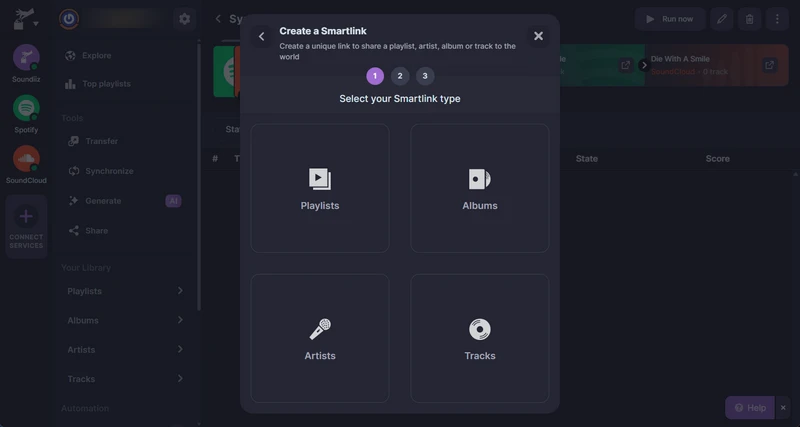
Click the "Share" feature in Soundiiz. And choose a smartlink type (Playlists, Albums, Artists, and Tracks).
Select Playlist, for example, and select the playlist you like, tap "Confirm and continue".
Wait the server to load and generate a new link. Then you can post the music link to your preferred social media platform with one-click share operation.
Part 4.PlaylistGo vs. Soundiiz: Price and Plans
PlaylistGo
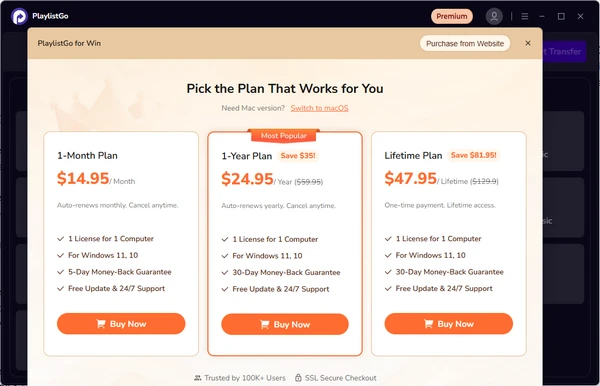
PlaylistGo offers three subscription tiers: Monthly at $14.95, Annual at $24.95, and Lifetime at $47.95. These plans include unlimited streaming platform playlist migration, as well as the ability to export and back up entire music collection. The pricing structure is straightforward, with the lifetime option offering the best long-term value for those who plan to use the service consistently.
Soundiiz
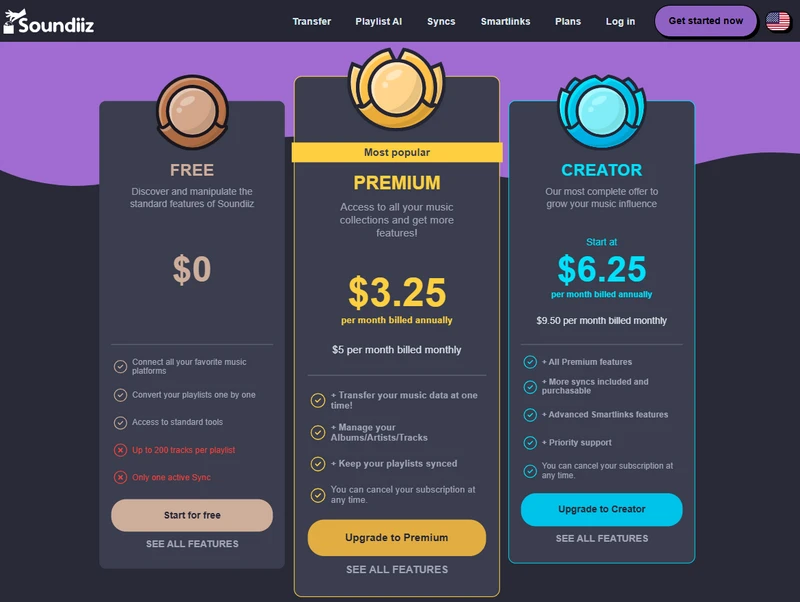
Soundiiz's free plan provides a decent entry-level experience. It offers a free plan, but it limits users to 200 tracks per playlist and one active sync at a time. This could be restrictive for those who have large playlists. The free plan is useful for testing, but if you need to transfer larger playlists or use syncing across platforms, the Premium or Creator plans offer better value. The Premium plan unlocks the core features required for playlist management, while the Creator plan targets power users who require advanced syncing and Smartlink functionality.
👍PlaylistGo offers a straightforward pricing structure with a clear benefit for long-term users, especially if you're looking for high success rate of unlimited transfer across platforms.
Part 5. PlaylistGo vs. Soundiiz: How to Transfer Playlists Between Music Platforms
PlaylistGo
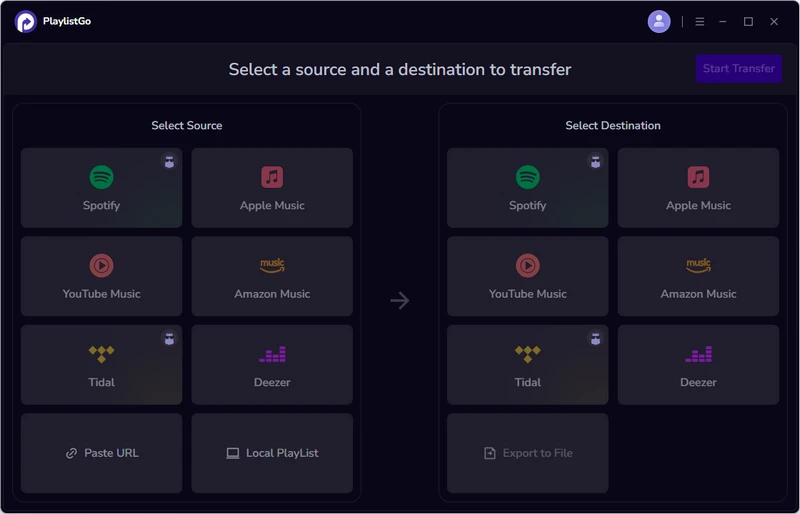
Select Source Platform (Spotify)
Open PlaylistGo program. One the left side, pick the source platform, login to the platform account, load and choose the playlists or catalog you want to transfer.
Pick Destination Platform (Tidal)
On the right panel, select the target platform that will receive the playlists.
Match Playlist Songs
Click "Start Transfer." PlaylistGo will read and write the matched tracks from the selected playlists or albums. Any unmatched songs will be listed, and the program will provide an option to back them up locally so they can be kept or imported to another platform if needed.
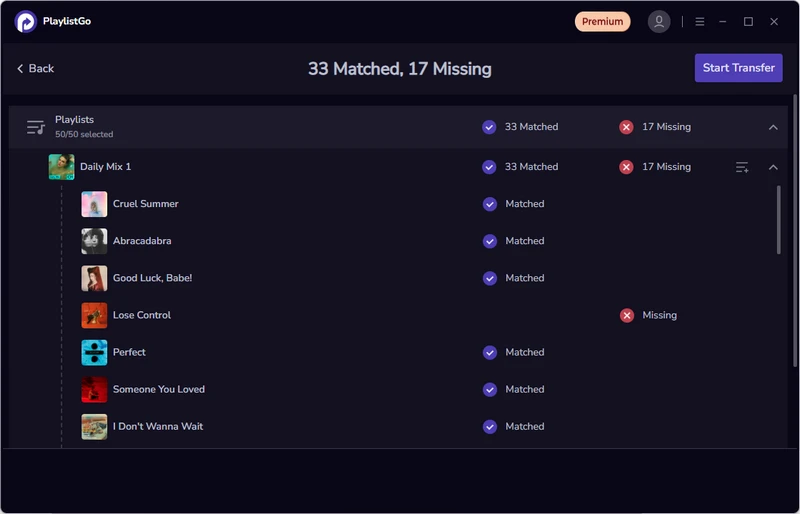
Start Music Playlist Transfer
Review the selected playlists and click "Start Transfer" again to begin the full transfer from Spotify to Tidal.

Soundiiz
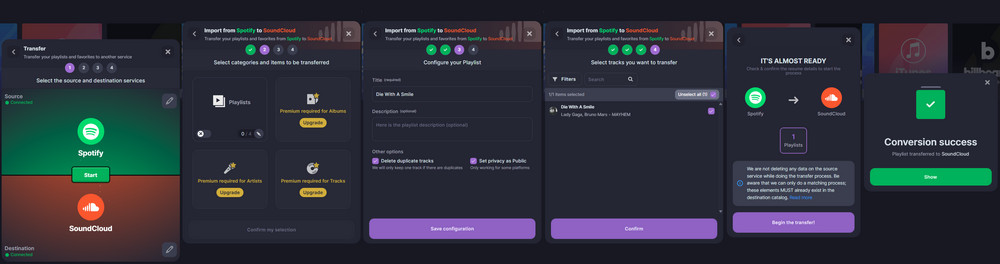
Select Source and Destination Platform (Spotify and SoundCloud respectively)
On the Soundiiz left navigation bar click on Transfer tool. Pick Spotify as the source and SoundCloud as the destination service.
Pick Transfer Content Type
Test with a free account, here we can only transfer playlists between Spotify to SoundCloud. To transfer albums, artists or single tracks, you need to upgrade Soundiiz Premium plan.
Configure Playlist Title and Description
Fill the playlist name and details. Tick off the option to delete duplicate tracks if needed. And tap Save Configuration to continue. Confirm the playlist to transfer and begin the conversion task.
Part 6. PlaylistGo vs. Soundiiz: Pros & Cons, Which One Should You Opt?
PlaylistGo supports song and playlist transfers across six major streaming platforms, including Spotify and Apple Music. The interface is clean, the steps are clear, and very little setup is required. It is well suited for everyday playlist migration and for backing up playlists in common formats such as M3U. When the goal is simply to move music between mainstream services, PlaylistGo is a practical and efficient choice.
Pros
- Dedicated program, simple, user-Friendly interface.
- 6 major music streaming platform support.
- Full music library (songs, albums, playlists) transfer.
- Upload or download playlists as files.
- Swift transfer speed.
- No overly complex settings.
Cons
- Limited platform support.
- Artist follows are not included in transfers.
Soundiiz targets a broader range of use cases. It supports more niche and professional platforms such as Beatport, iHeartRadio, and Napster, and also provides advanced features like playlist generation and Smart Links. This wider feature set comes with a more complex management interface and a longer learning curve, which may feel less straightforward for casual use.
Pros
- Web transfer tool available for more devices.
- More than 41 services connected.
- All music transfer (tracks, albums, playlsits, artists).
- Local file import/export.
- Basic free tier with limits.
- More music platforms support.
- Additional Synced, smartlink, and ai playlist features.
Cons
- Incomplete transfers sometimes occur.
- Basic free tier with limits.
- Slower with large libraries.
PlaylistGo – Best Music Library Transfer Software 2026
The only desktop app that moves your entire library (playlists, liked songs, albums) with 99.7% success rate, 100% offline, and perfect metadata preserved.
- One-click transfer to Apple Music, YouTube Music, TIDAL, etc.
- Works completely offline – your data never leaves your computer
- Lossless quality + all album artwork & ID3 tags kept
- One-time payment $49.95 – lifetime license + free updates
FAQs about PlaylistGo and Soundiiz Playlist Transfer
Multiple versions (remixes, live versions, extended edits): Matching is based on metadata (title, artist, album). If the tool cannot clearly identify which version to use, it may choose one version automatically or list it as unmatched.
Playlist structure: Playlist names, folders (if supported), and basic grouping are usually maintained. Advanced folder structures or nested playlists may not always transfer perfectly, depending on the destination platform.
Untransferred tracks remain pending: The tool often provides a report or list of the tracks that were not transferred.
Resume or retry option: Many tools, especially PlaylistGo, allow you to resume the transfer or retry only the missing tracks, so you don’t have to start over from scratch.
The transfer program requests permissions needed to read playlists and, if applicable, write tracks to your account.
Both platforms claim not to share account information with third parties beyond what is required to perform the transfer.
Conclusion: Pick the Best Playlist Transfer
After comparing PlaylistGo and Soundiiz based on transfer accuracy, handling of unmatched songs, and management of duplicates, PlaylistGo demonstrates a more reliable and user-friendly workflow. If you prioritize efficiency and want to minimize issues during playlist transfers, PlaylistGo is the recommended choice, while Soundiiz can still be a viable option for those who need its broader or niche platform integrations.

PlaylistGo – Best Desktop Transfer Tool
The fastest and most reliable way to move entire Spotify library to Apple Music, YouTube Music, TIDAL, etc. 100% offline • One-time payment • 99.7% success rate

